Beamer Pricing & Review (2026): Plans, Add-ons, Pros & Cons
Beamer (getbeamer.com) is a product-update and changelog tool for SaaS teams, now run by the combined Beamer and Userflow team.
Beamer pricing in 2026: the Changelog has a Free plan for up to 1,000 monthly active users, then Starter at $49 a month billed yearly ($59 monthly), Pro at $99 ($119) and Scale at $249 ($299). Feedback Pro costs $99 a month billed yearly ($119 monthly) and NPS Pro $99 a month. Extra MAUs cost $50 a month per 5,000.
Prices checked on getbeamer.com/pricing and Beamer's help center on October 25, 2026.
This page covers Beamer the changelog tool (getbeamer.com), not the Beamer Mac app or a projector.
Beamer Pricing at a Glance (2026)
Beamer sells three products that are billed separately: Changelog, Feedback and NPS. Each has a Free plan and paid plans you can mix and match. Your Changelog plan sets your monthly active user (MAU) allowance.

The Changelog plans as of October 2026, from the plan cards and feature grid:
| Plan | Billed monthly | Billed yearly (per month) | Per year, yearly billing | Included MAUs | Teammates | What it adds |
|---|---|---|---|---|---|---|
| Free | $0 | $0 | $0 | 1,000 | 1 | In-app and standalone changelog, basic analytics. Watermark, one language, API limit 0. |
| Starter | $59 | $49 | $588 | 5,000 | Unlimited | No watermark. Advanced analytics. Pop-ups, top bars, snippets and tooltips. Scheduling. Unlimited languages. 2,000 API requests. |
| Pro | $119 | $99 | $1,188 | 10,000 | Unlimited | Comments, Inbox. Basic segmentation. Email (5,000 a month) and push. Custom domain. Zapier. 20,000 API requests. |
| Scale | $299 | $249 | $2,988 | 50,000 | Unlimited | Advanced segmentation. Email (20,000 a month). Segment, audit logs, SOC 2 report, staging. 100,000 API requests. Google SSO is listed from Scale in Beamer's grid. |
| Custom | Quote | Quote | Quote | Custom | Unlimited | Assisted setup, vendor security review, invoices with bank transfer or ACH, an account executive. |
Beamer says yearly billing gets you "up to two months for free". On list prices, that saves $120 a year on Starter, $240 on Pro and $600 on Scale. First-time users can start a 14-day free trial of a paid plan.
Beamer Feedback and NPS Pricing
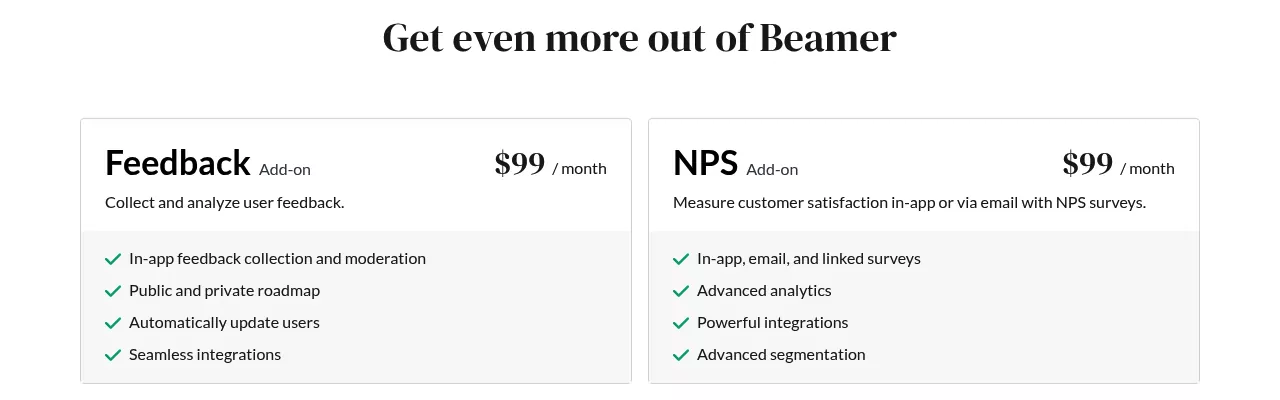
Feedback and NPS are not part of any Changelog plan. Each is its own subscription with a Free and a Pro plan. Beamer Feedback includes idea voting and a public roadmap even on its Free plan.
Beamer Feedback Pricing
As of October 2026, Feedback Pro costs $119 a month billed monthly or $99 a month billed yearly.
| Feature | Feedback Free | Feedback Pro |
|---|---|---|
| Price | $0 | $119 monthly, or $99 a month yearly |
| Ideas, comments, portal and roadmap | Public | Public and private |
| Votes | Unlimited | Unlimited |
| Status updates to people who submit an idea | Yes | Yes |
| In-app widget and standalone page | Yes | Yes |
| Statuses and categories | Standard | Custom |
| Feedback button, moderation, segmentation, custom look | No | Yes |
| Priority Score and internal notes | No | Yes |
| Integrations, API and webhooks | No | Yes |
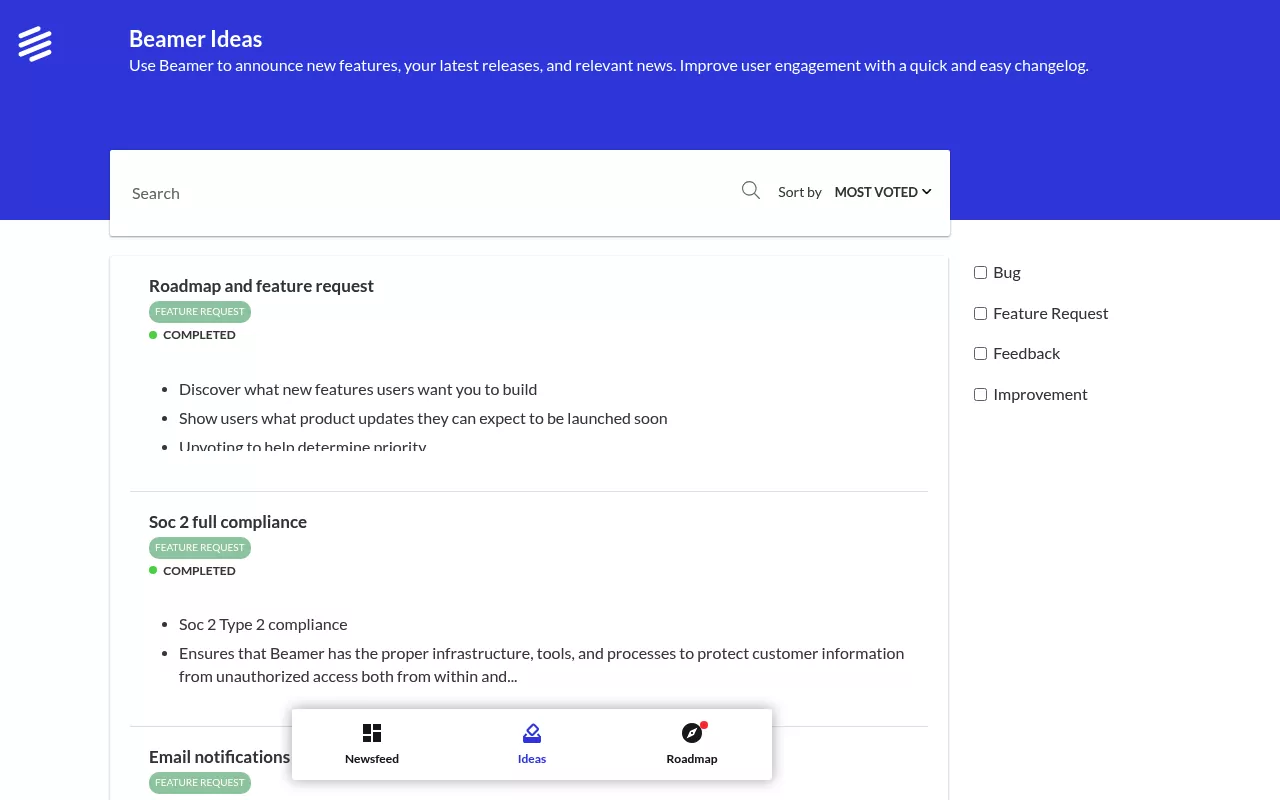
The Priority Score is built from two numbers you enter per idea: effort in hours and expected revenue in dollars. Beamer runs its own public Ideas portal on this product, sorted by votes, with statuses such as Under review, In progress and Completed (October 2026).
Beamer NPS Pricing
As of October 2026, NPS Pro costs $99 a month. Beamer shows no yearly NPS price.
| Feature | NPS Free | NPS Pro |
|---|---|---|
| Price | $0 | $99 a month |
| Surveys per month | Up to 500 | Up to 2,000 |
| NPS history | Last 90 days | Unlimited |
| In-app surveys | Yes | Yes |
| Email surveys and shareable links | No | Yes |
| Segmentation, Zapier, API and webhooks | No | Yes |
| Languages, custom questions, four score types | No | Yes |
| Custom sender domain | No | Contact Beamer |
Beamer counts one survey per user it is sent to, answered or not. At the limit, surveys stop until next month. The article also mentions Scale and Enterprise NPS plans not on the pricing page, so ask Beamer if 2,000 is not enough.
How Beamer's MAU Pricing Works
What Counts as a Monthly Active User
Beamer counts unique users who load any page with its script, or the standalone page, in a month. They do not have to open the changelog. With a user_id, one person counts once across devices. Without it, Beamer uses a cookie, so one person on two browsers can count twice.
What Happens When You Go Over
Beamer adds MAU bundles automatically at $50 a month per 5,000 extra MAUs and emails the account owner. A 14-day grace period lets you judge a spike. The widget keeps running.
The catches: bundles are not removed when usage drops (support removes them at period end, with no refund). And while you are over a lower plan's limit, you cannot downgrade to it or cancel from billing settings.

How to Keep the MAU Count Down
A checklist built from Beamer's advice on reducing MAUs:
- Load the script only on pages behind login.
- Send a user_id, so one person on three devices counts once.
- Keep automated tests and uptime monitors off pages with the script.
- Check the MAU figure after any launch, before the grace period ends.
What Beamer Really Costs: Worked Examples
Assumptions: list prices from getbeamer.com/pricing as of October 2026, yearly billing where shown (NPS Pro shows monthly only), no discounts, and overage at $50 a month per 5,000 MAUs.
| Team | MAUs | What they need | Beamer setup | Per month | Per year |
|---|---|---|---|---|---|
| Side project | 800 | Changelog only | Changelog Free | $0 | $0 (watermark, one teammate) |
| Early-stage SaaS | 4,000 | Changelog, public idea board and roadmap | Starter + Feedback Free | $49 | $588 |
| Small SaaS | 9,000 | Email and push, private feedback with notes, NPS by email | Pro + Feedback Pro + NPS Pro | $99 + $99 + $99 = $297 | $3,564 |
| Growing SaaS | 18,000 | Changelog on Pro | Pro + 2 MAU bundles | $99 + $100 = $199 | $2,388 |
| Growing SaaS | 23,000 | Changelog on Pro | Pro + 3 MAU bundles | $99 + $150 = $249 | $2,988, the same as Scale, which includes 50,000 MAUs |
Note the crossover. Pro plus two bundles covers 20,000 MAUs. A third bundle costs as much as Scale on yearly billing, and Scale includes 50,000. So past 20,000 MAUs on Pro, price Scale before the bundles pile up.
Add-ons matter as much as MAUs: the Small SaaS row comes to $10,692 over three years at list prices.
Beamer's Free Plans: What You Get and the Catch
Is Beamer free? Yes. Changelog Free gives 1,000 MAUs and one teammate, with a watermark and no scheduling or boosted announcements. Feedback Free is public only. NPS Free sends up to 500 in-app surveys a month.
The catch is the 1,000-MAU ceiling, which counts every visitor to a page with the script. If you may outgrow it, use the 14-day trial to check real usage.
Billing Rules to Know Before You Sign
These rules sit in a dozen help articles. As of October 2026:
- No refunds or prorations. Cancellations and downgrades take effect at term end, with no refund of current or prior payments. The invoices article says support will look at a refund request.
- Some changes need a person. Yearly to monthly, removing MAU bundles or the email add-on, and custom-plan changes go through the dashboard chat.
- Payment. Monthly plans take cards. Yearly plans also take PayPal, ACH or bank transfer (USA and Europe only). The grid lists bank transfer and ACH under Custom only, so confirm first.
- Unpaid invoices. Nothing is restricted for 14 days. Then you cannot publish or edit in that product, though the widget keeps working. After 30 days the account moves to Free.
- Contract terms. The Terms of Service allow a late penalty of 1% per day overdue, and say pricing can change at any time without prior notice.
- API overage. Extra requests cost $49 for the first extra 100,000 and $19 per further 100,000.
- One bill per changelog. Separate changelogs need separate accounts, each billed on its own, and invoices cannot be combined.
- Export goes through the API. Posts come out only as JSON through the API, without images, and count toward your API limit, per the export guide. Changelog Free has an API limit of 0.

Beamer and Userflow: What the Merger Means for Buyers
Beamer announced its merger with Userflow on February 7, 2024, and its help center now lives at help.userflow.com/beamer. User Onboarding (product tours, checklists, a resource center and an AI assistant) is Userflow's product, priced on the Userflow pricing page. No Beamer plan includes it, and Changelog, Feedback and NPS are still billed per product.
Beamer Review: What It Does Well
- A full in-app announcement kit. The Beamer tool pairs a feed with pop-ups, top bars, snippets and tooltips from Starter, and push from Pro.
- Free plans and open seats. Three Free plans, and unlimited teammates on paid Changelog plans.
- Clear overage rules. A published rate, a 14-day grace period, and no shutdown.
- Targeting and AI help. Pro adds segmentation and dynamic content. The AI Content Generator drafts posts on Changelog Pro, Scale and Custom, and AI Translation is in beta on Pro and up.
- Integrations. Zapier, API and webhooks, Segment on Scale, and a two-way HubSpot sync for selected Scale, Custom and NPS Scale customers.
- One view of the data. A Dashboard for changelog, NPS and feedback data launched on August 25, 2025.
Beamer Cons: Where the Price and the Plan Rules Hurt
- Three subscriptions. Changelog, Beamer Feedback and Beamer NPS on Pro add up to $297 a month.
- MAUs count visitors, not readers, and cookies can count one person twice.
- Sticky bundles. They stay on after usage drops, and you cannot downgrade or cancel while over a lower plan's limit.
- No refunds or prorations, and several billing changes need a support chat.
- Feedback Free is public only. Private ideas, moderation, custom statuses, notes and the Priority Score need Pro.
- A quiet public changelog. Beamer's public changelog lists months through January 2026 and none after (checked October 25, 2026), though help articles were updated as recently as October 16, 2026. Ask Beamer about its 2026 plans.
How These Tools Were Compared
Prices and features were checked on Beamer's pricing page on October 25, 2026, with 19 help center articles and the Terms of Service. Beamer's public changelog, Ideas portal and roadmap served as live examples. No account or trial was used, so details come from Beamer's public pages. Each alternative was checked on its own site the same day.
Who Should Pay for Beamer (and Who Should Not)
Good fit: teams that need logged-in users to notice releases inside the app (pop-ups, top bars, push, email). Also teams that need segmentation, several languages, AI writing help or Zapier (Pro and up), Segment (Scale), or HubSpot (selected Scale and Custom customers). A predictable user base keeps the bill easy to forecast.
Weaker fit: products that need the script on busy public pages, teams that mainly need a voting board (Feedback Pro on top of a Changelog plan), and very small teams that do not want three subscriptions and MAU bands.
Beamer Alternatives Worth Pricing
If one of Beamer's three jobs is your main one, a tool built around it may fit better.
1. AnnounceKit: Best for a Changelog With Mobile SDKs
AnnounceKit is the closest match to the Beamer changelog. Its site lists a changelog, 10+ in-app widget types, feature voting and NPS, delivery by email, Slack and RSS, and native SDKs for iOS, Android and Flutter.
2. Canny: Best for Feature Voting Tied to Revenue
Canny centers on a portal where customers submit and vote on requests and get status updates. It ties requests to revenue, and its AI Autopilot pulls feedback from tools like Intercom, Slack and Gong.
3. Featurebase: Best for Feedback, Changelog and Support Together
Featurebase combines a voting portal, a public roadmap and a changelog with in-app widgets. It also sells support tools, including an AI support agent and a help center.
4. Tiny Team Feedback: Best for Small Teams That Want One Module Instead of Three Subscriptions
Tiny Team's Feedback module puts boards, a roadmap, a changelog and surveys in one web module for small teams. It is a one-time purchase for your whole organization, with no subscription, no per-seat fees and no per-voter or MAU-based fees. Its free trial needs no credit card, and nothing is charged automatically.
- As many boards as you need, private to your team or public. Customers post, vote and comment after verifying their email.
- Up to 20 custom statuses per board, internal notes, and a drag-and-drop roadmap with a public view.
- A changelog with categories, scheduling and subscriber emails. Customers who posted or voted get status-change emails.
- NPS, CSAT, customer effort and product-market fit surveys, by portal link or a website popup targeted by page path.
- A branded portal on one custom subdomain, plus inline embeds of a board, the roadmap or the changelog.
Pros: one purchase covers boards, roadmap, changelog and surveys, with no fees tied to users or voters. Surveys go beyond NPS to CSAT, customer effort and product-market fit.

Where it falls short: no AI of any kind, no integrations, webhooks or public API, and no SSO or identification of logged-in users. There is no moderation queue and no customers-only board. Surveys have no email distribution, branching or NPS trends. With no CSV import, moving from Beamer means re-entering posts by hand. Beamer is the better pick when targeted in-app announcements, segmentation, languages, AI or integrations matter.
| Feature | Beamer | Tiny Team Feedback |
|---|---|---|
| How you pay | Three subscriptions (Changelog, Feedback, NPS). Changelog sized by MAUs, $50 a month per extra 5,000 (October 2026). | One-time payment per module; see current prices |
| Free option | Free plans, plus a 14-day trial of paid plans | Free trial, no credit card |
| Team members | Free: 1. Paid Changelog: unlimited. | No per-seat fees |
| How updates reach users | In-app feed, pop-ups and top bars (Starter), email and push (Pro) | Changelog page, inline embed, subscriber emails |
| Voting board and public roadmap | Feedback Free | Yes |
| Private boards or ideas | Feedback Pro | Team-only private boards |
| Custom statuses and internal notes | Feedback Pro | Yes |
| Surveys | NPS in-app (Free), plus email and links (Pro) | NPS, CSAT, effort and fit, by link or popup |
| Segmentation | Changelog Pro and up, Feedback Pro, NPS Pro | No |
| AI writing and translation | Changelog Pro and up | No |
| Integrations and API | API from Starter, Zapier from Pro, webhooks, Segment | None |
| Languages | Unlimited on paid Changelog plans | No translations |
| Custom domain | Changelog Pro and up | One custom subdomain |
If a voting board, a roadmap, a changelog and surveys in one module cover what your team needs, Tiny Team Feedback is worth a look. See current prices, or create a free workspace and start the Feedback trial from Modules & Billing when you're ready.
Final Verdict
Beamer is one of the most complete tools for announcing releases inside an app. The Changelog ladder is fair for logged-in products under 10,000 MAUs, and the overage rate is published.
It gets expensive once you stack Feedback Pro, NPS Pro and MAU bundles, and the billing rules make that stack hard to unwind. Small teams that mainly want a board, roadmap, changelog and surveys should price a one-time option before they commit.
Frequently Asked Questions
What is Beamer software?
Beamer (getbeamer.com) is a product-update tool for SaaS teams: an in-app changelog with announcements, plus separate Feedback (idea board and roadmap) and NPS products.
Is Beamer free?
Yes. Changelog, Feedback and NPS each have a Free plan. Changelog Free covers 1,000 monthly active users and one teammate, with a watermark, as of October 2026. First-time users can also try a paid plan free for 14 days.
How much does Beamer cost per month?
As of October 2026, the Beamer price for Changelog Starter is $49 a month billed yearly or $59 monthly. Pro is $99 or $119, Scale is $249 or $299, and Custom is by quote. Feedback Pro ($99 yearly or $119 monthly) and NPS Pro ($99 a month) cost extra.
Is Beamer part of Userflow?
Beamer merged with Userflow in February 2024, and the two now work as one team. The products are still billed separately: Userflow covers onboarding tours and checklists, and Beamer covers the changelog, feedback and NPS.
Does Beamer have AI features?
Yes. The AI Content Generator drafts changelog posts on Changelog Pro, Scale and Custom, and AI Translation is in beta on Pro and up. Beamer has no MCP server or built-in AI assistant connector, per its help center.