Productboard Pricing & Review (2026): Plans, Costs, Pros & Cons
Productboard pricing got harder to read in 2026. Productboard now shows two plans and no prices on its public pricing page. Its help center still lists four plans, three with clear rates.
Below, both sources sit side by side with dates, plus AI credits, billing terms, the trial, pros, cons and alternatives.
Productboard prices per maker. Its public pricing page (checked October 25, 2026) shows no list prices: Business has only a Request demo button and a 5-maker minimum, and Enterprise is quoted by sales. Its help center lists Free at $0, Plus at $19 and Business at $59 per maker per month billed annually ($25 and $75 monthly).
Productboard Pricing in 2026 at a Glance
This table merges both official sources for Productboard plans, as of October 25, 2026.
| Plan | Where it is listed | Billed annually | Billed monthly | Makers | Contributors | AI credits a month | Key limits |
|---|---|---|---|---|---|---|---|
| Free | Help center | $0 | $0 | Not stated | Not stated | 50 per workspace | AI stops at 50 credits |
| Plus | Help center | $19 per maker a month | $25 per maker a month | Not stated | Not stated | 250 per maker | Self-serve |
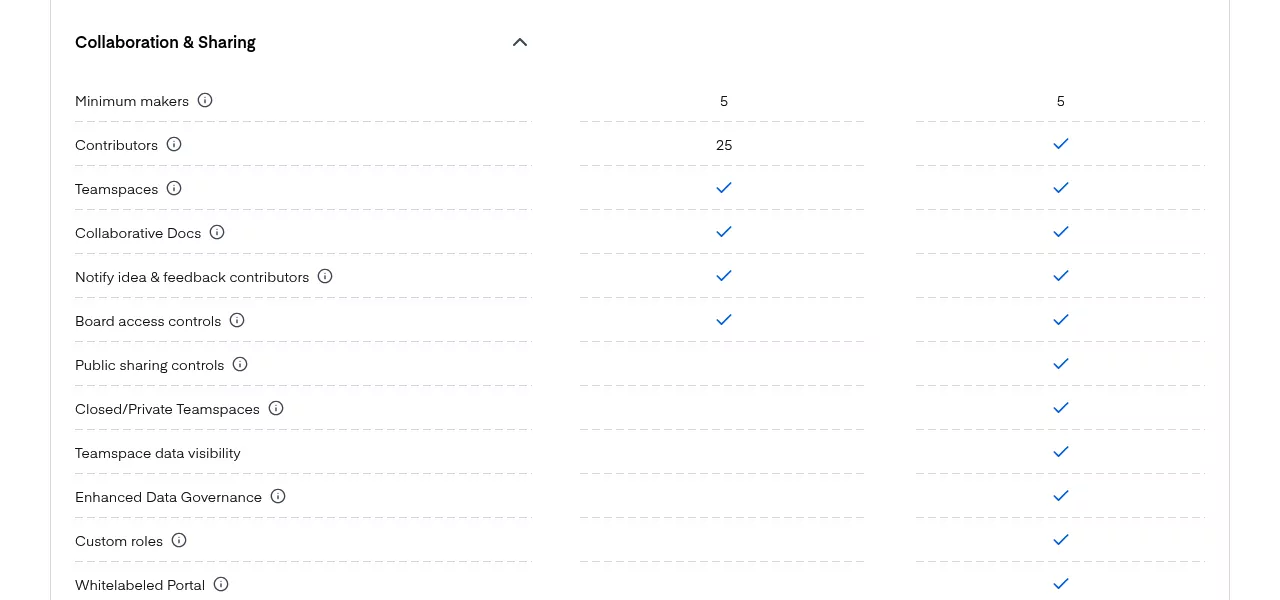
| Business | Pricing page (no price) and help center | $59 per maker a month | $75 per maker a month | 5 minimum (pricing page) | 25 | 500 per maker | 2 Portals, 5 Jira links, no SAML SSO |
| Enterprise | Pricing page | Custom | Custom | 5 minimum | Unlimited | 1,500 plus 800 per extra maker | SAML SSO, SCIM, Salesforce, audit logs |
Credit top-ups cost $5 per 50 credits on monthly plans, or $60 a year per 600 credits on annual plans. They expire at the monthly reset.
What the Pricing Page Shows Today
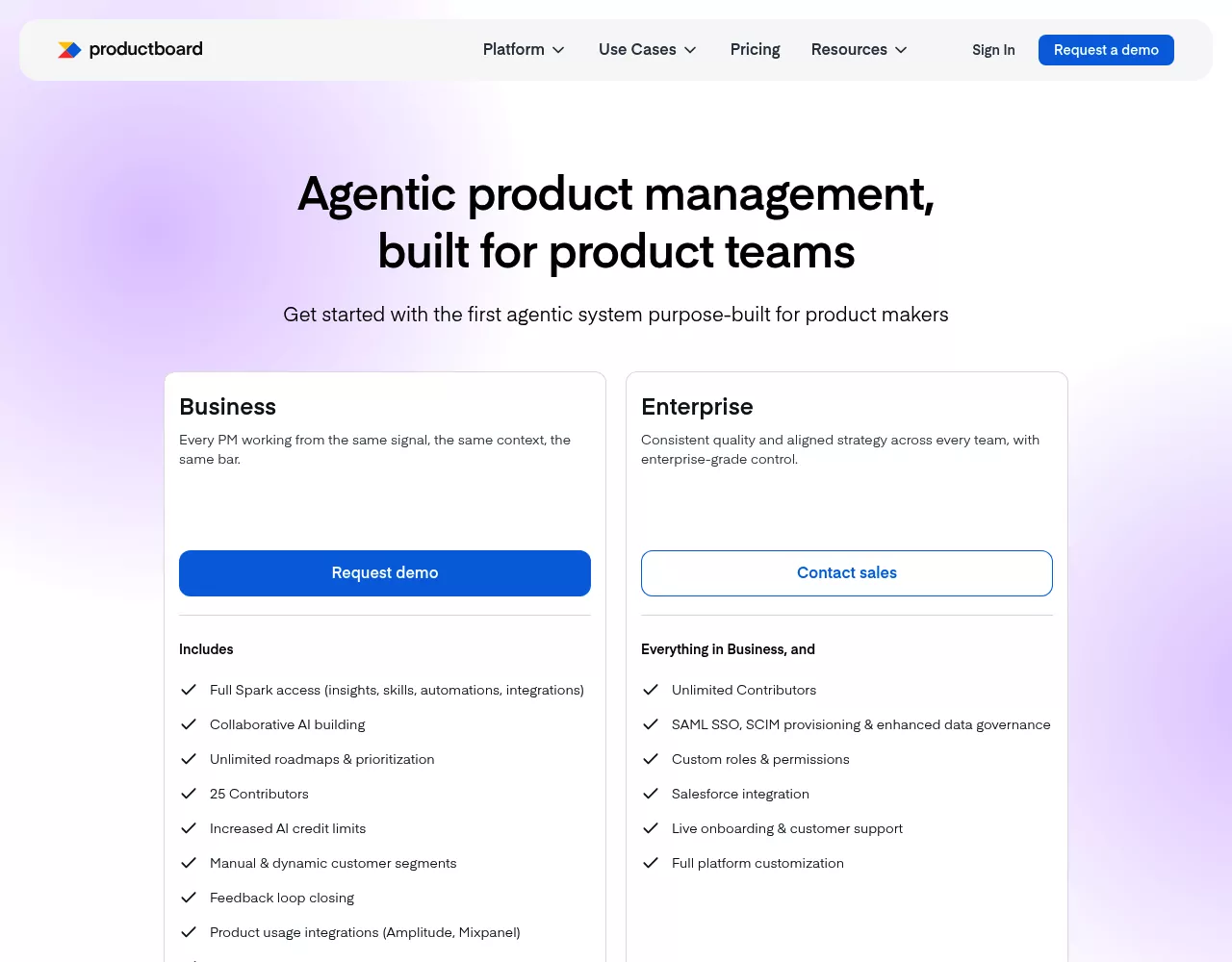
The Productboard pricing page has two plan cards. Business shows a Request demo button, and Enterprise shows Contact sales. Neither shows a price.
Both list a 5-maker minimum. A Monthly and Annual toggle says "Save 21%", yet no price appears in either view.
What the Help Center Still Lists
The Spark pricing and billing FAQ (updated September 4, 2026) lists all four plans and the prices in the table above.
It also splits self-serve Business from Business contract. The demo-gated card is probably the contract one, but neither page says so. Confirm your plan and maker minimum in a written quote or in Settings > Billing.
Why Other Guides Show Different Prices
Guides from August and September 2026 show four plans, three with prices, and a 2-maker Business minimum.
Older guides list a free Starter plan, Essentials at $19 and Pro at $59 per maker. Those figures match today's Plus and Business rates. Older plans also sold Pulse and a Productboard AI add-on. The new pricing drops both, and Spark covers most of what they did.
How Productboard Pricing Works
Makers, Contributors and Viewers
It charges per maker. Makers are the people who own roadmaps, priorities and insights. Contributors add feedback and comments, and they do not count toward the maker limit.
Business caps contributors at 25, and Enterprise has no cap. Older plans with unlimited contributor and viewer seats keep them after the switch, per the Spark FAQ.
Added seats are charged right away, pro-rated. Removed seats only drop at the next renewal, with no refund for the days left, per the billing article.
AI Credits: The Second Meter
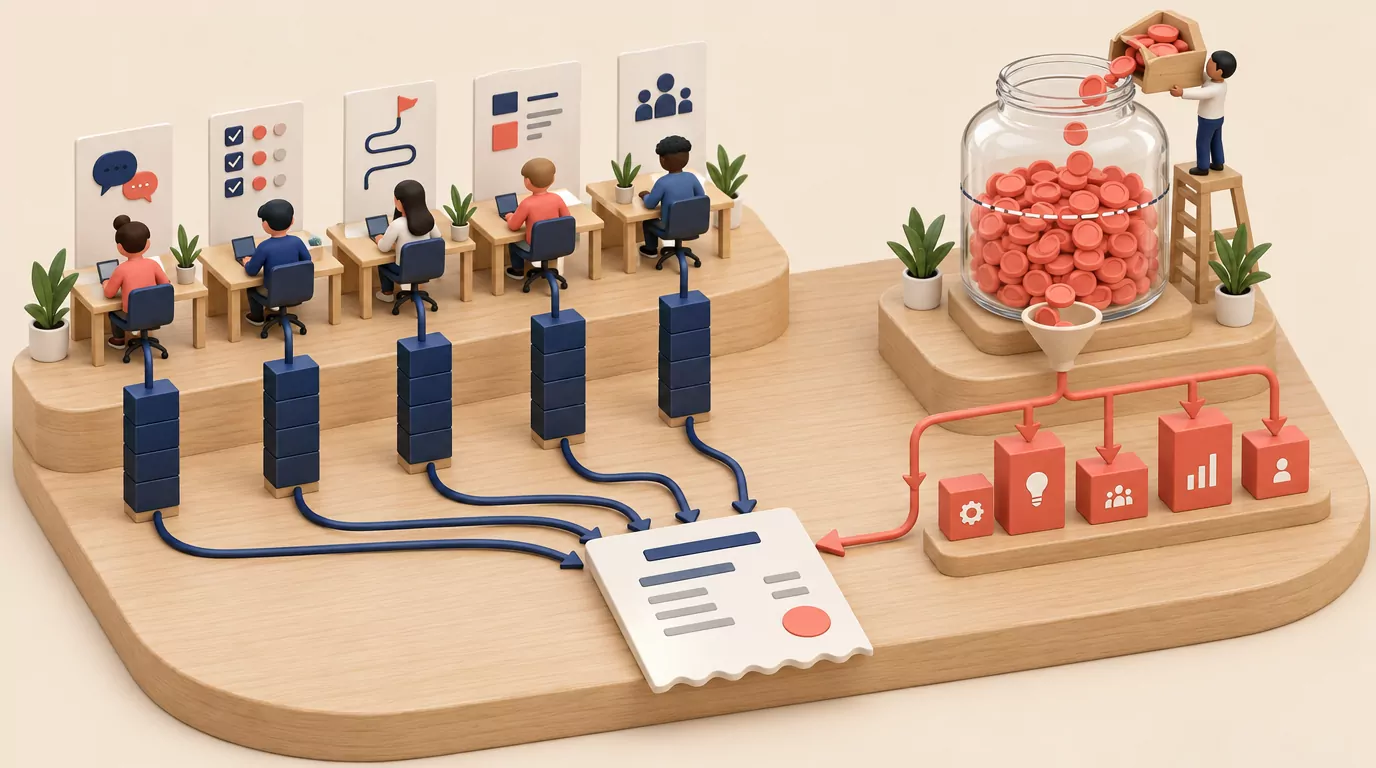
Each plan comes with Productboard Spark, its AI agent. Each Spark task spends credits. Credits are pooled and reset monthly, top-ups included.
The help center lists typical costs. A feedback analysis takes 23 credits (range 5 to 77), and a spec takes 29 (range 3 to 77). The pricing page says 100 feedback items take about 30 to 50 credits. A full spec takes 50 to 200.
So the Free plan's 50 credits cover one or two feedback analyses a month. A 5-maker Business workspace gets 2,500 pooled credits, or roughly 50 to 80 batches of 100 feedback items. Each $60 annual bundle adds 50 credits a month.
Self-serve plans (Free, Plus and Business) stop AI at zero until the reset, or a top-up on paid plans. Contract plans (Business contract and Enterprise) bill extra bundles at month end, unless you ask for a hard cap.
Monthly vs Annual Billing
On Business, $59 billed annually against $75 monthly matches the "Save 21%" label. Monthly billing costs about 27% more. Plus works the same way, at $19 against $25.
What Productboard Costs by Team Size
These are help-center list rates before tax and discounts. They are not quotes.
| Team | Plan | Billed annually | Billed monthly |
|---|---|---|---|
| 1 maker | Plus | $228 a year | $300 a year |
| 3 makers | Plus | $684 a year | $900 a year |
| 5 makers | Business | $3,540 a year | $4,500 a year |
| 10 makers | Business | $7,080 a year | $9,000 a year |
| Any size | Enterprise | Quote only | Quote only |
The demo-gated 5-maker Business on the pricing page has no published price, so the self-serve rate may not apply to it. Confirm maker minimums for Plus and Business in Settings > Billing.
That 5-maker team gets 2,500 credits a month. Ten extra 600-credit annual bundles would add $600 a year.
Productboard Free Plan and Free Trial
The Spark FAQ lists a Free plan at $0 with no credit card. It has 50 AI credits a month for the whole workspace. When they run out, AI pauses, but your workspace and notes stay open.
The free trial lasts 14 days with 500 credits per maker. Then you upgrade or drop to a free account. A help article confirms that the trial needs no credit card.
An older trial article (updated March 24, 2026) still says 15 days and a free Starter plan.
Other Costs and Terms to Check Before You Sign
As of October 2026, Productboard's own pages list these terms.
- 30-day notice: annual plans renew on their own unless you give notice 30 or more days before the end.
- Data deletion: data is deleted 60 days after termination. Exporting it is your job.
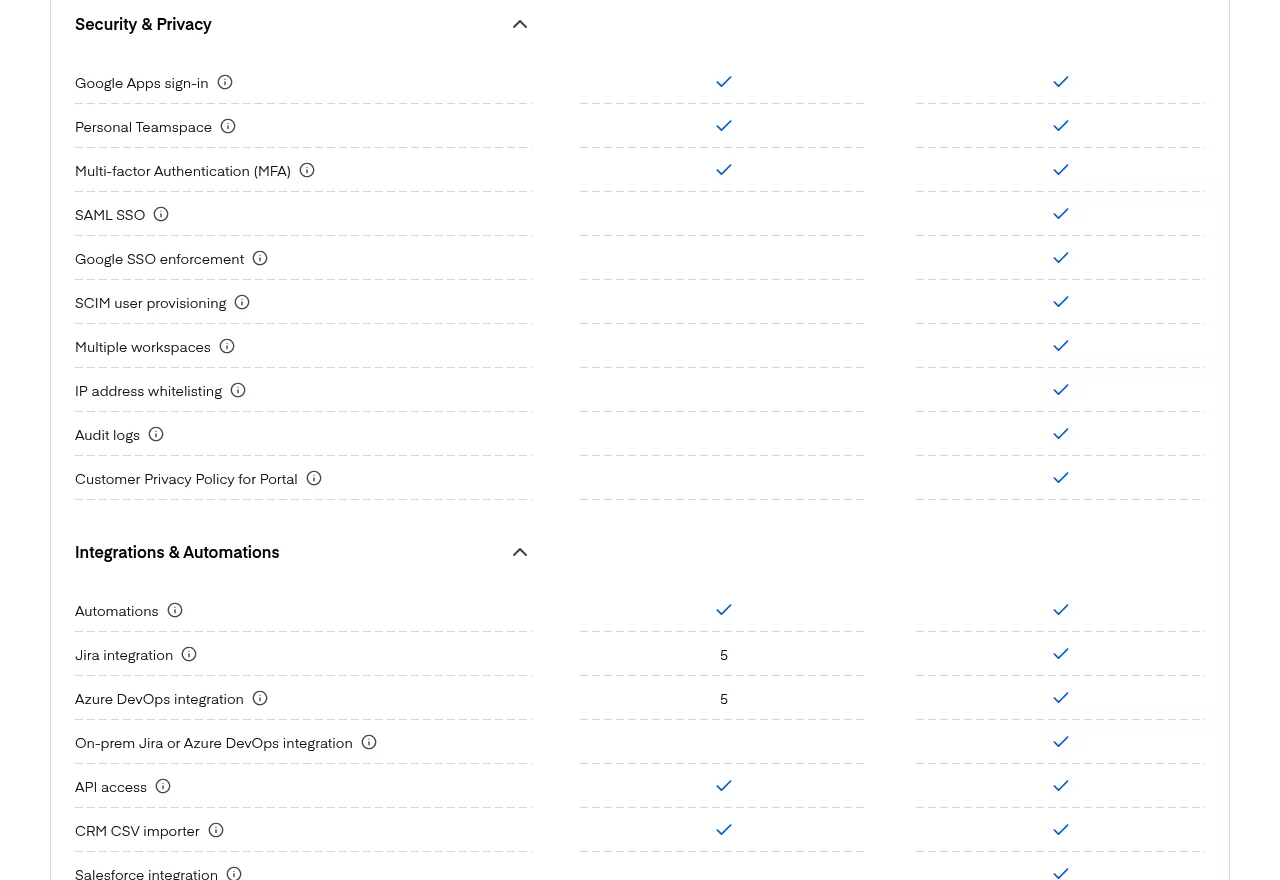
- Enterprise only: SAML SSO, SCIM, audit logs, IP allowlisting, Salesforce and a whitelabeled Portal.
- Business caps: 25 contributors, 2 Portals, 5 Jira and 5 Azure DevOps links.
- Legacy plans: contract customers move to v13 pricing at their next renewal (credits applied September 8, 2026). Self-serve customers move at their next renewal on or after October 1, 2026.

What Is Productboard?
Productboard calls itself an agentic product management system. It gathers customer feedback, helps teams rank features and builds roadmaps. A customer Portal lets users vote on ideas.
Productboard Features Overview
Spark AI Agent
The Spark help article says Spark finds opportunities in feedback. It also drafts specs based on your codebase. It pulls context from Notion, Confluence and MCP tools like Amplitude.
Customer Feedback and Insights
Business has an insights repository, feedback forms, customer segments and a Chrome extension. Feedback loop closing alerts the people who asked for an idea.
Prioritization and Roadmaps
Business adds custom scoring formulas, dependency tracking and custom fields. Roadmaps come in timeline and column views, with release planning.
Portal and Voting
Business has 2 Product Portals with voting, custom voting questions, moderation, embedding, localization and Portal SSO.
Integrations, API and MCP
Business has API access and the Productboard MCP server. It also links to Jira, Azure DevOps, Slack, Teams, Zendesk, Gong and Amplitude. Salesforce needs Enterprise.
Productboard Pros
- Contributors do not count as makers (up to 25 on Business).
- Deep prioritization and roadmaps: formulas, dependency tracking and release planning.
- A voting Portal with embedding, SSO and localization.
- Wide integrations, plus an API and MCP.
- Spark is part of each plan, not a paid add-on.
- A Free plan and a no-card trial, per the help center.
Productboard Cons
- No price on the public pricing page, only Request demo and a 5-maker minimum.
- A second meter: credits expire monthly, and top-ups cost extra.
- Monthly billing costs about 27% more on Business.
- Annual auto-renewal with a 30-day notice rule and no mid-term seat cuts.
- SAML SSO, Salesforce and audit logs are Enterprise only.
- Reviewers report a learning curve for people who are not PMs.
Open question: the pricing page lists no public changelog or release-notes page.
What Reviewers Say About Productboard
Reviews on Capterra praise the clean interface and roadmap views. Many like linking customer feedback to feature ideas, and several single out the Portal.
The complaints repeat. The feature hierarchy confuses newcomers, the inbox gets cluttered and views slow down with many items. Others cite a weak Zapier integration, plan gating, sales talks and value at middle tiers.
Some say it is more than an early-stage startup needs. Most reviews shown date from 2019 to 2023. Many are labeled vendor-referred with a small incentive (checked October 2026).
What to Check in a Productboard Trial
- The trial length and credits the app shows (14 days and 500 credits per maker in the Spark FAQ).
- The plans, prices and maker minimums under Settings > Billing.
- Contributor limits on Free and Plus, which no public page states.
- Whether a public changelog or release-notes page exists.
- The credits one Spark feedback analysis uses on your data, under Settings > Reports > AI Credits.
- The renewal and notice terms in the order form.
The 2-maker versus 5-maker question stays open. Ask sales which Business plan you are being quoted.
Who Productboard Is Best For (and Who Should Skip It)
It fits product orgs with 5 or more PMs on Jira or Azure DevOps. Those teams get the most from AI synthesis and scoring formulas.
Skip it if 1 to 4 product people mostly need a voting board, a public roadmap, a changelog and a survey. A per-maker suite with a credit meter is a lot of tool for that job.
Productboard Alternatives Worth Considering
Prices come from each vendor's pricing page, checked October 25, 2026. The list runs from the closest product management tool to simpler feedback boards.
1. Jira Product Discovery: Best for Teams Already on Jira
Jira Product Discovery is Atlassian's idea and roadmap tool inside Jira. Its pricing page lists Free for 3 creators, then Standard at $10.50 and Premium at $26.25 per creator per month, billed monthly. Contributors are free.
It links ideas to Jira issues and shares roadmap views with stakeholders.
2. Canny: Best for Voting Boards With AI Triage
Canny runs feedback boards, a public roadmap and a changelog. Its pricing page lists Free for 25 tracked users and Pro from $79 per month billed yearly. Price grows with tracked users (anyone tied to feedback).
Autopilot, its AI that captures and dedupes feedback, comes with every plan.
3. Featurebase: Best for Feedback and Support Together
Featurebase combines feedback boards, roadmaps, a changelog and help desk tools. Its pricing page lists Free for 1 seat without AI. Growth is $29, Professional $59 and Enterprise $99 per seat per month, billed yearly. Paid plans add $0.49 per AI resolution.
4. Tiny Team Feedback: Best for Small Teams That Want to Pay Once
Tiny Team's Feedback module covers the board, roadmap, changelog and survey slice a small team uses. It is a one-time purchase per organization, with no subscription and no per-seat or per-voter fees.

- Boards: private boards for your team, and public boards on a portal that can run on your own subdomain. Customers post, vote and comment on public boards after verifying their email.
- Workflow: up to 20 statuses per board, internal notes, manual merging and a roadmap built from your statuses.
- Changelog and surveys: a changelog that can email subscribers, plus NPS, CSAT, customer effort and product-market fit surveys.
Pricing model: a one-time payment per module for your whole organization, with a free trial and no credit card. Pros: one payment, with no seat or credit meter.
Where it falls short: no AI, no Jira, Slack or Salesforce integrations, no webhooks, no public API and no SSO. It also lacks scoring formulas, custom fields, CSV import and a multi-language portal. Teams that need those should stay with Productboard or try Jira Product Discovery.
Best for: 1 to 4 product people who need customer voting, a public roadmap, a changelog and surveys. See current prices.
Pricing and Features Side by Side
| Tool | Pricing basis | Entry paid price | Free option | AI | Jira | Public roadmap | Changelog |
|---|---|---|---|---|---|---|---|
| Productboard | Per maker | Plus, $19 per maker a month, annual (help center) | Free plan | Spark, metered by credits | Yes, 5 on Business | Product Portal | Not listed |
| Jira Product Discovery | Per creator | Standard, $10.50 per creator a month, monthly | Free for 3 creators | Yes | Built in | Shared views | Not listed |
| Canny | Tracked users | Pro, from $79 a month, yearly | Free for 25 tracked users | Autopilot | Yes | Yes | Yes |
| Featurebase | Per seat plus AI use | Growth, $29 per seat a month, yearly, plus $0.49 per AI resolution | Free for 1 seat | Yes, on paid plans | Yes | Yes | Yes |
| Tiny Team Feedback | One-time per organization | One-time payment per module; see current prices | Free trial | No | No | Yes, read-only | Yes, with subscriber emails |
The Bottom Line
Productboard pricing now has two faces: a quote-only page and a help-center price list. At list rates, a 5-maker Business team pays $3,540 a year billed annually, before credit top-ups. Get the terms in writing.
Jira teams that want AI synthesis should weigh Productboard against Jira Product Discovery.
If a voting board, a public roadmap, a changelog and surveys cover what your team needs, Tiny Team's Feedback module is worth a look. It's a one-time purchase for your whole organization, with no subscription and no per-seat fees. See current prices, or create a free workspace and start the trial when you're ready.
Frequently Asked Questions
How much does Productboard cost?
As of October 25, 2026, the pricing page shows no prices, only Business and Enterprise with a 5-maker minimum. The help center lists Free at $0, Plus at $19 and Business at $59 per maker a month billed annually, or $25 and $75 monthly. Enterprise is custom.
Does Productboard have a free plan?
Yes, per the help center: $0, no credit card and 50 Spark credits a month for the whole workspace. The public pricing page shows no Free card, so confirm it when you sign up.
Is there a Productboard free trial?
Yes. The Spark FAQ says 14 days with 500 AI credits per maker, and no credit card is needed. Afterward, you upgrade or drop to a free account.
Does Productboard Spark cost extra?
Not as a separate fee. Spark is part of each plan, metered by AI credits. You get 50 a month on Free, 250 per maker on Plus and 500 per maker on Business. Extra credits cost $5 per 50 on monthly plans.
Is Productboard worth it for a small team?
It earns its price when several PMs need scoring formulas, Jira sync and AI synthesis. For 1 to 4 product people who mostly need a voting board and release notes, it is more than the job needs.