Notion Pricing & Review (2026): Plans, Add-On Costs, Pros & Cons
Notion pricing in 2026 has four plans: Free at $0, Plus at $10 per member per month billed yearly ($12 monthly), Business at $20 ($24 monthly) and custom-priced Enterprise. Every full member pays, including colleagues who only read the wiki. Full Notion AI starts on Business, and Custom Agents and custom domains cost extra.
This guide prices Notion for a 10 to 50 person team that uses it as the company wiki. Every figure comes from Notion's pricing page and help center, checked on November 11, 2026.
Notion Pricing at a Glance (2026)
Notion's page shows your local currency, so the figures below are the USD prices.
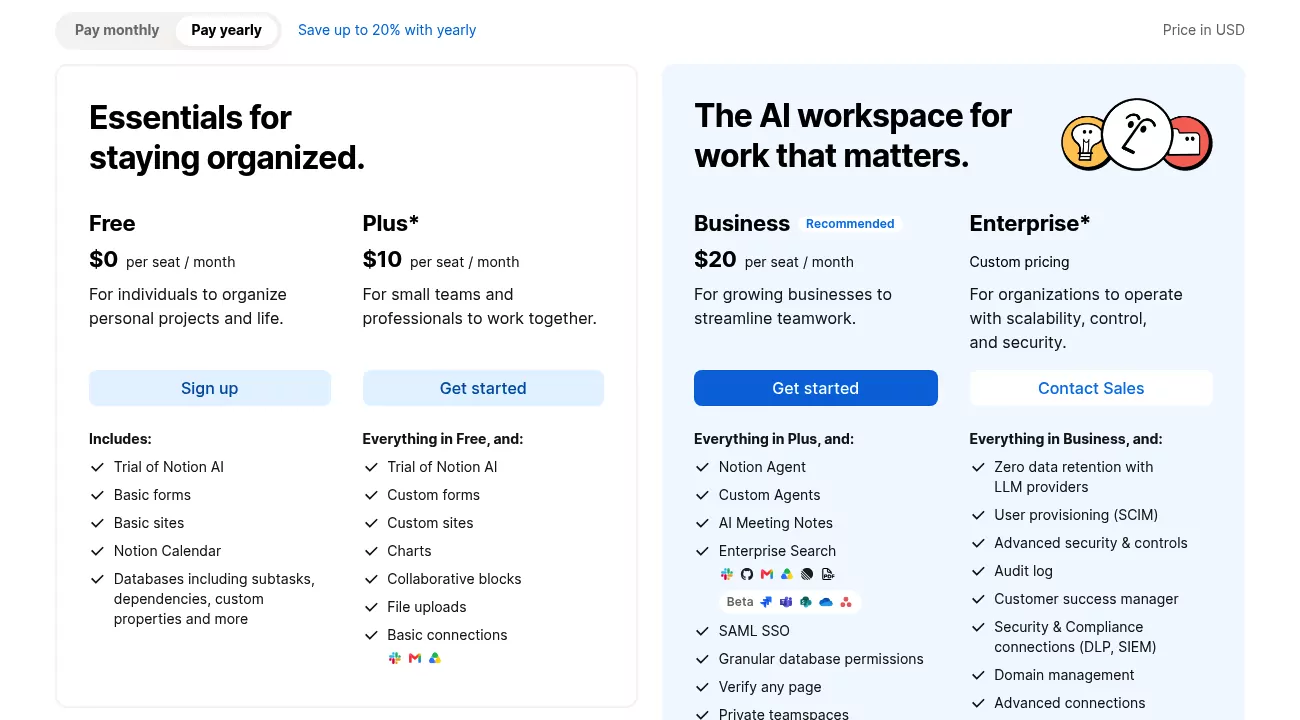
| Plan | Per member per month, billed yearly | Per member per month, billed monthly | Page history | File upload limit (per file) | External guests | Notion AI |
|---|---|---|---|---|---|---|
| Free | $0 | $0 | 7 days | 5 MB | 10 | Limited trial |
| Plus | $10 | $12 | 30 days | 5 GB | Not listed | Limited trial |
| Business | $20 | $24 | 90 days | 5 GB | Not listed | Included, with 1,500 Standard and 500 Select credits per seat a month |
| Enterprise | Custom pricing | Custom pricing | Custom | 5 GB | Not listed | Included, with Standard and Select credits per member |
Prices as of November 2026, from Notion's pricing page.
Paid plans show a check mark for guests with no number.
How Notion Bills a Team: Members, Guests and Seats
Who Counts as a Paid Member
On a paid plan, Notion charges a fee per member, and the plan applies to one whole workspace. Two paid workspaces are billed separately, even with the same people in both (Notion's billing guide).
Here is the wiki trap. Per Notion's help center, anyone who uses one of your organization's email domains is added as a paid member, not a guest. That covers an allowed domain, the workspace owner's domain and any verified domain, and it applies whatever your guest limit is.
With an allowed domain set, colleagues who sign in with a work email are offered the option to join as members. So if 25 colleagues read the wiki and only 5 of them write, you still pay for 25 members.

Guests Are Free but See Only the Pages You Share
Guests cost nothing. The catch is scope: a guest can only open the individual pages they are invited to. They can't see the team pages under Teamspaces in the sidebar.
The Free plan allows 10 guests, and Notion's help center says limits vary by plan. Contractors and clients on their own email fit the guest model. Colleagues on the company domain do not.
Notion's billing guide adds a tip: when you share a page and Notion asks whether to upgrade the person to a member, select "Skip for now" to keep them a free guest.
Adding and Removing People Mid-Cycle
Notion bills upfront at the start of each period, and members added mid-cycle cost a prorated amount for the time left. Removals are not prorated. The bill only drops at your next renewal.
Until then, you can give the freed seat to a new hire at no extra cost. At each renewal, Notion resyncs your paid seats to match your members. Even on yearly billing, it invoices membership changes monthly.
- Yearly versus monthly: monthly billing adds $2 per member on Plus and $4 on Business. The pricing page sums it up as "Save up to 20% with yearly".
- Accidental additions: Notion's pricing FAQ offers a refund of the prorated charges if you remove the extra members and write in within three days of the invoice date.
Notion Add-On Costs: AI Credits, Custom Agents and Custom Domains
Notion AI Comes With Business, Not Plus
Per Notion's AI help page, Notion AI is available on the Business and Enterprise plans. Free and Plus get a limited number of complimentary AI responses so people can try it.
Business lists Notion Agent, Custom Agents, AI Meeting Notes and Enterprise Search. Each Business seat also includes 1,500 Standard credits and 500 Select credits a month.
Standard credits cover work where Notion picks the model. Select credits cover work where you pick a model or use a Custom Agent you set up. Both are per-member balances that reset monthly, don't roll over and can't be pooled. When one runs out, the features using it pause until the reset, unless an owner allows Notion credits.
Some older articles still describe a separate AI add-on for Plus. Notion's pricing page didn't offer one as of November 2026.
Custom Agents and Notion Credits
Custom Agents run tasks on their own, and the pricing page says they are "free to try, then $10 per 1,000 monthly Notion credits". Notion credits are a separate, workspace-wide balance that only Business and Enterprise workspaces can buy.
They cover Custom Agents, high credit consumption models and any use beyond each member's Standard or Select credits. According to Notion's credits guide, there are two kinds:
- Monthly credits: $10 per 1,000 credits, billed with your plan. They reset each month, and unused credits don't carry over.
- Annual credits: $13 per 1,000 credits, paid upfront. You can use them any time in your plan year, but they expire at renewal.
Bought in Notion's settings, the credit type follows your billing cycle, so yearly plans pay the higher credit rate.
Notion estimates that on Auto, where it picks the model, a simple task uses about 5 credits, a medium one about 10 and a complex one about 25. By that estimate, a Business seat's 1,500 Standard credits cover about 150 medium tasks a month, and $10 of monthly Notion credits about 100 more.
Picking a top model yourself uses more: Notion puts a medium task with Opus 5.5 at about 85 credits, so 500 Select credits cover about 6 such tasks.
Owners can set how many credits each member may spend, and Notion alerts them at 80% and 100% of the balance. If you downgrade to Free or Plus, existing Custom Agents are switched off.

Custom Domains for Published Sites
Any plan can publish pages to the web. Free includes one notion.site domain and the paid plans include five. To connect your own domain and remove Notion branding, you pay $8 per domain per month billed yearly, or $10 billed monthly.
The add-on is open on Plus, Business and Enterprise, not Free. It matters if you publish part of the wiki, such as a public handbook, on your own domain.
What Notion Really Costs a 10, 25 and 50 Person Team
Here is the math at list prices: members times the per-member price times 12 months, before any credits or domains.
- 10 members: Plus is $1,200 a year billed yearly or $1,440 billed monthly; Business is $2,400 or $2,880.
- 25 members: Plus is $3,000 a year billed yearly or $3,600 billed monthly; Business is $6,000 or $7,200.
- 50 members: Plus is $6,000 a year billed yearly or $7,200 billed monthly; Business is $12,000 or $14,400.

What pushes the bill up? Moving to Business for AI, private teamspaces or SAML SSO raises the price for every member, not only the people who need those features.
Custom Agents and custom domains then come on top. For example, a 25 member team on Plus, billed monthly, with one custom domain pays $3,600 for seats plus $120 for the domain, or $3,720 a year.
Which Notion Plan Fits a Team Wiki
A small-team wiki usually holds the handbook and policies that people operations for a small team starts with, such as a PTO policy, plus onboarding notes and process docs.

Free: Fine for One Person, Tight for a Team
Free is truly free for one person, who can add as many pages and blocks as they like. Once a Free workspace has two or more members, it gets only a limited block trial. When that runs out, you can still read and edit existing blocks, but you can't add new ones.
Plus: The Default for a Small Team Wiki
Plus removes the block limit for teams and adds 30 days of page history and 5 GB uploads. It also brings custom forms and sites, charts, database automations and basic connections such as Slack and Google Drive.
What Plus lacks: private teamspaces, SAML SSO and full Notion AI. For a wiki that everyone can read, those gaps are often fine.
Business: Private Teamspaces, SSO and AI
Business adds private teamspaces, which hide pages from everyone you don't add, for HR or leadership pages. It also adds verified pages, granular database permissions, SAML SSO, domain verification, 90-day history, PDF export of the whole workspace and Notion AI.
A written change plan is the kind of page that benefits here: a verified badge tells readers it is current, and longer history lets you restore older drafts.
Enterprise: Security Controls, Custom Pricing
Enterprise adds SCIM user provisioning, an audit log, advanced security controls, workspace analytics, zero data retention with Notion's LLM providers and a customer success manager. The pricing page lists it as custom pricing through sales. Notion's help center adds that organizations with fewer than 100 employees can upgrade to it from their settings.
Free Trial, Discounts, Refunds and Billing Terms
These rules come from the pricing page FAQ, the billing guide and Notion's guide to upgrading or downgrading.
- Renewal: plans renew on their own until you cancel. After you cancel, paid features last until the end of the billing period.
- Refunds: Notion refunds the full amount if you downgrade within three days of signing up for monthly billing, or within 30 days for annual billing. Local law can extend this, for example to 14 days for EU monthly plans.
- Plan changes: upgrades take effect at once, with a prorated credit for unused time. Downgrades take effect at the end of the cycle.
- Failed payments: Notion retries up to 8 times within a month. After that, the workspace is restricted for a time and then moved to Free.
- Free trial: teams on a work email domain can try Business, and most trials run 14 or 30 days, depending on the offer, per Notion's trial guide. Starting from Free usually asks for a payment method, and the workspace moves to paid Business when the trial ends unless you cancel first.
- Startups: through Notion for Startups, companies under 100 employees that don't yet pay for Notion can get Business free, AI included. Tech startups get 3 months, or 6 through a partner VC or accelerator; service businesses and companies under 10 employees get 1 month.
- Nonprofits: Notion for Nonprofits gives verified organizations 50% off Business; no other plan currently qualifies.
- Education: students and educators get Plus free, limited to one member.
Notion Review: Pros and Cons
Pros
- Pages and databases live in one workspace, with subtasks, dependencies and custom properties on every plan.
- Teamspaces and permission groups on every plan let you split a wiki by team.
- Any plan can publish pages to the web on notion.site domains, with search engine indexing.
- A public API, webhooks, embeds and connections link the wiki to other tools.
- Desktop and mobile apps work offline.
- Every plan can export the whole workspace as HTML, Markdown and CSV.
Cons
- Every member is billed, even read-only colleagues on the company domain.
- Full Notion AI starts on Business.
- Custom Agents and custom domains are billed on top of seats.
- Private teamspaces and SAML SSO start on Business, which raises the price for everyone.
- Free workspaces with two or more members hit a block limit.
- History windows cap what you can restore: 7, 30 or 90 days below Enterprise.
- Removing members isn't prorated, so savings wait until renewal.
Is Notion Worth It for a Team Wiki?
Is it worth paying for Notion? Yes, when the same people write docs, run project databases and want AI or automations in one place.
It is harder to justify when most of the company only reads the wiki, because each reader with a company email becomes a paid member. A 25 person company where 5 people write pays $3,000 a year on Plus billed yearly, about $600 per writer.
How These Tools Were Compared
Prices and plan limits were read on each vendor's own pricing and help pages on November 11, 2026. No tool was tested hands-on and no trial was used.
Notion Alternatives for a Team Wiki
The four wiki tools below each bill readers and guests differently.
1. Confluence: Best for Teams Already on Jira
Confluence is Atlassian's wiki, built from spaces and pages in a page tree.
- Key features: spaces and pages, databases, a template library, page versioning, space and page permissions, and whiteboards. Standard adds Rovo search, chat and agents.
- Billing: free for up to 10 users. For a 25 user team billed monthly, Confluence pricing showed Standard at $7.15 and Premium at $14.10 per user a month, as of November 2026. The per-user rate changes with team size, and yearly billing saves up to 17%.
- Pros: guests are free, up to 5 per paid user, though each guest is limited to one space.
- Falls short: below Enterprise, SSO and SCIM need a separate Atlassian Guard subscription. Teams outside the Atlassian stack gain less from it.
- Best for: teams that already plan work in Jira.
2. Slab: Best for a Focused, Searchable Wiki
Slab is a dedicated knowledge base built from posts and topics.
- Key features: real-time collaboration, templates, page verification and what Slab calls unified search. Version history runs 90 days on Free, 365 days on Startup and unlimited on Business.
- Billing: per Slab's pricing page, it is free for up to 10 users plus guests. Startup costs $6.67 and Business $12.50 per user a month billed annually, as of November 2026. Slab bills every user who can log in.
- Pros: a focused wiki with no databases to manage, and paid plans include guests (3 per user on Startup, 5 on Business).
- Falls short: Slab has no read-only user type, so every reader with a login is billed.
- Best for: teams that want a clean, searchable wiki and track projects elsewhere.
3. Nuclino: Best for a Lightweight Wiki With Real-Time Editing
Nuclino is a lightweight workspace of real-time collaborative documents, which it calls items.
- Key features: real-time editing, list, board, table and graph views, canvases for diagrams, publishing, and Sidekick AI on Business.
- Billing: the free plan allows 50 items. Per Nuclino's pricing page, Starter costs $6 and Business $10 per user a month billed yearly, as of November 2026. Starter has a 14-day free trial with no credit card.
- Pros: a simple editor, plus version history of 30 days on Starter and unlimited on Business.
- Falls short: Nuclino counts every user, including guests and read-only members, and upgrades the whole team at once.
- Best for: small teams where most people both read and write.
4. Tiny Team Document Spaces: Best for Nested Team Handbooks Without Seat Fees
Document Spaces is a team wiki module in Tiny Team's web app for handbooks and guides.

- Key features: nested drag-and-drop pages in private or public spaces, with breadcrumbs and a page outline; an editor with headings, checklists, tables and code blocks; internal links; autosaved drafts with concurrent-edit protection; and publishing selected pages of a public space through the public Documents API, with editing and publishing set by role.
- Billing: a module plan for your whole organization, with no per-seat fees. Review current prices, payment timing and renewal terms before paying.
- Pros: one module plan covers everyone, so read-only colleagues add no seat cost.
- Falls short: no full-text search across documents. It also lacks version history, templates, real-time co-editing, comments, notifications, file attachments, per-space permissions, a hosted public reader website, AI and a mobile app. With no import or export, moving from Notion means recreating pages.
- Best for: a nested team handbook, with no per-seat fees. Teams that rely on AI, real-time co-editing or version history should stay on Notion.
More detail is on the Document Spaces page.
Final Verdict
Pick Plus if your team wants a shared wiki with 30 days of history and no need for private spaces or AI. Pick Business if you need private teamspaces for HR or leadership pages, SAML SSO or Notion AI. At 25 members billed yearly, Business doubles the bill from $3,000 to $6,000 a year.
If nested pages and a rich editor cover what your team wiki needs, and most people only read it, Tiny Team's Document Spaces module is worth a look. It offers a module plan for your whole organization, with no per-seat fees. See current prices. New workspace access starts after the first module payment is confirmed.
Frequently Asked Questions
Is Notion free for a team?
For personal use, yes: Free costs $0 with no block limit for a single member. A team gets less: once a second member joins, Free offers only a limited block trial. Free also caps page history at 7 days, uploads at 5 MB and guests at 10, with no custom domain.
How much does Notion cost per user?
As of November 2026, Plus costs $10 per member a month billed yearly or $12 billed monthly. Business costs $20 billed yearly or $24 billed monthly, and Enterprise is priced by quote.
Is Notion AI included in the Plus plan?
No. Plus gets only a limited AI trial. Notion AI comes with Business and Enterprise, and Custom Agents use Notion credits on top of that.
Do guests cost extra in Notion?
No, guests are free, but they only see the pages you share with them. People on your organization's email domains (allowed, the owner's or verified) are added as paid members, not guests.
How does Notion pricing work?
Notion charges a price per member per month, billed yearly or monthly, and the plan applies to the whole workspace. Guests are free. Custom Agents, extra AI usage and custom domains are billed separately.