Absence management is how you track, plan for, and handle employee time off. For small teams, it's simple: know who's out, keep things running, and treat people fairly. A clear process saves you from scrambling every time someone calls in sick or books a two-week vacation.
This guide covers what a founder or first HR hire needs. You'll get a ready-to-use policy template, tracking options, and proven ways to cut unplanned absences — all built for teams of 5 to 100 people.
What Is Absence Management?
At its core, absence management covers three things:
- Policy — Rules about PTO, sick leave, and other time off
- Tracking — Recording who's out and when
- Response — Keeping work on track while someone is away
Done well, these three work together. Your policy sets expectations. Tracking gives you data. Response plans keep projects moving.
Companies with a clear system see 25% fewer coverage gaps and 40% higher work-life balance scores, per SHRM's 2025 Benefits Survey.
Here's a quick example. Your lead developer needs emergency surgery during a product launch. Without a system, you're guessing what they were working on. With one, you have docs, backup plans, and client comms ready to go. The difference between a crisis and a hiccup? Preparation.
Types of Employee Absences
Not all absences are the same. Each type needs different rules and different handling. Knowing the categories helps you write better policies and respond faster.
Planned Absences
- PTO / Vacation — Scheduled ahead with manager approval. Best chance to plan coverage since you know the dates in advance.
- Professional development — Conferences, training, courses. Usually good for the team long-term, and can even re-energize burnt-out employees.
- Bereavement leave — Time off after a death in the family. A clear bereavement leave policy removes guesswork during hard times.
- Religious observances — Protected under federal and state law. Be flexible and accommodating here.
Unplanned Absences
- Sick days — From a single day to extended illness. Small teams feel these the most because there's rarely a backup ready.
- Family emergencies — Childcare falls through, a parent needs urgent help. Needs quick response and flexibility.
- Mental health days — More common and more accepted than ever. Handle with care and respect privacy.
Extended Absences
- Parental leave — Birth, adoption, or foster care. Many small companies now offer paid leave beyond the legal minimum to attract talent.
- FMLA leave — Up to 12 weeks of job-protected leave for companies with 50+ employees.
- Disability leave — Short- or long-term, often tied to insurance programs.
- Military leave — Protected under USERRA for active duty or training.
The goal? Have clear rules for each type, but stay flexible enough for situations that don't fit neatly into a box.
Why Absence Management Matters
Poor absence management hits small teams harder than big companies. There's no "HR department" to sort things out. It's usually you.
The Money Problem
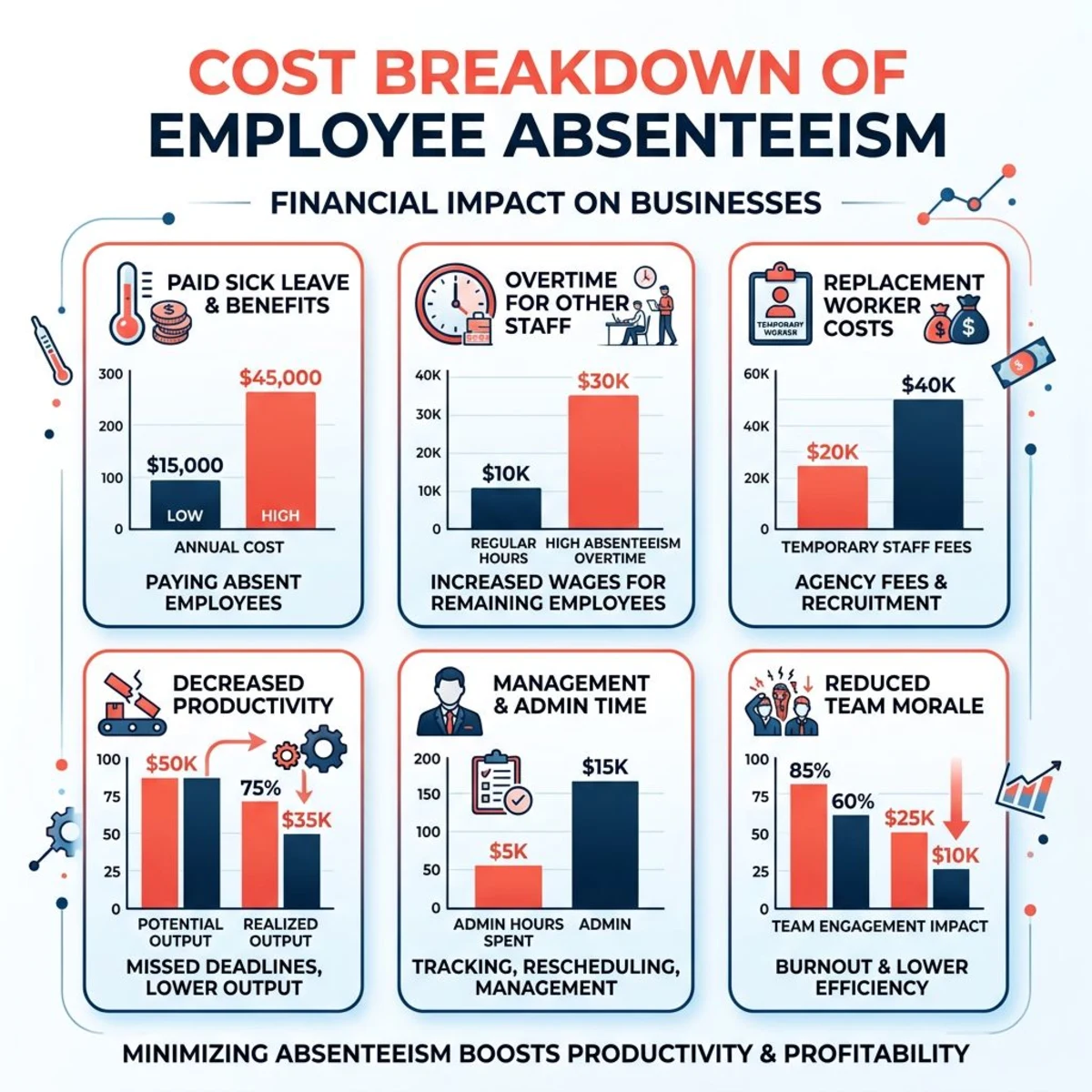
Unscheduled absences cost U.S. employers $84 billion a year, per the Integrated Benefits Institute. For small businesses, that works out to about $3,600 per employee. This includes lost output, overtime for the rest of the team, and temp hires.
Real example: A 15-person marketing agency lost their content manager during a big client launch. No backup plan existed. The team worked 60-hour weeks for three weeks. Two more people burned out and called in sick. The client left. Total damage: over $50,000 in lost revenue and hiring costs.
The Coverage Problem
Small teams don't have bench depth. When someone's out, their work lands on people who may not know how to do it. Projects stall, quality drops, and the people covering get burned out. Then they're absent too — a vicious cycle.
The Legal Problem
Even small employers face legal rules around leave. The EEOC reports that 15% of workplace discrimination claims involve leave issues. Small businesses get hit more often because their processes tend to be more informal.
The Morale Problem
When some people get easy approvals and others don't, resentment builds fast. Even small inconsistencies get noticed. Fair, transparent policies protect team trust and culture.
How to Create an Absence Management Policy
You don't need a 20-page document. You need clear rules that everyone understands and that you apply the same way every time.
Step 1: Pick Your Approach
Decide your company's stance. Are you results-focused (deliver your work, take time when you need it)? Or coverage-based (we need people available during set hours)? Write a one-line philosophy:
"We give you flexibility to manage life. In return, we ask you to plan ahead and communicate early."
This line sets the tone for every decision that follows.
Step 2: Define Leave Types
Set clear rules for each category. Here's a starter template:
PTO
- 20 days per year (1.67 days/month)
- 2 weeks notice for single days, 4 weeks for 3+ days
- First-come, first-served approval
- Max 30 days banked
Sick Leave
- Available from day one, no annual cap
- Tell your manager by 9 AM on sick days
- Doctor's note needed after 3 straight days
- Covers illness, medical visits, and mental health
Emergency Leave
- Unpaid, up to 30 days with manager approval
- Extended leave needs CEO sign-off
- Job protection for the full approved period
Need a full framework? Grab our PTO policy template for a ready-made starting point.
Step 3: Set Procedures
Every policy needs a "how." Keep it simple:
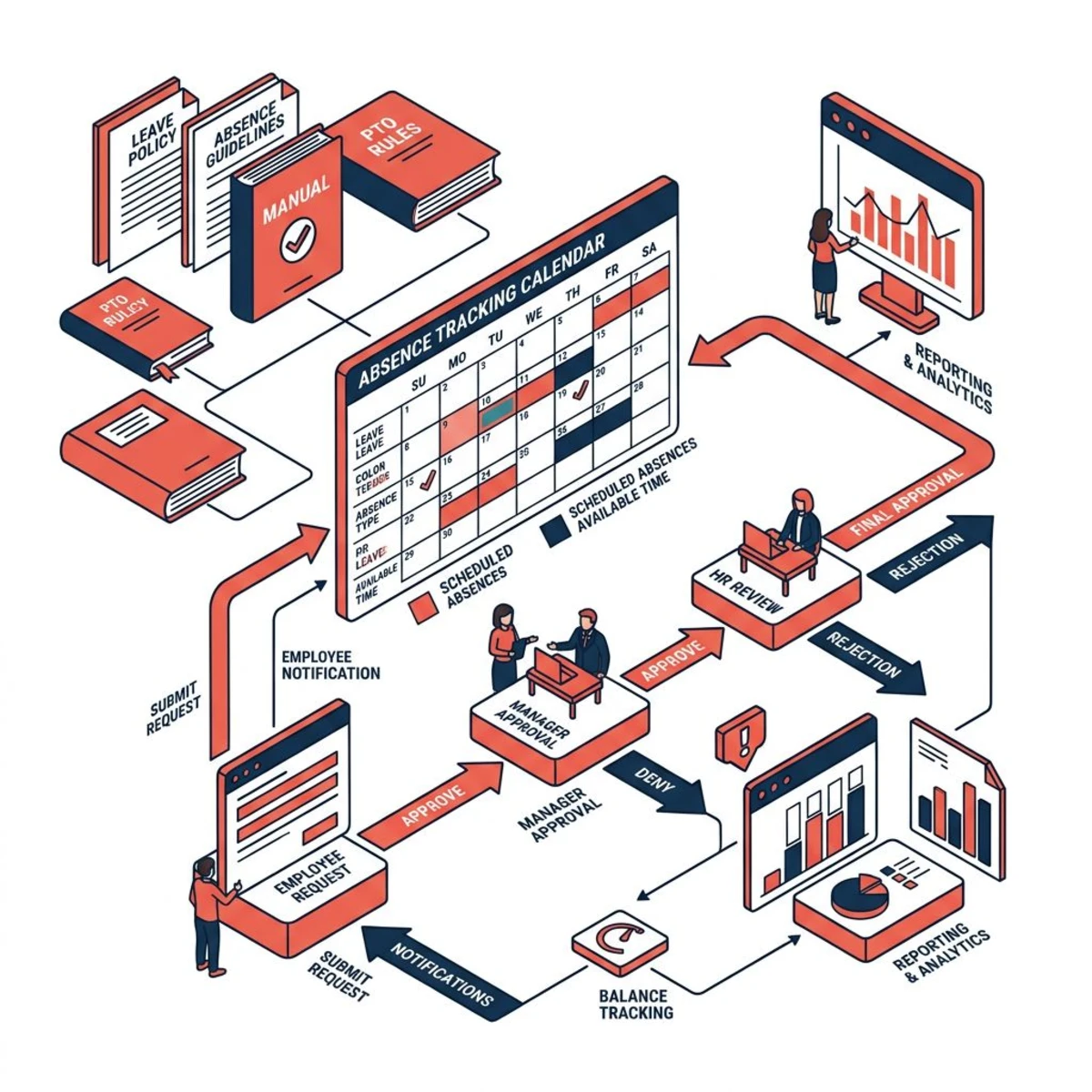
- How to request: One standard process for everyone. A shared calendar, HR tool, or even a Slack channel — just pick one and stick with it.
- Who approves: Direct managers handle routine PTO. CEO approves extended leave.
- Coverage plan: Ask employees to note who covers their work while they're out. This small step prevents most coverage headaches.
Step 4: Share and Train
Add the policy to your handbook. Walk through it with the team. Answer questions openly. Then review it once a year and update as your team grows.
Absence Tracking Methods
Your tracking method should match your team size. Don't overcomplicate things early on.
Spreadsheets (5–15 Employees)
A Google Sheet works fine for very small teams. It's free, flexible, and everyone knows how to use it.
Pros: No cost, full control, quick to set up.
Cons: Manual updates, no automation, prone to errors, doesn't scale.
Tips for making it work: Use data validation to prevent bad entries. Add conditional formatting to flag low balances. Assign one person to own the sheet. Back it up monthly.
Software (15+ Employees)
Once you pass 15 people, a tool pays for itself in time saved. Here's how the popular options compare:
| Tool | Best For | Cost |
|---|---|---|
| Tiny Team | All-in-one HR + PTO tracking | Free up to 10 · $79/mo flat up to 50 |
| BambooHR | Mid-size teams wanting a full HR suite | $99+/mo |
| Gusto | Teams that also need payroll | $40+/mo |
| Time Off Cloud | Teams that only need leave tracking | $2–4/employee/mo |
For in-depth reviews, check our guides on leave management software and PTO tracking tools.
What matters most: Auto accrual calculations, approval workflows, calendar views, mobile access, and reporting. If the tool doesn't handle accruals automatically, it's not saving you much over a spreadsheet.
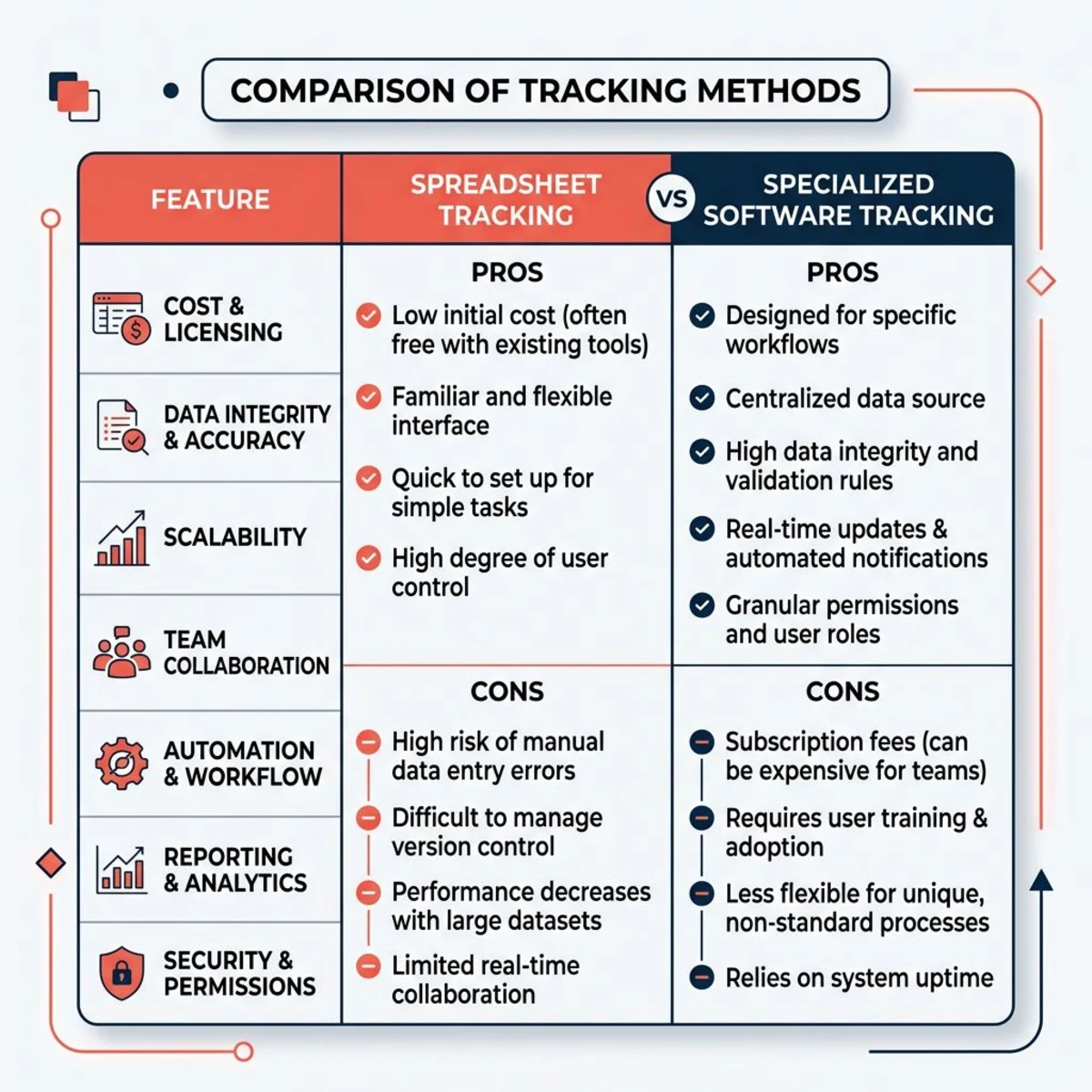
The best system is the one your team actually uses. A simple spreadsheet updated every day beats fancy software nobody opens.
How to Reduce Employee Absenteeism
Some absences are unavoidable. But you can cut the preventable ones with a few focused strategies.
Fix the Root Causes
High stress and unrealistic deadlines push people toward burnout. If your team is stretched thin all the time, absences are a symptom — not the problem. Check workloads regularly. Adjust before people break. Ask your team how they're doing — and listen.
Poor workplace culture makes people look for reasons to stay home. If team dynamics are bad, no absence policy will fix that. Fix the environment first. Common culture issues include unclear expectations, lack of recognition, and managers who don't listen. Address those and watch sick days drop.
Physical workspace matters too. Bad lighting, uncomfortable chairs, or a freezing office can drive up sick days. Small upgrades often pay for themselves in fewer absences.
Offer Flexibility
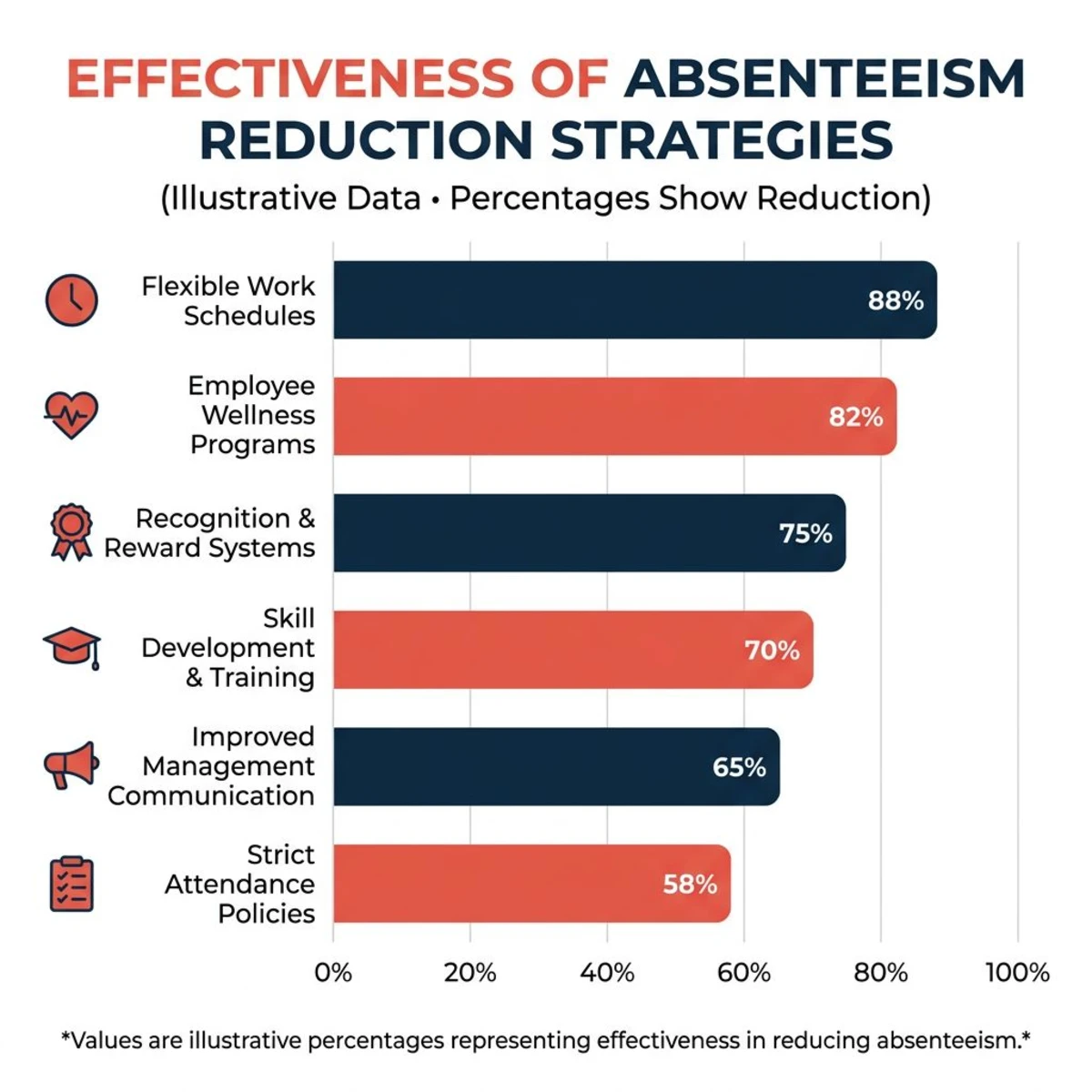
Remote work and flexible hours cut unplanned absences by 35%, per Stanford research. The logic is simple: when people can shift their schedule around a doctor's visit or school pickup, they don't need a full day off.
Intervene Early
- Monthly one-on-ones help managers spot stress before it snowballs.
- Employee assistance programs (EAPs) offer confidential counseling. Many insurers include them at no extra cost.
- Return-to-work plans after long absences ease people back in gradually, which prevents re-injury and boosts retention.
Watch the Data
Track patterns over time. Are Monday absences spiking? Does one team have double the sick days? Data shows you the real problem — so you can fix the cause instead of chasing symptoms.
Pair your tracking with a clear employee attendance policy so expectations are set from day one.
Absence Management Best Practices for Small Teams
These tips work specifically for teams of 5–100 people, where every person's absence is felt.
Cross-train your team. At least two people should be able to cover every critical role. You don't need deep experts. Just enough backup to keep things moving for a few days.
Document everything. Project docs, client contacts, and process steps should live in a shared space. When someone's out, their backup shouldn't have to guess what's going on. Tools like Tiny Team's Documents feature make this easy.
Tell clients early. If an absence affects a client project, let them know right away. Transparency beats surprise every time. Most clients are fine with a short delay — they hate being blindsided.
Train your managers. They should apply rules the same way for everyone. They need to know the basics of FMLA and ADA. And they should handle absence talks with empathy, not suspicion.
Stay flexible. Small teams can get creative in ways big companies can't. Unique situations deserve unique solutions — just make sure you're fair across the board.
Review quarterly. Check your absence data every few months. Patterns change. Policies that worked at 10 people may not work at 40. Adapt early.
Set the tone from the top. If founders or managers never take time off, the team won't either — even if the policy says they can. Lead by example. Take your PTO. Talk about it openly. That signals to your team that time off is truly okay.
Plan for peak seasons. If your business has busy periods (tax season, holiday retail, product launches), set team-wide expectations early. Block out those weeks on the calendar so everyone plans around them.
Legal Basics You Need to Know
You don't need a law degree. But knowing the big rules keeps you out of trouble.
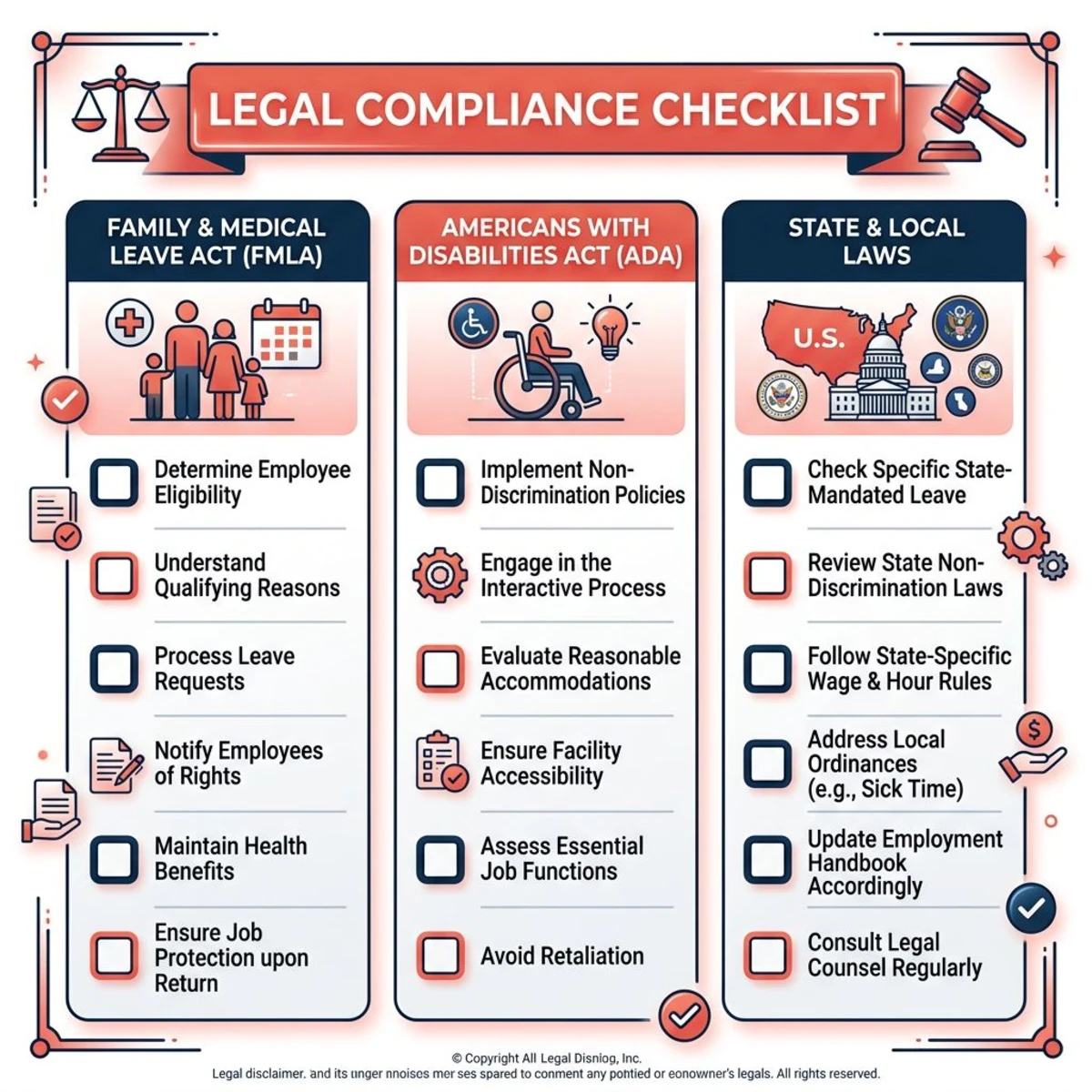
FMLA (50+ employees): Up to 12 weeks of unpaid, job-protected leave for serious health issues, new children, or family care. Even if you're under 50, build FMLA-compatible policies now. You'll thank yourself later.
ADA: Offer reasonable accommodations for employees with disabilities. This can mean modified schedules or extra leave. Keep all medical info confidential and in a separate file.
State laws: Many states go further than federal law. California, New York, and Washington require paid sick leave for all employers, no matter the size. Other states have their own family leave rules. Check yours — the requirements may surprise you.
Record keeping: Keep records of all leave requests and decisions for 3–4 years. If a situation ever turns into a complaint, your documentation is your defense.
Frequently Asked Questions
How much PTO should small companies offer?
Most offer 15–20 days per year for new hires, going up to 20–25 after a few years. Some now use unlimited PTO to compete for talent. Benchmark against your industry and local market, then pick what fits your culture and budget.
Can I deny PTO during busy periods?
Yes, but you must apply restrictions fairly and tell your team in advance. Define blackout periods in your policy (like end-of-quarter for finance teams). Use a first-come, first-served system so it's clear and objective.
How do I handle suspected sick leave abuse?
Look for patterns first. Frequent Monday/Friday absences or sick days right after denied PTO are red flags. Have an honest chat before assuming the worst. The real issue is often stress or disengagement, not dishonesty. You can require a doctor's note after a set number of days, but watch out for ADA and state law limits.
Do I need to pay out unused PTO when someone leaves?
It depends on your state. Some require it by law, others leave it up to you. Check your local rules and spell out your approach clearly in the employee handbook.
How should I handle religious holiday requests?
Federal law requires reasonable accommodation for religious practices. Let employees use PTO, swap shifts, or take unpaid time. Be flexible and document your decisions for compliance.
What's the easiest way to start tracking absences?
If you have fewer than 15 people, a shared Google Sheet works. List each employee, their leave types, balances, and dates used. Once you outgrow that, move to dedicated software with auto-accruals and approval workflows.
Good absence management doesn't require perfect policies. It requires clear rules, fair application, and open communication. Start simple. Pick a tracking method that fits your team size. Review it every year.
Tiny Team's Team Calendar handles PTO tracking and custom leave policies out of the box — so you can spend your time on your team, not on spreadsheets.