People analytics is the practice of collecting and analyzing employee data to make better workforce decisions—like understanding why your top performers leave, which hiring sources produce the best employees, or how much training actually improves performance. For small teams, it's not about complex algorithms; it's about tracking the right metrics to build a stronger, more efficient organization.
Many founders think people analytics requires a dedicated data team or expensive enterprise software. The truth is, you can start making data-driven HR decisions with basic spreadsheets and simple tools you probably already have. The key is knowing which metrics matter most and how to act on the insights.
According to Deloitte's 2025 Global Human Capital Trends report, 71% of companies consider people analytics a high priority, but only 8% of organizations rate themselves as strong in this area. This gap represents a massive opportunity for small businesses to gain competitive advantages through smarter people decisions.
What Is People Analytics?
People analytics (also called workforce analytics or talent analytics) is the process of collecting, analyzing, and acting on data about your employees to improve business outcomes. Instead of making hiring, retention, and development decisions based on gut feelings, you use concrete data to guide your choices.
Think of it as applying the same data-driven approach you use for sales or marketing to your human resources function. Just as you track conversion rates and customer acquisition costs, you track metrics like time-to-hire, employee turnover by department, and engagement scores.
Simple People Analytics in Action
Consider a 30-person software company that noticed higher turnover in their engineering team. Instead of assuming it was market competition or salary issues, they analyzed the data:
What they found:
- Engineers hired through recruiters left within 18 months 73% of the time
- Engineers hired through employee referrals stayed 2+ years 89% of the time
- Exit interviews revealed poor cultural fit, not compensation, as the main issue
What they did: Shifted 80% of engineering hiring to referrals and cultural fit assessments, reducing turnover by 45% and saving $120,000 annually in replacement costs.
This is people analytics in its most practical form—using data to solve real business problems.
Why Traditional HR "Gut Feelings" Fall Short
Small business founders often make people decisions based on intuition because they know their team personally. While this works for very small teams (5-10 people), it breaks down as you scale:
- Recency bias: Recent events overshadow patterns
- Sample size issues: One bad hire doesn't indicate a problem with your process
- Hidden patterns: Successful hiring sources or management practices aren't always obvious
- Growth challenges: What worked for 10 employees may fail at 25 or 50
People analytics provides the objective foundation for people decisions that feel right but are also statistically sound.
People Analytics vs HR Analytics vs Workforce Analytics
These terms are often used interchangeably, but there are subtle differences that matter for small teams:
People Analytics
- Focus: Individual and team-level insights
- Questions: Why do certain employees succeed? What predicts good performance?
- Scope: Employee experience, engagement, and development
- Tools: Employee surveys, performance data, 1-on-1 feedback
HR Analytics
- Focus: HR process efficiency and compliance
- Questions: How long does hiring take? Are we paying market rates?
- Scope: Recruiting, compensation, compliance, administration
- Tools: HRIS systems, payroll data, recruiting metrics
Workforce Analytics
- Focus: Strategic workforce planning and optimization
- Questions: What skills will we need? How should we structure teams?
- Scope: Organizational design, skills planning, labor costs
- Tools: Business planning software, skills assessments, labor market data
| Aspect | People Analytics | HR Analytics | Workforce Analytics |
|---|---|---|---|
| Primary Goal | Improve employee experience | Optimize HR processes | Plan future workforce needs |
| Data Sources | Surveys, performance, feedback | HRIS, payroll, applications | Skills data, business forecasts |
| Typical Metrics | Engagement, career growth | Time-to-hire, cost-per-hire | Skills gaps, succession planning |
| Best For Small Teams | ✅ High impact | ✅ Essential basics | ⚠️ Future consideration |
For small teams, start with HR analytics basics (tracking key metrics) and add people analytics elements (engagement and development insights) as you grow.
Why Small Teams Need People Analytics (Even Without a Data Team)
The biggest mistake small businesses make is thinking people analytics is only for large enterprises with dedicated HR departments. In reality, small teams benefit more from basic people analytics because every hiring decision and retention challenge has a bigger proportional impact.
The Small Team Advantage
Higher impact per person: When you have 25 employees, losing one good performer costs 4% of your productivity. In a 1,000-person company, it's 0.1%.
Faster iteration: Small teams can test and adjust based on data insights within weeks, not quarters.
Direct access to employees: You can gather qualitative data through conversations that large companies need surveys to collect.
Lower complexity: Simple metrics and tools provide actionable insights without enterprise-level sophistication.
Real-World Small Team Benefits
Better Hiring Decisions A 40-person marketing agency tracked their hiring sources and found that employees hired through industry meetups had 60% higher performance ratings and 40% longer tenure than those found through job boards. This insight led them to shift 70% of their recruiting budget from online ads to event sponsorships.
Retention Improvements
A 15-person startup noticed that employees who didn't have regular 1-on-1s with their managers were 3x more likely to leave within 12 months. Implementing weekly check-ins reduced turnover from 35% to 12% annually.
Performance Optimization A 55-person consulting firm discovered that their most productive teams had at least one team member who'd been with the company 2+ years. This led them to change project staffing to always include an experienced team member, improving client satisfaction scores by 23%.
Cost-Benefit Analysis for Small Teams
Investment Required:
- Time: 2-4 hours monthly for data collection and analysis
- Tools: $0-500 monthly for analytics tools (many start with spreadsheets)
- Training: 10-20 hours initial setup and learning
Typical Returns:
- 15-25% reduction in turnover costs
- 20-30% improvement in time-to-hire
- 10-15% increase in employee satisfaction scores
- $15,000-50,000 annual savings on recruiting and training
For most small teams, people analytics pays for itself within 6 months through improved hiring and retention alone.
10 Key People Analytics Metrics to Track
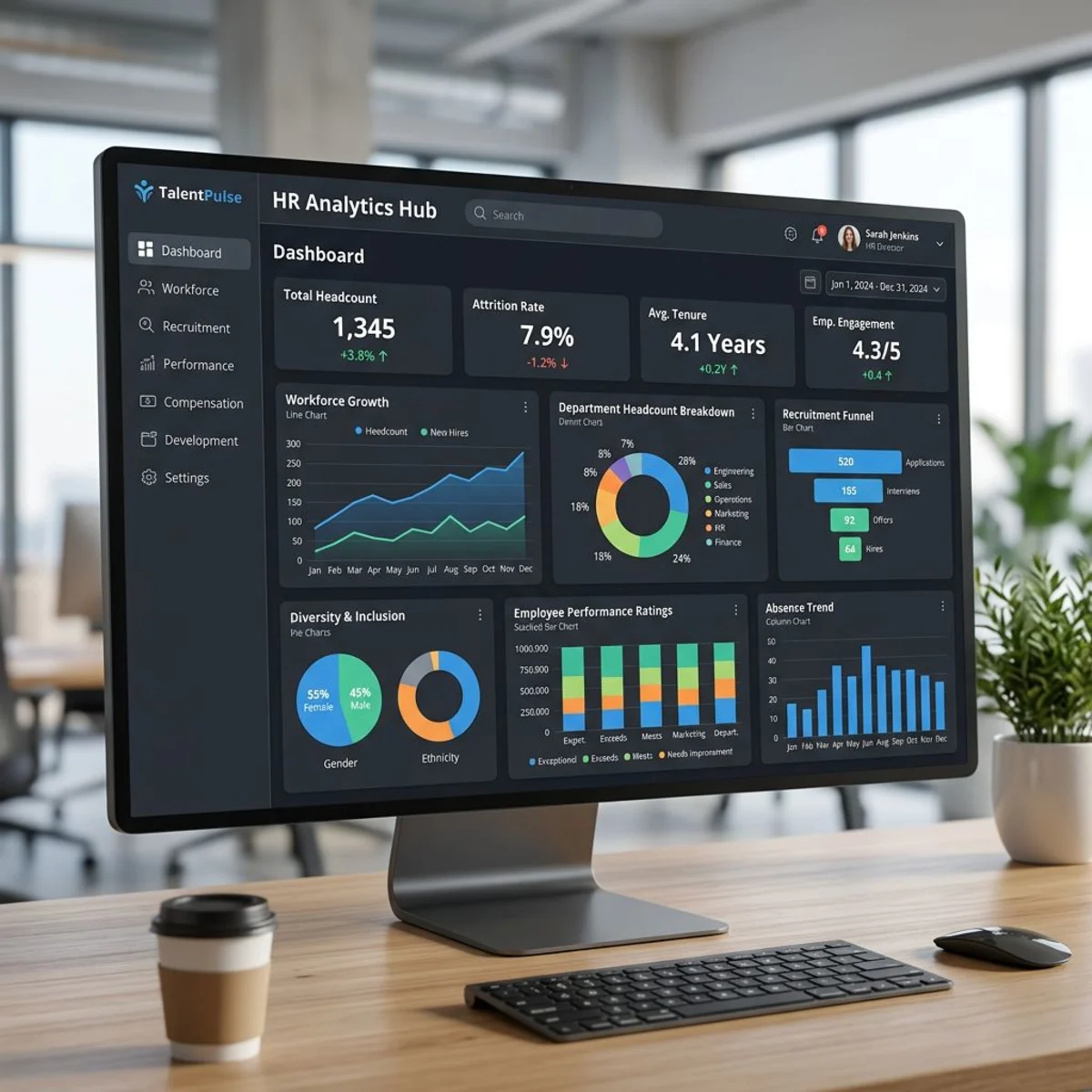
Don't try to measure everything. Start with these foundational metrics that provide maximum insight for minimal effort.
1. Employee Turnover Rate
Formula: (Number of departures ÷ Average employee count) × 100 Frequency: Calculate monthly, review trends quarterly Good benchmark: 10-15% annually for most industries Why it matters: High turnover costs 50-200% of an employee's salary in replacement costs
Deeper analysis:
- Voluntary vs. involuntary turnover
- Turnover by department, role, or hire source
- First-year vs. tenured employee turnover
- Exit interview themes and patterns
Action triggers:
- Overall rate >20% annually
- One department significantly higher than others
- New hire turnover >30% in first year
2. Time to Hire
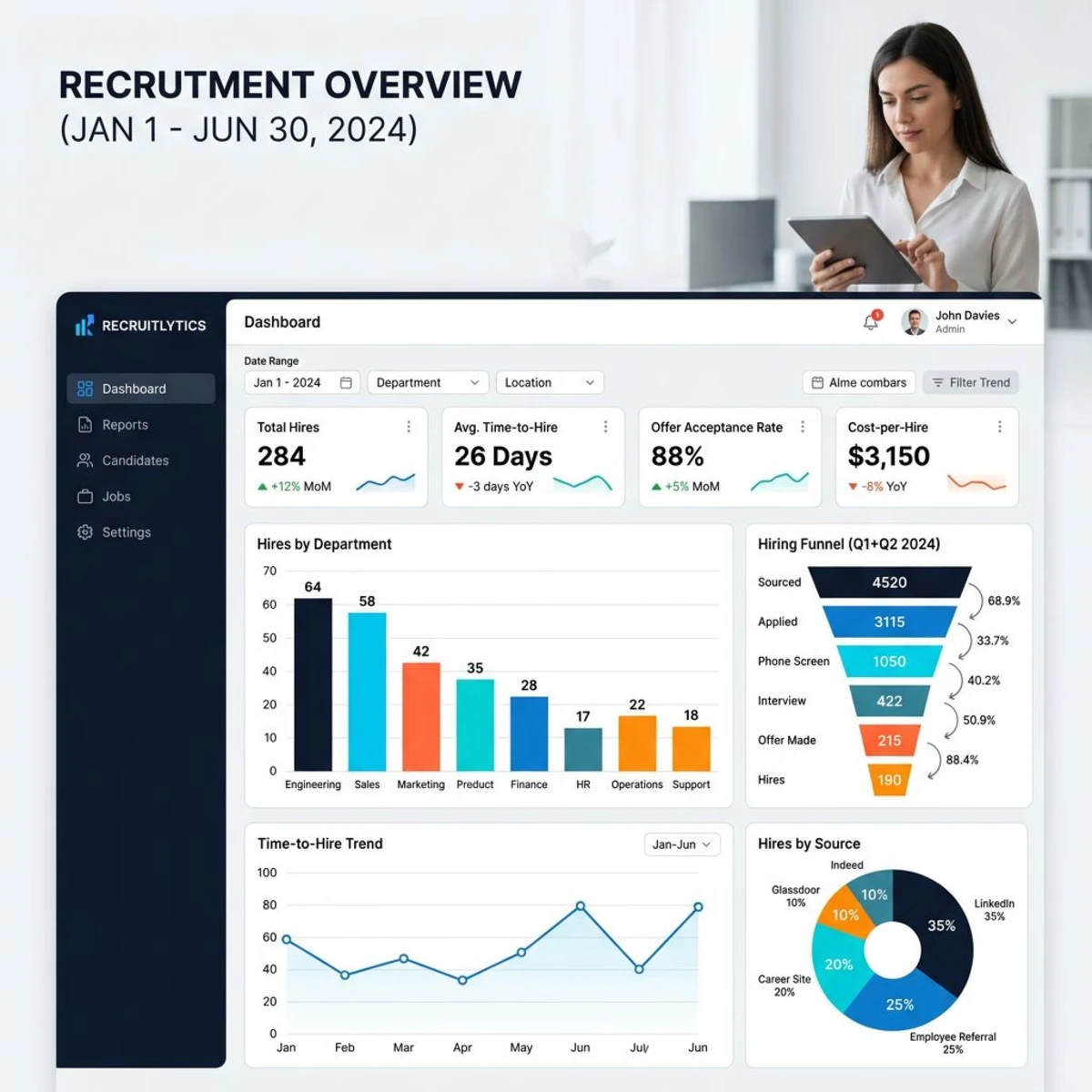
Formula: Days between posting a job and accepted offer Frequency: Track for each role, average monthly Good benchmark: 2-4 weeks for most roles, 4-8 weeks for senior positions Why it matters: Long hiring processes lose top candidates and increase productivity gaps
Deeper analysis:
- Time-to-hire by role complexity and seniority
- Bottlenecks in your hiring process (screening, interviews, decision-making)
- Difference between internal vs. external hires
- Seasonal hiring patterns
Action triggers:
- Time-to-hire >6 weeks for standard roles
- Losing candidates during the process
- Hiring manager complaints about slow processes
3. Cost per Hire
Formula: (Total recruiting costs ÷ Number of hires) Frequency: Calculate quarterly Good benchmark: $3,000-5,000 for most roles, $8,000-15,000 for senior positions Why it matters: Helps optimize recruiting budget allocation and identify most cost-effective hiring sources
Include in total costs:
- Job board fees and advertising
- Recruiter fees or internal recruiting time
- Interview time (calculated at employee hourly rates)
- Background checks and assessments
- Onboarding and training costs
Deeper analysis:
- Cost per hire by source (referrals, job boards, recruiters)
- Internal vs. external recruiting costs
- Success rate (quality) vs. cost trade-offs
4. Employee Engagement Scores

Measurement: Quarterly pulse surveys (5-10 questions) Frequency: Survey quarterly, analyze monthly Good benchmark: 70%+ engagement rate, less than 10% "disengaged" Why it matters: Engaged employees are 23% more profitable and 18% more productive according to Gallup
Key survey questions:
- "I would recommend this company as a great place to work"
- "I have the resources I need to do my job effectively"
- "My manager provides helpful feedback"
- "I see opportunities for career growth"
- "I understand how my work contributes to company goals"
Action triggers:
- Engagement scores declining for 2+ quarters
- Scores significantly lower in specific departments
- High performers showing decreased engagement
5. Absenteeism Rate
Formula: (Total absent days ÷ Total working days) × 100 Frequency: Track monthly, analyze quarterly Good benchmark: 2-3% for most industries Why it matters: High absenteeism indicates burnout, disengagement, or health issues
Track separately:
- Planned vs. unplanned absence
- Sick leave vs. personal time
- Monday/Friday absence patterns
- Department or role-specific trends
Action triggers:
- Absenteeism rate >5% company-wide
- Individual employees >8% annual absence
- Sudden increases in unplanned absence
6. Revenue per Employee
Formula: Total revenue ÷ Number of full-time employees Frequency: Calculate quarterly, compare year-over-year Good benchmark: Varies by industry (software: $200K+, services: $100-150K) Why it matters: Measures overall workforce productivity and efficiency
Considerations for small teams:
- Exclude founders/owners from initial calculations
- Track trends more than absolute numbers
- Compare to industry benchmarks when possible
- Consider seasonal revenue fluctuations
Deeper analysis:
- Revenue per employee by department
- Productivity trends as team grows
- Impact of new hires on overall productivity
7. Training Completion Rate
Formula: (Completed training sessions ÷ Assigned training sessions) × 100 Frequency: Track monthly Good benchmark: 85%+ completion rate Why it matters: Indicates learning culture strength and training program effectiveness
Track by category:
- Mandatory compliance training
- Skills development programs
- Leadership and management training
- New hire onboarding completion
Action triggers:
- Completion rates less than 80% consistently
- Specific training programs with low engagement
- New hire onboarding incomplete >30 days
8. Diversity Metrics
Measurements: Representation by gender, race, age across roles and seniority levels Frequency: Track quarterly, report annually Good benchmark: Reflects your local talent market and customer base Why it matters: Diverse teams make better decisions and access broader talent pools
Key metrics to track:
- Overall workforce diversity percentages
- Leadership and management diversity
- New hire diversity trends
- Promotion and advancement equity
- Pay equity analysis
Action triggers:
- Significant gaps between available talent pool and workforce
- Lack of diversity in leadership roles
- Declining diversity trends over time
9. Internal Mobility Rate
Formula: (Internal promotions + lateral moves) ÷ Total workforce Frequency: Calculate annually Good benchmark: 10-15% of workforce moves internally each year Why it matters: Shows career development opportunities and reduces external hiring costs
Track separately:
- Promotions vs. lateral moves
- Time between role changes
- Success rate of internal moves
- Departments that develop vs. receive talent
Action triggers:
- Internal mobility rate less than 5% annually
- High performers leaving for external opportunities
- Limited promotion pipeline in key departments
10. Manager Effectiveness Score
Measurement: 360-degree feedback scores for all managers Frequency: Annually, with quarterly pulse checks Good benchmark: 4.0/5.0 average score across all managers Why it matters: Manager quality is the #1 predictor of employee engagement and retention
Key effectiveness areas:
- Communication and feedback quality
- Career development support
- Goal setting and accountability
- Team building and collaboration
- Recognition and appreciation
Action triggers:
- Manager scores consistently less than 3.5/5.0
- High turnover in specific manager's team
- Employee feedback indicating management issues
How to Get Started With People Analytics (5 Steps)

Most small teams get overwhelmed thinking they need sophisticated analytics tools from day one. Start simple and build complexity as you grow.
Step 1: Centralize Your Employee Data
Before you can analyze anything, you need reliable data in one place. Most small teams have information scattered across multiple systems.
Data audit checklist:
- Employee contact information and job details
- Start dates, salary history, and promotion records
- Performance review scores and feedback
- Training completion and certification records
- Time-off usage and attendance data
- Exit interview notes and reasons for leaving
Simple centralization options:
- Excel/Google Sheets: Free, familiar, good for teams less than 25 people
- HRIS platforms: Tiny Team, BambooHR, Workday automatically centralize data
- Database tools: Airtable or Notion for more sophisticated tracking
Data quality tips:
- Standardize job titles, departments, and location names
- Use consistent date formats throughout
- Create unique employee IDs for tracking
- Document data sources and update frequencies
- Set up regular data validation checks
Step 2: Pick 3-5 Metrics to Start
Don't try to track all 10 key metrics immediately. Choose the 3-5 that address your biggest current challenges.
For hiring challenges: Focus on time-to-hire, cost-per-hire, and first-year turnover For retention issues: Track overall turnover rate, engagement scores, and manager effectiveness For productivity concerns: Monitor revenue per employee, training completion, and absenteeism
Sample starter dashboard for a 25-person team:
- Monthly turnover rate (identify retention issues early)
- Time-to-hire (optimize recruiting process)
- Employee engagement pulse (quarterly 5-question survey)
- Revenue per employee (track productivity as team grows)
- Training completion rate (ensure knowledge transfer)
Step 3: Set Up Simple Dashboards
Create visual dashboards that make trends obvious at a glance. You don't need expensive BI tools—even Excel charts work well for small teams.
Essential dashboard elements:
- Current month metrics with prior month comparison
- Quarterly trends (line charts work best)
- Department breakdowns (if you have multiple departments)
- Alerts for metrics outside normal ranges
- Last updated date and data sources
Free dashboard options:
- Google Sheets: Built-in charting with automatic updates
- Excel: Pivot tables and charts with data connections
- Tableau Public: Free version for basic visualizations
- Google Data Studio: Free dashboards that connect to Sheets
Dashboard best practices:
- Update monthly on a consistent schedule
- Include context (benchmarks, goals, explanations)
- Make it accessible to managers who need the information
- Keep it simple—5-7 metrics maximum per dashboard
Step 4: Review Monthly and Set Goals
Data without action is just interesting numbers. Set up regular review cycles that turn insights into decisions.
Monthly review agenda (30 minutes):
- Review current month metrics vs. previous month
- Identify any concerning trends or outliers
- Discuss specific actions to address issues
- Set goals for improvement over next quarter
Quarterly deep dive (2 hours):
- Analyze trends over longer time periods
- Conduct root cause analysis on problem areas
- Review and adjust metrics collection if needed
- Plan major process improvements or investments
Example goal setting:
- "Reduce time-to-hire from 35 days to 25 days by Q3"
- "Improve engineering team engagement from 68% to 75% by year-end"
- "Achieve 90% training completion rate for all new hires"
Step 5: Act on Insights and Iterate
The best people analytics programs start small and evolve based on what you learn. Begin with basic metrics, prove value through action, then add sophistication.
Common first-year improvements:
- Month 1-3: Basic data collection and dashboard setup
- Month 4-6: Identify and address biggest pain points
- Month 7-9: Add more sophisticated metrics based on learnings
- Month 10-12: Implement predictive insights and process optimizations
Success indicators you're ready to expand:
- Managers regularly ask for the monthly metrics
- You've made at least 2 significant process improvements based on data
- Data collection is automated and reliable
- You can see clear trends and patterns in your metrics
Next-level analytics to consider:
- Predictive turnover modeling
- Hiring source effectiveness analysis
- Compensation equity studies
- Skills gap identification
- Performance correlation analysis
People Analytics Tools for Small Teams
Choose tools that grow with you rather than requiring major changes as you scale.
Free and Low-Cost Options
Google Sheets/Excel
- Best for: Teams less than 20 people, simple metrics, tight budgets
- Pros: Free, familiar interface, good for basic analysis
- Cons: Manual data entry, limited automation, doesn't scale well
- Cost: Free
Survey Tools (Google Forms, Typeform, SurveyMonkey)
- Best for: Employee engagement and feedback collection
- Pros: Easy survey creation, automatic response collection
- Cons: Limited analysis capabilities, require manual data transfer
- Cost: $0-25/month
Airtable
- Best for: Teams who want database functionality with spreadsheet simplicity
- Pros: Relational data, automation features, good visualization
- Cons: Learning curve, can get expensive with advanced features
- Cost: $0-20/user/month
HRIS-Integrated Analytics
Tiny Team
- Best for: Small teams wanting an all-in-one solution with flat pricing
- Analytics features: Built-in reporting, performance tracking, goal management
- Pros: No per-seat pricing, integrates with all HR data, easy setup
- Cost: Free for up to 10 people; $79/month flat for up to 50 (all features, not per-seat). 30-day free trial requires a credit card; the free plan needs no card.
BambooHR
- Best for: Teams prioritizing user experience and support
- Analytics features: Standard reports, custom dashboards, trend analysis
- Pros: Excellent interface, strong customer support
- Cost: $6-12/employee/month
Workday HCM
- Best for: Larger small teams (50+ people) with complex needs
- Analytics features: Advanced analytics, predictive insights, benchmarking
- Pros: Enterprise-grade features, sophisticated reporting
- Cost: $15-50+/employee/month
Specialized People Analytics Platforms
Culture Amp
- Best for: Teams focused primarily on employee engagement and culture
- Analytics features: Advanced survey analytics, engagement benchmarks
- Pros: Best-in-class engagement tools, excellent benchmarking
- Cost: $3-5/employee/month
15Five
- Best for: Teams wanting continuous performance management
- Analytics features: Goal tracking, performance trends, manager insights
- Pros: Great for ongoing feedback, good manager training
- Cost: $4-14/employee/month
Lattice
- Best for: Teams focused on performance management and career development
- Analytics features: Performance analytics, goal tracking, growth insights
- Pros: Excellent performance tools, good manager dashboards
- Cost: $11-15/employee/month
Tool Selection Framework
Questions to ask before choosing:
- What's your primary goal? (engagement, hiring, retention, performance)
- How technical is your team? (comfort with setup and maintenance)
- What's your budget? (consider both current and future team size)
- Do you need integration with existing tools? (payroll, calendar, etc.)
- How much time can you invest in setup? (simple vs. sophisticated)
Recommended progression:
- Start (5-15 people): Excel/Sheets + Google Forms
- Grow (15-50 people): HRIS with built-in analytics (Tiny Team, BambooHR)
- Scale (50+ people): Specialized tools or enterprise HRIS
Common Mistakes to Avoid
Learning from others' mistakes can save months of frustration and wasted effort.
Mistake 1: Measuring Everything Instead of What Matters
The problem: New people analytics teams try to track 20+ metrics from day one, creating overwhelming dashboards that nobody uses.
Better approach: Start with 3-5 metrics that directly relate to your biggest business challenges. Add more metrics only after you've proven value with the basics.
Example: A startup tracked 15 different hiring metrics but ignored the fact that 60% of their turnover happened in the first 90 days. Focusing solely on onboarding effectiveness would have provided more value than all the hiring data combined.
Mistake 2: Analysis Without Action
The problem: Creating beautiful reports that get reviewed monthly but never lead to process changes or improvements.
Better approach: For every metric you track, define what action you'll take if it moves outside acceptable ranges. If you can't think of an action, don't track the metric.
Example: A company tracked engagement scores for two years but never changed anything based on the results. When they finally acted on consistently low scores in their sales team, turnover dropped 40% within six months.
Mistake 3: Ignoring Data Quality
The problem: Making decisions based on incomplete, inconsistent, or outdated data leads to wrong conclusions and poor decisions.
Better approach: Spend 20% of your time on data quality—standardizing entries, validating sources, and ensuring consistency. Clean data is more valuable than sophisticated analysis of messy data.
Common data quality issues:
- Job titles entered inconsistently (Manager vs. Mgr vs. Team Lead)
- Missing start dates or salary information
- Exit interviews not conducted or not documented
- Performance review scores not standardized across managers
Mistake 4: Comparing Yourself to Wrong Benchmarks
The problem: Using industry averages or enterprise benchmarks that don't apply to small, growing teams.
Better approach: Track your own trends over time and compare to companies of similar size and stage. A 15% turnover rate might be great for a large corporation but concerning for a 20-person startup.
Size-appropriate expectations:
- 5-15 employees: Focus on trends, not absolute benchmarks
- 15-50 employees: Regional and industry comparisons become relevant
- 50+ employees: National benchmarks and detailed segmentation make sense
Mistake 5: Forgetting the Human Element
The problem: Becoming so focused on numbers that you stop having conversations with employees and lose the context behind the data.
Better approach: Use analytics to identify patterns, but validate insights through qualitative feedback. The best people analytics programs combine data with regular employee conversations.
Example: Data showed that a department had high engagement scores but also the highest turnover. Conversations revealed that people loved the work but felt underpaid—something surveys didn't capture clearly.
Mistake 6: Over-Engineering the Solution
The problem: Spending months building complex dashboards and automated systems before proving basic value.
Better approach: Start with manual processes and simple tools. Automate only after you've established that the insights drive better decisions.
Progressive automation:
- Month 1-3: Manual data collection, Excel analysis
- Month 4-6: Semi-automated data gathering, basic dashboards
- Month 7-12: Automated reporting, advanced analytics
- Year 2+: Predictive models, sophisticated integrations
Advanced People Analytics for Growing Teams
Once you've mastered the basics, these advanced techniques provide deeper insights for scaling organizations.
Predictive Turnover Modeling
Instead of just measuring who left, predict who might leave before they do.
Key indicators to track:
- Declining engagement scores over 2+ surveys
- Reduced participation in optional activities
- Increased absence patterns
- Lower performance review scores
- Lack of career advancement discussions
Simple risk scoring: Create a 1-10 risk score combining multiple factors:
- Recent engagement survey scores (weight: 30%)
- Time since last promotion or raise (weight: 25%)
- Manager relationship scores (weight: 25%)
- Performance trend (weight: 20%)
Action triggers: Employees scoring 7+ get proactive career conversations and retention interventions.
Hiring Source Effectiveness Analysis
Move beyond cost-per-hire to understand which sources produce the best long-term employees.
Metrics to track by source:
- Time-to-productivity (days to full effectiveness)
- First-year performance ratings
- Cultural fit scores from manager feedback
- 2-year retention rates
- Promotion rates within first 3 years
ROI calculation: (Average 2-year value of hire - Total cost to hire) ÷ Total cost to hire
This often reveals that expensive sources (referrals, executive search) provide much better ROI than cheap sources (job boards).
Skills Gap Identification
Systematically identify what capabilities your team needs to develop.
Assessment process:
- Map current skills across all employees
- Define skills needed for business goals
- Identify gaps by role and department
- Prioritize based on business impact
- Create development or hiring plans
Skills tracking framework:
- Technical skills (rated 1-5 by self and manager)
- Leadership capabilities
- Industry knowledge
- Soft skills (communication, problem-solving)
Compensation Equity Analysis
Ensure fair pay practices across all employees.
Regular equity reviews:
- Compare salaries by role, experience, and performance
- Analyze pay gaps by gender, race, and other demographics
- Review promotion and raise patterns for bias
- Benchmark against market rates annually
Red flags to investigate:
- Pay gaps >10% for similar roles and performance
- Promotion rates varying significantly by demographic
- Salary increases not correlated with performance
- New hires consistently paid more than existing employees
Measuring People Analytics ROI
Track the business impact of your people analytics efforts to justify continued investment and expansion.
Financial Impact Metrics
Direct cost savings:
- Reduced turnover costs (replacement costs: 50-200% of salary)
- Faster time-to-hire (reduced productivity gaps)
- Lower recruiting costs through better source allocation
- Reduced training costs through better retention
Productivity improvements:
- Revenue per employee increases
- Customer satisfaction improvements from better employee engagement
- Reduced absenteeism and sick leave usage
- Improved performance ratings across teams
Example ROI calculation for 30-person team:
Investment:
- People analytics tools: $3,600/year
- Staff time (4 hours monthly): $4,800/year
- Training and setup: $2,000 first year
- Total annual cost: $10,400
Returns:
- Reduced turnover (2 fewer departures): $60,000
- Faster hiring (10 days average improvement): $15,000
- Better hiring decisions (longer tenure): $25,000
- Total annual benefit: $100,000
ROI: 862% in first year, 1,100%+ in subsequent years
Operational Impact Metrics
Process improvements:
- Time spent on manual HR tasks
- Manager confidence in people decisions
- Employee satisfaction with HR processes
- Speed of identifying and addressing problems
Cultural benefits:
- Increased trust in company decision-making
- Greater manager effectiveness through data insights
- Improved employee development conversations
- More equitable treatment and opportunities
Frequently Asked Questions
Do we need a dedicated data analyst to do people analytics?
No. Most small teams can start with basic analytics using existing staff and simple tools. Plan to spend 3-4 hours monthly on data collection and analysis. As you grow past 50 employees, consider adding analytics capabilities to an existing HR role rather than hiring a dedicated analyst.
What sample size do we need for reliable insights?
For basic metrics like turnover and time-to-hire, any team size provides useful data. For engagement surveys, aim for 10+ responses per department. For more sophisticated analysis (like compensation equity), you need 15-20 people in comparable roles for statistical reliability.
How do we get employees comfortable with data collection?
Be transparent about what you're measuring and why. Share aggregate results and improvements you're making based on the data. Never use analytics for punitive purposes—focus on process improvement, not individual performance monitoring. Give employees control over their own data when possible.
Should we benchmark against industry standards?
Start by tracking your own trends over time rather than worrying about industry benchmarks. Most published benchmarks reflect large companies, not small teams. After 6-12 months of data collection, industry comparisons become more useful for context.
What's the biggest risk of people analytics for small teams?
Over-analyzing without acting on insights. Small teams benefit from simple metrics and quick improvements rather than sophisticated analysis. Focus on 3-5 key metrics, take action when you see problems, and iterate based on results.
How do we handle privacy concerns?
Aggregate data whenever possible and avoid tracking individual productivity metrics. Be clear about what data you collect and how it's used. In many regions, employee data privacy laws require consent for certain types of tracking—consult employment lawyers if you're unsure about compliance requirements.
Building Your People Analytics Program
Ready to start making data-driven people decisions? Here's your roadmap for the next 90 days.
Days 1-30: Foundation Setting
Week 1: Data audit and centralization
- Gather all employee information into one location
- Standardize data formats and clean up inconsistencies
- Choose your initial 3-5 metrics to track
Week 2: Tool selection and setup
- Evaluate and choose your analytics tools
- Set up basic data collection processes
- Create simple tracking spreadsheet or dashboard
Week 3: Baseline establishment
- Calculate current state for your chosen metrics
- Set up regular data collection schedules
- Document your processes for consistency
Week 4: Team communication
- Share your people analytics goals with managers
- Train relevant staff on data collection
- Set expectations for review cycles and decision-making
Days 31-60: Process Implementation
Month 2 focus: Establish regular rhythms and prove initial value
- Implement monthly metric reviews
- Make your first process improvements based on data insights
- Gather feedback on dashboard usefulness and adjust accordingly
- Begin collecting baseline data for future trend analysis
Days 61-90: Optimization and Expansion
Month 3 focus: Demonstrate ROI and plan for growth
- Document improvements made based on analytics insights
- Calculate cost savings and productivity gains
- Plan addition of 2-3 new metrics based on learnings
- Set goals and benchmarks for continued improvement
Long-Term Success Factors
Consistency: Regular data collection and review cycles matter more than sophisticated analysis Action-oriented: Every insight should lead to a decision or process improvement Employee trust: Maintain transparency about what you measure and why Continuous improvement: Start simple and add complexity as you prove value
The goal isn't to become a data science organization—it's to make better people decisions that help your team and business thrive. Start small, focus on what matters most to your current challenges, and let the insights guide your next steps.
Want to streamline your people analytics with built-in reporting and goal tracking? Tiny Team provides people management and analytics tools designed specifically for growing teams—with flat-rate pricing that scales with you.