Beamer Alternatives (2026): 7 Changelog Tools for Small Teams
The best Beamer alternatives in 2026 are AnnounceKit, Headway, Sleekplan, Frill, Featurebase, Canny and Tiny Team Feedback. AnnounceKit is the closest like-for-like changelog widget, with 10,000 monthly active users included. Headway and Sleekplan have free plans, and Canny's changelog is free with its feedback board.
This guide covers getbeamer alternatives: Beamer here is the changelog and in-app announcement tool, now part of Userflow. It is not the LaTeX slide class, the Mac casting app or a projector. Every price below was read on the vendor's own pricing page on October 25, 2026.
Quick picks:
- AnnounceKit: the closest swap, with 10,000 monthly active users included.
- Headway: the simplest free changelog widget.
- Sleekplan: a free plan with a changelog, a board and email announcements. NPS starts at $13 a month billed yearly.
- Frill: a flat price with unlimited admins.
- Featurebase: the broadest suite, with a Beamer importer.
- Canny: a free changelog on top of a feedback board.
- Tiny Team Feedback: pay once per organization instead of monthly.
Why Teams Look for Beamer Alternatives
The triggers below come from how Beamer bills and what each plan includes. Here is what Beamer's own pages say.
Monthly active users set the bill
Beamer prices by monthly active users (MAU): people who load any page with Beamer's script, or its standalone page, in a month. As of October 2026, Beamer's pricing page lists Free at $0 for 1,000 MAU.
Starter is $59 a month, or $49 billed yearly, for 5,000. Pro is $119 or $99 for 10,000, and Scale is $299 or $249 for 50,000.
Go over, and Beamer upgrades you on its own, at $50 a month per extra 5,000 MAU. So 7,000 users on Starter means one extra bundle on top of the plan.

Feedback and NPS cost extra
Beamer's feedback board and NPS surveys are add-ons. Feedback Pro is $119 a month or $99 billed yearly, and NPS Pro is $99 a month. Both have free tiers with fewer features.
On monthly billing, Starter ($59) plus Feedback Pro ($119) plus NPS Pro ($99) comes to $277 a month. That is before any MAU bundles.

Email, custom domain and integrations start on Pro
Beamer Free has 1 teammate, a watermark, 1 language and an API limit of 0. Email to users (5,000 a month), Zapier and a custom domain start on Pro. Paid plans have unlimited teammates, so seats are rarely the issue.
Beamer is now part of Userflow
Beamer and Userflow announced their merger on February 7, 2024. Beamer's help docs now live on help.userflow.com. Beamer's own public changelog lists no post newer than January 2026 (checked October 25, 2026).
Beamer Alternatives at a Glance
Prices from each vendor's pricing page, checked October 25, 2026.
| Tool | Best for | Free plan | Starting paid price | Billing basis | In-app widget | Email to subscribers | Feedback board and roadmap | Surveys |
|---|---|---|---|---|---|---|---|---|
| Beamer (for reference) | Targeted announcements | Yes, up to 1,000 MAU | $59 a month ($49 yearly) | Monthly active users | Yes | From Pro | Add-on | NPS add-on |
| AnnounceKit | Like-for-like swap | No (15-day trial) | $59 a month ($49 yearly) | Per product, 10,000 MAU included | Yes | Add-on, $49 a month | Add-on, $49 a month | NPS, $59 a month |
| Headway | A simple badge | Yes | $29 a month | Flat | Yes | Not listed | Not listed | Not listed |
| Sleekplan | Small budgets | Yes | $13 a month billed yearly | Per workspace, with caps | Yes | Yes, capped | Board free, roadmap from Starter | CSAT and NPS from Starter |
| Frill | Unlimited admins | No (14-day trial) | $25 a month | Flat tiers | Yes | Not listed | Yes | 1 on Startup |
| Featurebase | A full suite | Yes (1 seat) | $29 per seat a month billed yearly | Per seat, plus usage | From Growth | Yes, 5,000 free a month | Yes | From Growth |
| Canny | Feedback first | Yes (25 tracked users) | $79 a month billed yearly | Tracked users | Yes | From Pro | Yes | Not listed |
| Tiny Team Feedback | Paying once | No (free trial) | One-time payment per module; see current prices | One-time, per organization | Inline embed | Yes | Yes | NPS, CSAT and more |
The billing basis matters more than the headline price. A $25 flat plan and a $13 plan with view caps behave very differently as your user count grows.

How These Tools Were Compared
Each changelog software option was checked for five jobs: a public changelog page, an in-app widget, email to subscribers, a board and roadmap, and surveys. Prices, limits and trial terms were read on each vendor's pricing page, help center and changelog on October 25, 2026. No accounts or trials were used, so limits are quoted as each vendor states them.
The 7 Best Beamer Alternatives
1. AnnounceKit: the closest like-for-like replacement
Best for: teams that want Beamer's changelog and widget with a cheaper overage rate.
AnnounceKit's pricing is modular: you pick products, and "prices simply add up." As of October 2026, Changelog is $59 a month, or $49 billed yearly. It includes an editor with AI assist, a standalone page, all widget types, scheduling, comments, reactions, RSS and JSON feeds, and analytics.
Every workspace includes 10,000 MAU, then $25 per extra 5,000, half of Beamer's $50. Each product includes 3 team members. The API, webhooks, Zapier, Slack and an MCP server come with every product.
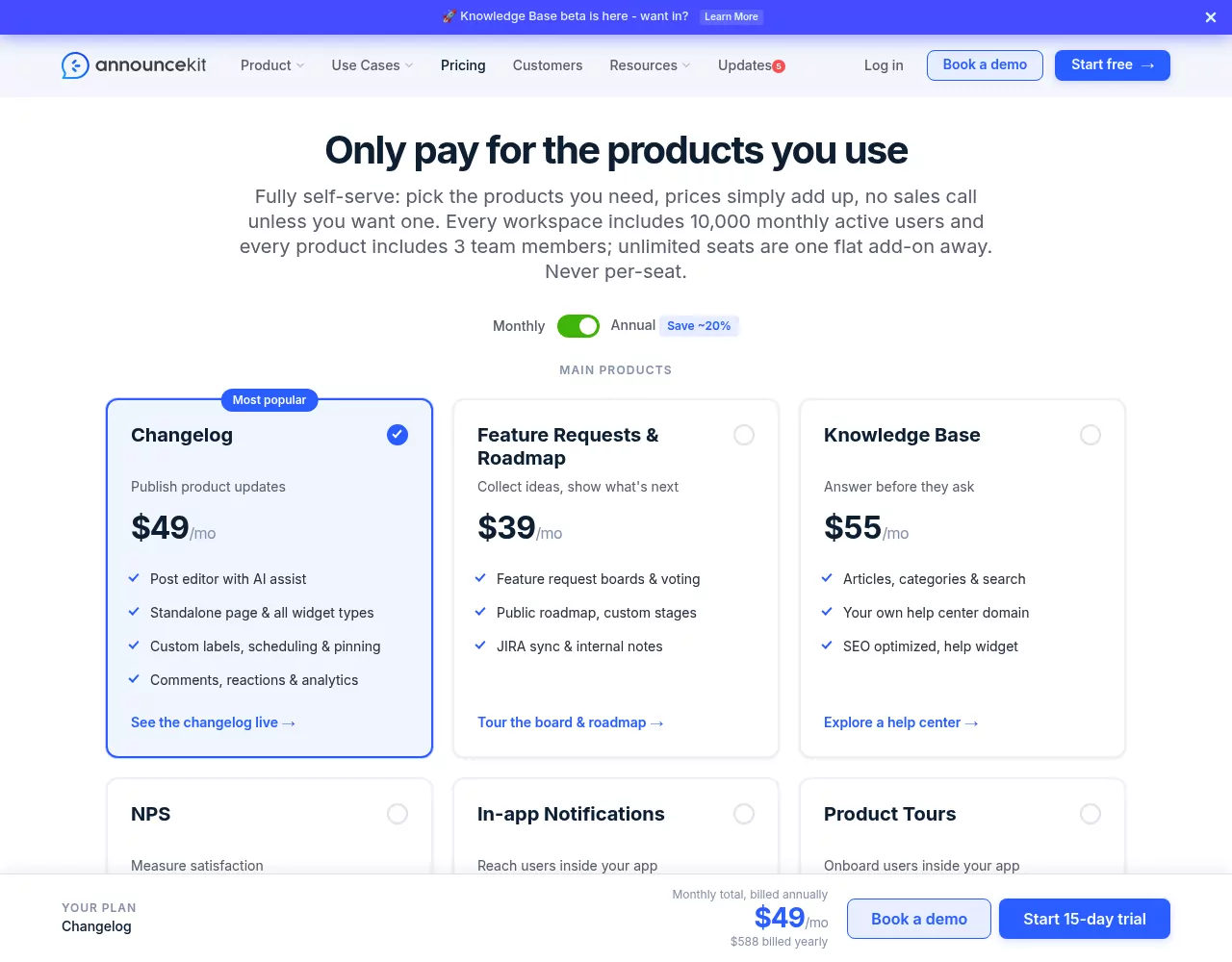
There is a 15-day trial with no card, no free plan listed and a 7-day refund policy. Startups under 5 people, under 2 years old and with at most $1M raised get 50% off for 12 months.
What you give up: add-ons stack up. Subscriber email is $49 a month for 10,000 sends.
Pop-ups, banners and modals are a separate $99 product, while Beamer includes boosted announcements from Starter. One license covers one project.
Pick it if you want the closest match to Beamer and can pay for pop-ups separately.
2. Headway: the simplest free changelog widget
Best for: founders who only need a changelog page and a widget badge.
Headway's pricing sits on its homepage, since its /pricing URL returns a 404. As of October 2026, Free covers unlimited changelogs, page and widget styling, custom categories and the "Eyecatcher" badge animation. Pro is $29 a month and adds white label, a custom domain, Slack and Twitter integrations, team management, a private changelog and scheduled posts.
A Headway changelog is a hosted page plus an in-product widget with a count badge. No board, roadmap, subscriber email or surveys are listed.

What you give up: signs of active work. The newest entry on Headway's own changelog is dated June 14, 2023, so check that support answers before you rely on it.
Pick it if you only need a badge and a page, and free matters most.
3. Sleekplan: free board, changelog and announcements, cheap NPS
Best for: small teams that want a changelog, a voting board and NPS on a small budget.
As of October 2026, Sleekplan's pricing page lists Indie at $0, with a board, a changelog, email and in-app announcements, and one admin. Starter is $13 a month billed yearly, with 3 seats, CSAT, NPS, AI credits, SSO and an API. Business is $38 a month billed yearly, with 10 seats, surveys and a custom domain.
Tracked users are unlimited, but monthly use is capped. Announcement views are 1,000 on Indie, 10,000 on Starter and 30,000 on Business. Email sends are 500, 2,000 and 10,000, and popup views start at 5,000 on Starter.
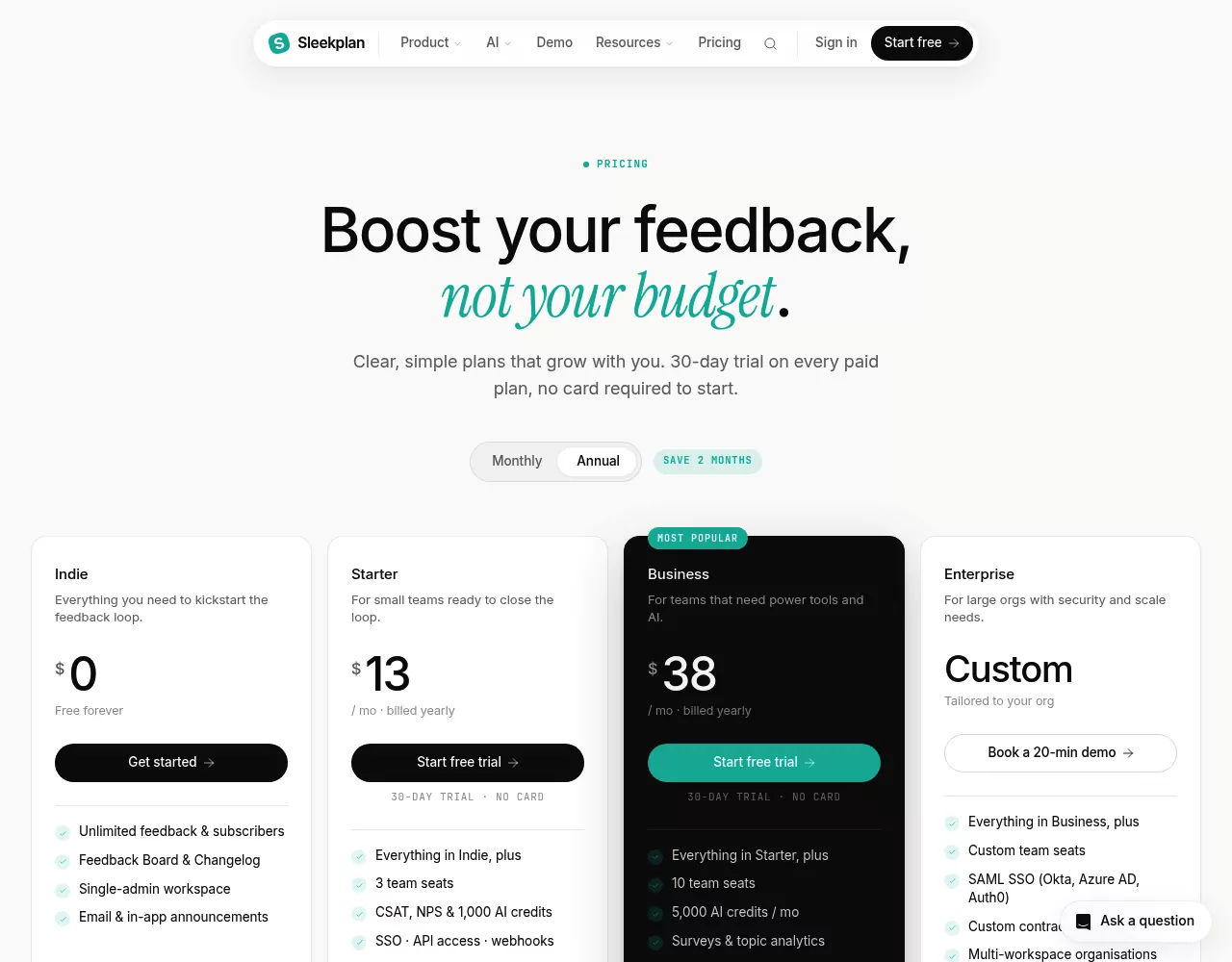
Paid plans have a 30-day trial with no card. If you do not upgrade, you drop to Indie. The Sleekplan pricing breakdown lists every cap by plan.
What you give up: Indie has no roadmap. Scheduled changelog posts and user segments start on Business. At 10,000 MAU, Starter's caps on views and sends can bind before the price does.
Pick it if your audience is small and you want NPS for little money.
4. Frill: a flat price with unlimited admins
Best for: teams that want ideas, a roadmap, announcements and surveys in one widget.
Frill's pricing page shows monthly prices as of October 2026. Startup is $25 (50 ideas, 1 survey), Business is $49 (unlimited ideas, 3 surveys), Growth is $149 and Enterprise is $349. Every paid tier has unlimited admins and widgets.
The plan table ticks scheduled and boosted announcements, segments, multi-language and comments on every tier, Startup included. No email send cap is listed. There is a 14-day trial with no card, and no free plan. The Frill pricing breakdown covers each tier in more detail.
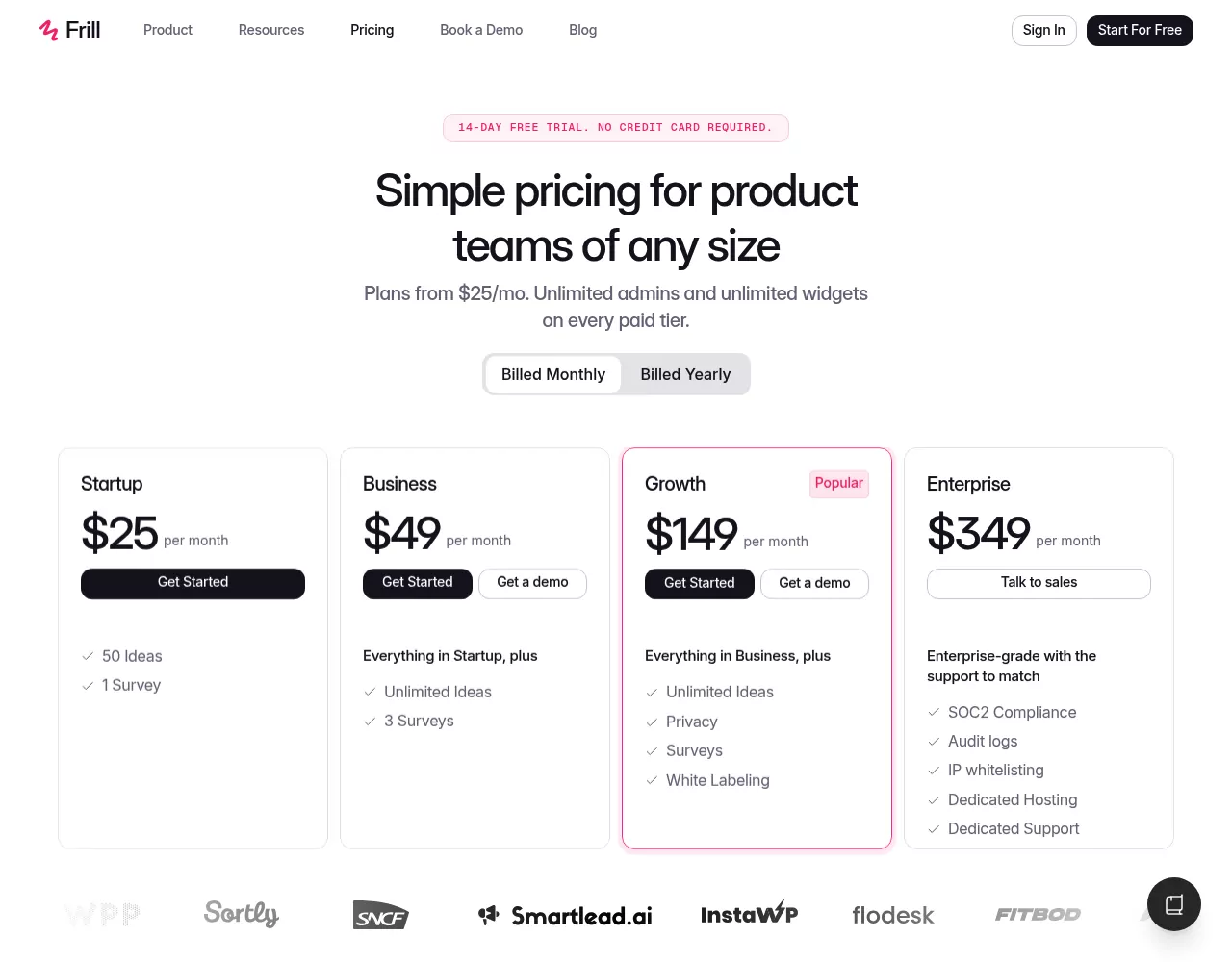
Read Frill's own Beamer page with care. Its title suggests you can stay free, but the pricing page lists no free plan. It also sets Frill's $25 monthly price against Beamer's $49 yearly rate.
What you give up: Startup's 50-idea cap fills fast on a busy board.
Pick it if you want Beamer-style boosted announcements at a flat price.
5. Featurebase: the broadest suite, with a Beamer importer
Best for: teams that want support, feedback and a changelog in one product.
As of October 2026, Featurebase's pricing page lists Free with 1 seat. Growth is $29, Professional $59 and Enterprise $99 per seat a month billed yearly, or $37, $75 and $129 billed monthly. Paid plans add $0.49 per AI resolution.
Changelog emails are usage-based. Featurebase's usage doc says update emails count toward 5,000 free emails a month.
Past that, each email costs $0.003 up to 10,000, and $0.0025 up to 50,000. Surveys and tours share 500 free in-app messages a month.
The plan table lists the public changelog page and updates from Growth, so check before you plan a changelog on Free. Its Beamer page promises to move "all of your existing changelogs and release notes from Beamer with a click of a button." Treat that as the vendor's claim and test it on a copy.
What you give up: every admin is a paid seat, volume above the free allowances is billed, and the product now leads with support.
Pick it if you want one suite for a help desk, feedback and updates.
6. Canny: a free changelog on top of a feedback board
Best for: teams where feedback is the main job and the changelog is the follow-up.
As of October 2026, Canny's pricing page lists Free with 25 tracked users, Pro from $79 a month billed yearly, and Business by quote. A tracked user is anyone who posts, votes or comments, even through an admin or Canny's AI. Past the limit, Canny upgrades you unless you set a spend limit. The Canny pricing breakdown shows how tracked users add up.
Canny's changelog page says the changelog is "free to use with no restrictions," with a widget and a hosted page. Emailing subscribers when you publish needs Pro, and so do custom domains. No surveys are listed.
What you give up: subscriber email needs a paid plan, and the bill follows how many people give feedback.
Pick it if you want a voting board first and the changelog closes the loop.
7. Tiny Team Feedback: Best for paying once instead of monthly
Best for: small teams that want a public changelog with subscriber email, plus a board, a roadmap and NPS, without a monthly bill.
Tiny Team's Feedback module puts boards, a roadmap, a changelog and surveys in one module. Changelog entries take headings, lists, quotes, links and up to 30 images with alt text.
Each entry gets a category (New, Improved or Fixed), with drafts, preview and revision history. You can publish now or schedule, and on publish it can mark linked requests completed and email subscribers.
One script tag on your site powers inline embeds of the changelog, a board or the roadmap, plus survey pop-ups on pages you pick. The portal can run on your own subdomain. Customers verify by email, with no password.

Pricing model: a one-time purchase per organization, with lifetime access to the module for everyone in it. There is no subscription and no per-seat, per-voter or MAU fee. The free trial needs no credit card, and nothing is charged automatically.
What you give up: it cannot match Beamer's targeted in-app announcements. The widget embeds content and runs surveys, and customers hear about new entries by email.
There are no user segments, no RSS or reactions on posts, no translations and no AI. There are no integrations, webhooks, public API or SSO, and nothing imports from Beamer, so posts are re-entered by hand.
Pick it if you would rather pay once than watch MAU tiers. Skip it if you need announcement pop-ups, segments or integrations. See current prices.
Also Considered
More Beamer competitors, checked October 25, 2026:
- LaunchNotes: $833 a month billed yearly or $999 monthly, for one page and two users. Its trial starts after a demo. It suits release teams at larger companies.
- Userorbit: $95 a month billed yearly for 5,000 MAUs, with a changelog, tours, checklists, surveys and a roadmap.
- ReleasePad: a free tier with a post limit, and Pro at $35 a month per product with unlimited team members, an API and AI drafts from GitHub.
- ReleaseGlow: from $19 a month billed monthly for 1 project and 10 entries a month. Its 7-day trial needs a card.
- Noticeable: a free plan with a watermark, and paid plans with a 14-day trial. Prices show in your local currency.
Userflow itself sells onboarding tours and checklists. It is not a changelog replacement.
What a Beamer Alternative Costs at 10,000 Monthly Active Users
One scenario: about 10,000 monthly active users, 3 teammates, and a changelog with email to subscribers. These are list prices as of October 2026.
| Tool | Plan and list price | Included subscriber emails | Other limits at 10,000 MAU |
|---|---|---|---|
| Beamer | Pro, $119 a month, or $99 billed yearly | 5,000 a month | 10,000 MAU included, then $50 per 5,000 |
| AnnounceKit | Changelog $59 a month ($49 yearly), plus the $49 Email add-on | 10,000 sends a month | 10,000 MAU included, then $25 per 5,000; 3 team members |
| Headway | Pro, $29 a month | Not listed | No MAU limit stated |
| Sleekplan | Starter, $13 a month billed yearly | 2,000 a month | 10,000 announcement views and 5,000 popup views a month |
| Frill | Startup, $25 a month | Not listed | Unlimited admins; 50 active ideas |
| Featurebase | Growth, 3 seats × $29 = $87 a month billed yearly ($111 monthly) | 5,000 free a month | One update to 10,000 subscribers adds 5,000 × $0.003 = $15 |
| Canny | Pro from $79 a month billed yearly (needed for email) | Not listed | Billed by tracked users, not MAU |
| Tiny Team Feedback | One-time payment per module; see current prices | Not listed | No MAU, seat or voter metric |
A trial is the best way to see how each limit behaves with your own traffic.
How to Choose a Beamer Alternative
Most changelog tools handle the basics well. Pick by the one job you cannot give up:
- Pop-ups and targeting like Beamer's boosted posts: AnnounceKit with In-app Notifications, Frill or Featurebase.
- Just a changelog page and a badge: Headway, or Canny Free.
- A changelog, a voting board and NPS on a small budget: Sleekplan or Frill.
- A full support and feedback suite: Featurebase.
- Paying once instead of monthly: Tiny Team Feedback.
- Formal release notes at a larger company: LaunchNotes.
Whatever you pick, compare release notes software on how it bills first. Tools that look alike can cost very different amounts at your traffic.
Who Should Stay on Beamer
Beamer is still a strong tool, and switching has a cost. Staying makes sense for:
- Teams under 1,000 MAU who are fine with 1 teammate and a watermark on Beamer Free.
- Teams that rely on push notifications (Pro and up), or on advanced segments or the Segment integration (Scale and up).
- Teams that use Beamer's AI. The AI Content Generator is on Pro, Scale and Custom, and AI Translation is in beta on Pro and up.
- Teams that also run Userflow onboarding.
If your Beamer changelog has years of posts, segments and integrations, weigh the move against what you would save.
How to Switch from Beamer
- Export your posts. Beamer's export doc says there is no export button. Posts come out only through the API, each request counts against your monthly API allowance, and images come as URLs. Free has an API limit of 0, so ask Beamer support first.
- Download your images from those URLs.
- Recreate your categories in the new tool.
- Swap the script, and point your custom domain or link at the new changelog.
- Move subscribers. AnnounceKit's Enterprise concierge (from $799 a month, billed yearly) says it moves content and subscribers from Beamer. Otherwise, ask subscribers to follow the new changelog.
- Time the cancellation. Beamer says plan changes take effect at the end of the term, with no refunds. While you are over the MAU limit of a lower plan, you cannot downgrade or cancel.
Featurebase advertises a one-click Beamer import. Without an importer, posts are re-entered by hand, so you may choose to carry over only the last few months.

The Bottom Line
For a straight swap, AnnounceKit is the closest match, at half of Beamer's overage rate. Headway and Canny cover a free changelog, Sleekplan and Frill add boards cheaply, and Featurebase suits teams that want a full suite.
If a voting board, a public roadmap and a changelog cover what your team needs, Tiny Team's Feedback module is worth a look. It's a one-time purchase for your whole organization, with no subscription and no per-seat fees. See current prices, or create a free workspace and start the trial when you're ready.
Frequently Asked Questions
What are some alternatives to Beamer?
The main alternatives to Beamer are AnnounceKit (closest match), Headway (free widget), Sleekplan (free board and changelog), Frill (flat price), Featurebase (broad suite), Canny (free changelog on a feedback board) and Tiny Team Feedback (a one-time purchase instead of a monthly plan). LaunchNotes suits larger release teams.
How much does Beamer cost?
As of October 2026, Beamer is free up to 1,000 monthly active users. Starter is $59 a month ($49 billed yearly), Pro is $119 ($99) and Scale is $299 ($249). Over your limit, Beamer adds $50 a month per 5,000 MAU, and the Feedback and NPS add-ons cost extra.
Is there a free Beamer alternative?
Yes, Headway's Free plan, Sleekplan's Indie plan and Canny's changelog are free. Beamer itself has a Free plan up to 1,000 MAU, with 1 teammate and a watermark. Frill and AnnounceKit offer trials, not free plans.
Is Beamer part of Userflow now?
Yes. Beamer and Userflow announced their merger on February 7, 2024. Beamer is still sold as its own product, and its help docs now live on Userflow's help center.
Can you move a Beamer changelog to another tool?
Yes, with some work: posts come out through Beamer's API, and images come as URLs. Featurebase advertises a one-click importer, and AnnounceKit's Enterprise concierge says it moves content and subscribers. Otherwise, you re-enter posts by hand.