New hire paperwork includes all the forms, documents, and legal requirements you must complete before an employee's first day. This includes federal tax forms, work authorization documents, state-specific requirements, and internal company agreements. Proper paperwork protects both your business and your new employees from legal and administrative issues.
For small teams, missing or incomplete new hire paperwork can result in penalties, audit problems, and compliance headaches. We've created a comprehensive checklist that covers every form you need, organized by category for easy implementation. For the broader onboarding process beyond just paperwork, see our new hire onboarding checklist.
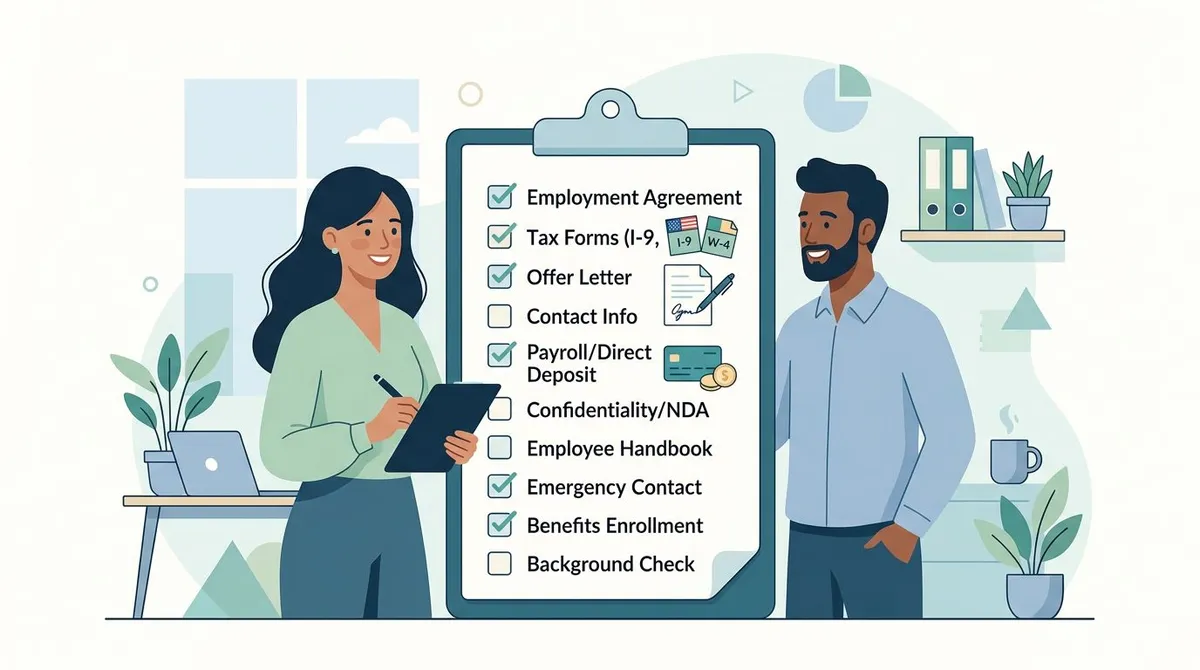
New Hire Paperwork Checklist (Complete List)
Use this master checklist to ensure you collect every required document:
Federal Forms (Required for All Employees)
- Form W-4 — Employee's Withholding Certificate
- Form I-9 — Employment Eligibility Verification
- E-Verify — Electronic eligibility verification (if required)
- Form W-2 setup in payroll system
State-Specific Requirements
- State tax withholding forms (varies by state)
- State disability insurance enrollment (CA, HI, NJ, NY, RI)
- Workers' compensation notification
- New hire reporting to state directory
Internal Company Forms
- Employment agreement or offer letter
- Job description acknowledgment
- Employee handbook receipt confirmation
- Code of conduct and ethics agreement
- Confidentiality/NDA agreement
- Non-compete agreement (where legally enforceable)
- Direct deposit authorization
- Emergency contact information
- Payroll and timekeeping setup
Benefits Enrollment Forms
- Health insurance enrollment
- Dental and vision insurance
- Life insurance beneficiary forms
- 401(k) or retirement plan enrollment
- Flexible spending account (FSA) setup
- Commuter benefits enrollment
IT and Equipment Forms
- Equipment checkout form (laptop, phone, etc.)
- IT security policy acknowledgment
- Software access requests
- Email and system account setup
- BYOD policy agreement (if applicable)
Optional but Recommended
- Photo consent for company materials
- Social media policy acknowledgment
- Parking permit application
- Building access and key cards
- Reference check consent (if not done during hiring)

Required Federal Forms
Every U.S. employer must collect these federal forms regardless of company size or location:
Form W-4: Employee's Withholding Certificate
What it does: Determines how much federal income tax to withhold from paychecks.
Timeline: Must be completed before first paycheck. Employees can update anytime.
Key points:
- Use the 2026 version (updated annually by IRS)
- No employer verification required
- Keep original on file for at least 4 years
- Employees claiming "exempt" must submit new W-4 annually
Common mistakes: Using outdated forms, not storing originals, missing payroll updates.
Form I-9: Employment Eligibility Verification
What it does: Verifies employee's legal right to work in the United States.
Timeline: Must be completed within 3 business days of start date (or by first day if employment duration is 3 days or less).
Critical requirements:
- Employee completes Section 1 on/before first day
- Employer completes Section 2 within 3 business days
- Must examine original documents (not copies)
- Both parties must physically sign (electronic signatures require E-Verify)
Acceptable documents (examples):
- List A (identity + work authorization): U.S. passport, permanent resident card
- List B + C (identity + separate work authorization): Driver's license + Social Security card
Penalties: $252-$2,236 per form for violations, up to $22,927 per unauthorized worker.
E-Verify (When Required)
Who must use it:
- Federal contractors and subcontractors
- Employers in certain states (Arizona, Georgia, Mississippi, etc.)
- Companies with previous immigration violations
Process:
- Create E-Verify account at e-verify.gov
- Enter Form I-9 information within 3 business days
- Resolve any mismatches with employee assistance
- Keep E-Verify results with I-9 forms
According to USCIS, I-9 violations are common compliance issues for small businesses, with average penalties exceeding $1,000 per form.
State-Specific Forms and Requirements
Requirements vary significantly by state. Here's what to check for your location:
State Tax Withholding Forms
States without income tax: Alaska, Florida, Nevada, New Hampshire, South Dakota, Tennessee, Texas, Washington, Wyoming.
States requiring forms: Most states have their own W-4 version. Examples:
- California: DE 4 (Employee's Withholding Allowance Certificate)
- New York: IT-2104 (Employee's Withholding Allowance Certificate)
- Texas: No state form required (no state income tax)
Where to find: Visit your state's revenue or taxation department website.
State Disability Insurance (SDI)
Required states: California, Hawaii, New Jersey, New York, Rhode Island.
What it covers: Short-term disability benefits for non-work-related injuries or illness.
Employee contribution: Typically 0.5-1.5% of wages, deducted from paychecks.
Workers' Compensation Notification
Most states require providing workers' compensation information to new employees:
- Insurance carrier contact information
- Coverage details and claim procedures
- Employee rights under workers' compensation law
New Hire Reporting
Federal requirement: Report all new hires to your state's New Hire Reporting Program within 20 days (some states require 7 days).
Information required: Employee name, address, Social Security number, start date, employer information.
Purpose: Helps locate parents for child support enforcement.
How to report: Online portals, phone, fax, or mail (varies by state).
Company Internal Forms
Beyond legal requirements, these internal forms protect your business and set clear expectations:
Employment Agreement/Offer Letter
What to include:
- Job title and department
- Start date and schedule
- Compensation and benefits overview
- At-will employment statement (where applicable)
- Reference to employee handbook
Legal note: Avoid creating implied contracts through overly specific language about job security or termination procedures. For a step-by-step breakdown of the full process, see our hiring process guide.
Confidentiality and Non-Disclosure Agreement (NDA)
When to use: All employees with access to proprietary information, customer data, or trade secrets.
Key elements:
- Definition of confidential information
- Duration of confidentiality obligations
- Exceptions for publicly available information
- Return of company property clause
State considerations: Some states limit non-compete agreements but generally allow confidentiality agreements.
Non-Compete Agreement
Legal landscape: Many states have restricted or banned non-compete agreements. Check current state law before implementing.
States with restrictions: California, North Dakota, and Oklahoma generally prohibit non-competes. Many others have salary thresholds or time limitations.
Alternatives: Consider non-solicitation agreements (preventing poaching customers/employees) or garden leave arrangements.
Employee Handbook Acknowledgment
What it confirms: Employee received, read, and understands company policies. Need to create one first? Start with our employee handbook template.
Should include:
- Handbook receipt date
- Understanding of at-will employment
- Agreement to follow policies
- Process for policy updates
Best practice: Update acknowledgment forms when handbook changes significantly.
Direct Deposit Authorization
Benefits: Reduces check processing time, eliminates lost checks, provides electronic records.
Information needed:
- Bank name and address
- Routing number
- Account number
- Account type (checking/savings)
Legal requirements: Most states require employee consent and allow employees to revoke authorization.
Emergency Contact Information
Essential details:
- Primary and secondary emergency contacts
- Relationship to employee
- Phone numbers and addresses
- Medical information (allergies, conditions, medications)
Privacy note: Store emergency contact information securely and limit access to HR personnel. Send a welcome email to your new employee before their start date so they know what documents to prepare.
Benefits Enrollment Forms
For companies offering benefits, proper enrollment documentation is crucial:
Health Insurance Enrollment
Timeline: Typically 30-60 days from hire date for initial enrollment.
Required information:
- Coverage level (employee only, family, etc.)
- Plan selection (if multiple options)
- Dependent information and documentation
- Primary care physician selection
COBRA notice: Required for all group health plans, explaining continuation coverage rights.
Retirement Plan Enrollment
401(k) plans require:
- Enrollment election (participate or decline)
- Contribution percentage or dollar amount
- Investment selections
- Beneficiary designation
Auto-enrollment: If using automatic enrollment, provide proper notices about default contributions and investment options.
Life Insurance Beneficiary Forms
Required information:
- Primary and contingent beneficiaries
- Beneficiary relationships
- Percentage allocations (if multiple beneficiaries)
- Beneficiary contact information
Updates: Encourage employees to update beneficiaries after major life events (marriage, divorce, birth of children).
Digital forms can save 4+ hours per new hire through auto-population. Centralized HR platforms store employee documents digitally, making onboarding and compliance easier.

IT and Equipment Forms
Protect company assets and establish clear technology policies:
Equipment Checkout Form
Assets to track:
- Laptops and desktop computers
- Monitors and peripherals
- Mobile phones and tablets
- Software licenses
- Office keys and access cards
Information to record:
- Item description and model number
- Serial number or asset tag
- Condition at checkout
- Employee acknowledgment of responsibility
- Expected return date (for temporary equipment)
IT Security Policy Acknowledgment
Key policies to address:
- Password requirements and multi-factor authentication
- Software installation restrictions
- Personal use of company equipment
- Data backup and security procedures
- Remote work security requirements
Compliance note: Some industries (healthcare, finance) have specific IT security requirements that must be addressed in acknowledgment forms.
Bring Your Own Device (BYOD) Policy
If allowing personal devices for work:
- Security requirements (encryption, screen locks)
- Company's right to remote wipe business data
- Personal vs. business data separation
- Expense reimbursement policies
- Device monitoring disclosures
Software Access Requests
Document access needs for:
- Email accounts and distribution lists
- Project management tools
- Customer relationship management (CRM) systems
- Financial and accounting software
- Industry-specific applications
Security principle: Follow "least privilege" access — give employees minimum permissions needed for their role.
How to Organize New Hire Paperwork
Efficient organization prevents missing documents and compliance issues:
Digital vs. Physical Storage
Digital advantages:
- Searchable and accessible
- Automatic backups and version control
- Integration with payroll/HR systems
- Reduced physical storage needs
Digital security requirements:
- Encrypted storage for sensitive documents
- Access controls and audit trails
- Regular backups and disaster recovery
- Data protection compliance
Physical storage (if needed):
- Locked filing cabinets
- Separate files by document type
- Climate-controlled environment
- Document retention schedule
Document Categories
Organize documents by type for easy access:
- Personal Information: I-9, W-4, emergency contacts
- Legal Agreements: Employment contracts, NDAs, non-competes
- Benefits: Insurance enrollments, retirement plans, beneficiary forms
- IT/Equipment: Asset assignments, policy acknowledgments
- Performance: Job descriptions, training records, evaluations
Retention Requirements
Federal minimums:
- I-9 forms: 3 years from hire date or 1 year after termination (whichever is later)
- W-4 forms: 4 years after tax becomes due or paid
- Payroll records: 3 years minimum
Best practice: Maintain most employment documents for 7 years to cover potential discrimination claims and audit requirements. When employees leave, follow a proper employee offboarding checklist to handle document retention correctly.
Common Mistakes That Cost You
Avoid these expensive and time-consuming errors:
Missing Deadlines
I-9 completion: 3 business days maximum. Late completion can result in penalties even if employee is authorized to work.
New hire reporting: 20 days in most states (7 days in some). Late reporting may result in fines.
Solution: Create automated reminders and checklists.
Using Outdated Forms
Problem: IRS updates W-4 forms periodically. State forms change annually.
Solution: Bookmark official government websites and check quarterly.
Resources:
- IRS.gov for federal forms
- State revenue department websites for state forms
- USCIS.gov for I-9 updates
Incomplete Documentation
Common gaps:
- Missing signatures or dates on forms
- Incomplete I-9 document examination
- Unsigned policy acknowledgments
- Missing direct deposit information
Solution: Create document review checklists and designate responsible staff members.
Poor Record Keeping
Issues:
- Documents stored in multiple locations
- No backup copies of critical forms
- Inconsistent filing systems
- Lack of access controls
Solution: Implement centralized document management with clear organization and security.
Inconsistent Processes
Problems:
- Different forms used for similar roles
- Varying information collection
- Inconsistent policy enforcement
Solution: Document standard procedures and train all hiring staff.
According to Department of Labor guidance, recordkeeping violations are common during employment audits, with average penalties of $1,000-$10,000.

Best Practices for Small Teams
Streamline your process without sacrificing compliance:
Create Standard Packets
Organize by role type:
- General packet: Federal forms, basic company documents
- Management packet: Additional confidentiality agreements, policy acknowledgments
- Remote worker packet: IT security policies, equipment forms
- Benefits-eligible packet: Insurance enrollments, retirement plans
Use Technology
Digital forms benefits:
- Auto-population reduces errors
- Electronic signatures speed completion
- Integration with payroll systems
- Automatic reminders for missing documents
Recommended tools:
- DocuSign or HelloSign for e-signatures
- Google Forms for information collection
- HR platforms with document management
- Payroll software with onboarding features
Batch Processing
For multiple new hires:
- Schedule group orientations for common documents
- Prepare identical packets in advance
- Use checklists to ensure consistency
- Designate specific staff for document review
Create Templates
Standardize common documents:
- Welcome email with document list
- Equipment checkout forms
- Policy acknowledgment templates
- Benefits explanation summaries
Train Your Team
Key training topics:
- Legal requirements and deadlines
- Proper I-9 completion procedures
- Document security and privacy
- Software system usage
- Emergency procedures
Centralized HR platforms like Tiny Team's People Management provide consistent processes and document storage for multiple locations or remote employees.
Compliance Monitoring
Regular reviews prevent costly violations:
Monthly Checklist
- Review new hire documentation for completeness
- Check for missing signatures or dates
- Verify payroll system matches forms
- Update changed state requirements
Quarterly Reviews
- Audit I-9 forms for compliance
- Update forms to current versions
- Review document retention practices
- Check state reporting compliance
Annual Tasks
- Comprehensive compliance audit
- Staff training updates
- Policy and procedure reviews
- Document management system evaluation
Frequently Asked Questions
What happens if we miss the I-9 deadline?
You can still complete Form I-9 after the 3-business-day deadline, but you may face penalties during government audits. Penalties range from $252-$2,236 per form depending on violation severity. Complete the form immediately and note any delays in your records.
Can we collect Social Security numbers before hiring?
Only collect Social Security numbers after making a job offer. Use them for background checks, I-9 verification, and payroll setup. Avoid requesting SSN on applications or during initial interviews to reduce identity theft risks.
How long should we keep employee paperwork?
Federal minimums: I-9 forms for 3 years from hire or 1 year after termination; W-4 forms for 4 years; payroll records for 3 years. Best practice: keep employment documents for 7 years.
What if an employee refuses to complete required forms?
Required federal forms (W-4, I-9) are mandatory. If refused, you cannot employ them. For company forms, clearly communicate which are required versus optional.
Can we use electronic signatures for all forms?
Electronic signatures work for most forms, but I-9 requires physical signatures unless using E-Verify. Check form requirements and ensure your e-signature system meets standards.
Do remote employees need the same paperwork?
Yes, all federal and state requirements apply regardless of location. Remote employees may need additional forms for IT security, equipment checkout, and home office policies. I-9 verification must still be completed in person or through authorized representatives.
Proper new hire paperwork protects your business while creating positive first impressions. Invest time in efficient systems and staying current with requirements — the upfront effort prevents compliance issues and creates smoother onboarding experiences that help new hires succeed.