This HiBob review looks at the platform from a small-team angle, not an enterprise one. Most reviews you'll find are written for 500-person HR departments. We wanted to answer a simpler question: is HiBob (the product is called "Bob") a smart buy if you run people ops for a team of 10, 30, or 80?
The short version: HiBob is a polished, modern HR platform with genuinely strong culture and analytics tools. It's also priced for mid-market and up, with quote-only pricing that can surprise small teams. Below we break down the features, the real costs, the honest pros and cons, and where a leaner tool fits better.
HiBob at a glance: the quick verdict
HiBob is a cloud HR platform (an HRIS) built for fast-growing, often global companies in the roughly 50–1,500 employee range. It centralizes employee records, time off, performance reviews, surveys, compensation planning, and now built-in payroll for the US and UK.
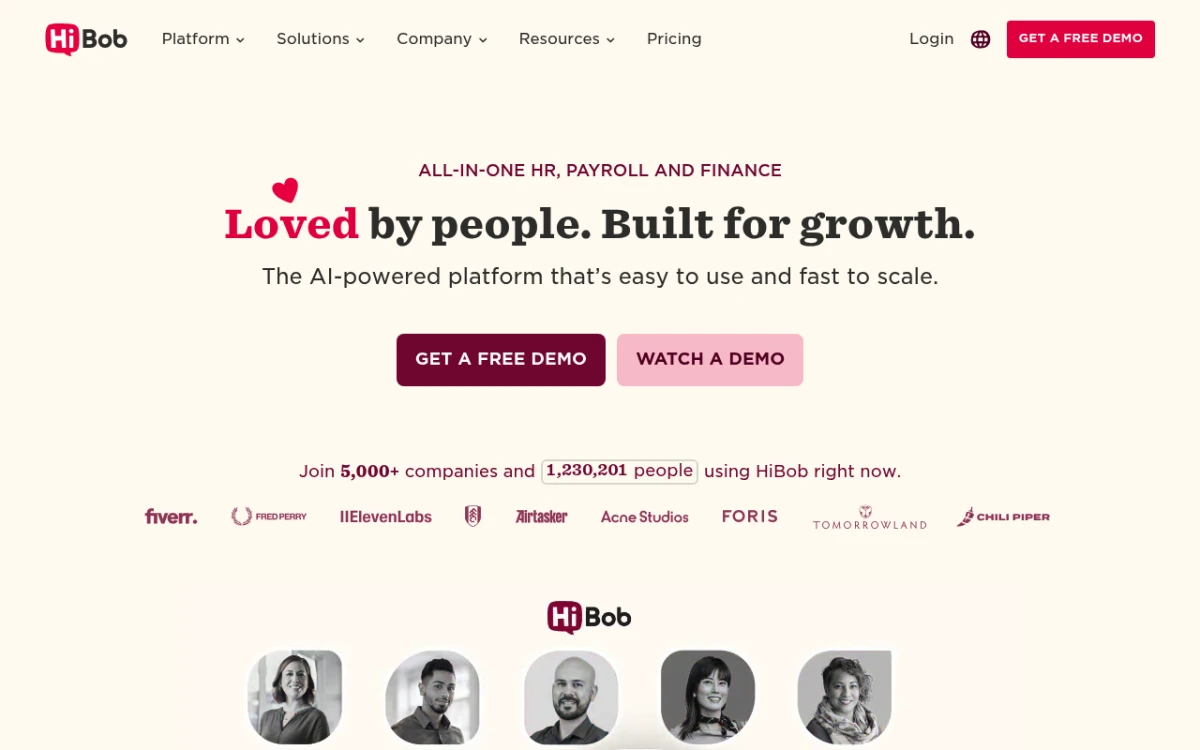
The HiBob homepage, leading with its "modern HR for modern business" positioning.
Best for: modern mid-sized and global companies (100+ people) that want strong analytics, a slick employee experience, and culture tools in one place.
Watch out if: you're a small team on a tight budget. Pricing is quote-only and scales per employee, so costs climb as you hire.
| HiBob (Bob) | |
|---|---|
| Type | All-in-one HRIS |
| Team size sweet spot | ~50–1,500 employees |
| Pricing | Quote-only, per employee/month |
| Rough cost | ~$8–16/employee/month (often quoted higher when bundled) |
| Built-in payroll | Yes (US + UK) |
| Free trial | No (demo only) |
| G2 rating | :rating(4.5): |
| Capterra rating | :rating(4.6): |
If you want the deeper cost breakdown, jump to HiBob pricing below. For a head-to-head with the other big small-business name, see HiBob vs BambooHR.
What is HiBob?
HiBob, founded in 2015 and headquartered in London and New York, makes an HR platform that most people just call "Bob." It's a human resources information system (HRIS) — the central database and toolset that holds employee data and runs core people processes. If the term is new to you, our guide to what an HRIS is explains the category in plain English.
Bob's pitch is "modern HR for modern businesses." It leans hard into culture, engagement, and a clean design. That makes it popular with tech firms and scale-ups that care about how staff feel at work. Thousands of companies use it, and it has a strong name with remote and global teams.
What sets it apart from older HR software is the look and feel. Where legacy systems feel like clunky databases, Bob feels like a consumer app — a social-style homepage, shout-outs, club groupings, and dashboards that managers actually open.
Key features
HiBob covers the full HR lifecycle. Here's what each module actually does.
Core HR
This is the heart of the platform: a single source of truth for employee records. You get a searchable directory, custom fields, org charts, document storage with e-signatures, and self-service so employees update their own details. Workflows automate the repetitive stuff, like kicking off an onboarding checklist when a new hire is added.
Performance and goals
Bob handles review cycles, 360-degree feedback, goal setting, 1-on-1s, and calibration. You can run structured review rounds and tie them to development plans. The tools are flexible enough for both lightweight check-ins and formal annual reviews. If you're building your own process first, our performance review examples library is a useful starting point.
Time and attendance
You can track hours, manage time-off policies, and enforce leave rules. Employees request PTO; managers approve in a few clicks. It supports custom policies and accrual rules, which matters for teams spread across regions with different holiday calendars.
Onboarding
Bob automates pre-boarding and onboarding flows — welcome pages, task lists, document collection, and intros to the team. It's solid for the administrative side, though some reviewers note it's lighter on advanced recruiting and applicant tracking than dedicated ATS tools.
Surveys and engagement analytics
This is where Bob shines. Built-in surveys (including engagement and lifecycle surveys), eNPS tracking, and "Bob AI" features surface trends in real time. The analytics module ships with dozens of dashboards. They cover headcount, turnover, diversity, and engagement. That's strong reporting for a people team that needs to show data to leaders.
Compensation and payroll
Bob includes comp cycle planning, custom pay bands, and pay insights. HiBob now offers built-in payroll for the US and UK. That's a big change from a few years ago, when it leaned fully on outside tools. Outside those two countries, you still connect a payroll provider through its app marketplace.
A note on payroll: if your team is mostly outside the US and UK, treat HiBob's payroll as integration-based, not native. Confirm coverage for your countries during the demo.
HiBob pricing
Here's the honest part: HiBob does not publish its prices. There's no public pricing table, no per-plan breakdown on the site, and no self-serve checkout. You book a demo, share your headcount and module needs, and get a custom quote.
Based on estimates from review sites and buyer reports, HiBob usually lands in the $8 to $16 per employee per month range. Bundled quotes that include payroll and premium modules are often higher. Some buyers report $20–25 per employee.
A few things to know about how the pricing works:
- It's modular. You pay for the base platform, then add modules (like performance, compensation, or payroll). More modules, higher cost.
- It's per employee, per month. Your bill grows every time you hire. A 25-person team and a 75-person team pay very different totals for the same software.
- There's usually an annual commitment and sometimes an implementation/onboarding fee.
- No free trial — you evaluate via a guided demo, not hands-on.
Pricing breakdown by team size
Here's what the $8–$16 estimate means for the software alone at common team sizes. These figures leave out any implementation fee, and bundled quotes with payroll or premium modules can land higher.
| Team size | Monthly cost (low) | Monthly cost (high) | Annual cost (low) | Annual cost (high) |
|---|---|---|---|---|
| 10 employees | $80 | $160 | $960 | $1,920 |
| 25 employees | $200 | $400 | $2,400 | $4,800 |
| 50 employees | $400 | $800 | $4,800 | $9,600 |
| 75 employees | $600 | $1,200 | $7,200 | $14,400 |
| 100 employees | $800 | $1,600 | $9,600 | $19,200 |
To put per-employee pricing in perspective for a small team, run the numbers. At $12/employee/month, a 30-person company pays about $4,320 per year. At 60 people, that's roughly $8,640 per year — and it keeps climbing. You can sanity-check the fully loaded cost of headcount with our free labor cost calculator.
Add-on modules and their costs
Every quote starts with the core HR platform described above. Each module you add raises your per-employee rate, and HiBob only shares module prices inside a quote. The main add-ons:
- Performance management: review cycles, 360-degree feedback, goals, and check-ins. This is one of HiBob's strongest areas.
- Engagement surveys: pulse surveys, eNPS tracking, and sentiment analysis.
- Compensation management: salary benchmarking, comp review cycles, and equity planning.
- Payroll: native in the US and UK, integration-based elsewhere.
- Talent acquisition: a built-in ATS for job posts and candidate tracking, lighter than dedicated recruiting tools.
- Workforce planning: headcount planning, scenario modeling, and budgeting.
Bundling can still work in HiBob's favor. According to OutSail's analysis, companies that bundle performance and engagement tools with HiBob often save compared to buying standalone tools like 15Five or Lattice separately.
Hidden costs to watch for
The per-employee rate is only part of the bill. Budget for these too:
- Implementation fee. HiBob may charge a one-time implementation or onboarding fee for configuration, data migration, workflow setup, and admin training. It's commonly reported at 10–20% of the first-year contract value, so get the exact figure in writing with your quote.
- Payroll. Native payroll in the US and UK is a paid module that raises your quote. Elsewhere you connect a third-party payroll provider, which means a second vendor with its own fees.
- Benefits administration. If you need US benefits enrollment (health insurance, 401(k)), confirm in the demo whether HiBob covers it for your locations or whether you'll need another provider and another bill.
- Per-seat scaling. Every hire raises the bill. At the same rate, growing from 25 to 75 employees triples your software cost, so price your hiring plan, not just today's headcount.
How to get the best HiBob deal
If HiBob is the right fit, a few tactics can bring the quote down:
- Time your purchase around quarter-end. Sales teams at quote-based vendors usually work to quarterly targets, so reps tend to have more room to negotiate near the end of a quarter.
- Start with fewer modules. Begin with core HR and one or two add-ons. You get a lower base price to negotiate from, and you'll know which modules your team actually uses before committing to the full suite.
- Negotiate the implementation fee. It's usually the most flexible line in the contract. If you have an HR admin who can handle some of the configuration, push for a reduced fee, or ask for it to be waived on a multi-year deal.
- Ask about startup discounts. If you're an early-stage company or part of a startup accelerator, ask whether reduced rates are available.
- Get competing quotes first. Price out BambooHR, Rippling, and at least one other option before your HiBob call. Concrete numbers give you leverage and a benchmark for whether the quote is reasonable.
Pros
HiBob earns its strong ratings (:rating(4.5): on G2, :rating(4.6): on Capterra). Here's what users consistently praise.
- Beautiful, modern interface. Bob feels like a product people want to use, not endure. High adoption is a real benefit — software only helps if employees actually log in.
- Excellent culture and engagement tools. Shout-outs, clubs, a social homepage, and built-in surveys make it stand out for companies that prioritize employee experience.
- Strong analytics and reporting. Dozens of dashboards covering headcount, turnover, and engagement, with real-time data that's genuinely useful for leadership reporting.
- Built for global teams. Multi-currency, localized policies, and distributed-team workflows are baked in, which is why scale-ups with remote staff like it.
- All-in-one breadth. Core HR, performance, comp, surveys, onboarding, and (in the US/UK) payroll under one login reduces tool sprawl.
- Frequent updates. HiBob ships new features regularly, so the product keeps improving.
- Flexible workflows and automation. You can model your own processes rather than bending to rigid templates.
Cons
No tool is perfect. These are the criticisms that come up most, especially from smaller buyers.
- Opaque, quote-only pricing. You can't see what you'll pay without talking to sales. For a small team comparing options quickly, that's friction — and the per-employee model gets expensive as you grow.
- Overkill for very small teams. A 10-person company rarely needs calibration cycles, scenario planning, and 35 dashboards. You can end up paying for depth you won't use.
- Limited recruiting/ATS depth. The hiring tools are lighter than dedicated applicant tracking systems; some reviewers miss automated interview scheduling and advanced pipeline features.
- Payroll is geographically limited. Native payroll covers the US and UK only. Elsewhere, you're back to integrations.
- Implementation can take time. The breadth that makes Bob powerful also means setup and configuration aren't instant — expect onboarding effort, sometimes with a fee.
- Some data-validation quirks. Reviewers note inconsistent field formatting (for example, phone numbers) and a few gaps in built-in security options.
Who is HiBob best for?
HiBob is a strong fit if you check most of these boxes:
- You have 100+ employees (or are growing fast toward it).
- You have a dedicated HR or people-ops team that will use the analytics and culture tools.
- You operate globally or remotely and need multi-currency, localized policies.
- Employee experience is a priority — you want shout-outs, surveys, and a polished interface that drives adoption.
- Budget is less of a constraint than capability.
For companies that fit that profile, Bob is one of the best modern HR platforms available, and the ratings back that up.
Who should look elsewhere?
Be honest with yourself about scale and budget. HiBob is probably not the right call if:
- You're a small team (under ~50 people) watching costs closely.
- You want transparent, predictable pricing you can evaluate without a sales call.
- You don't need enterprise-grade analytics, calibration, or scenario planning.
- You'd rather try before you buy with a hands-on free trial.
In those cases, a leaner, flat-rate HR tool usually delivers what a small team actually needs at a fraction of the cost. Tiny Team offers one-time lifetime access to HR and Document Spaces per organization. Choose one module or buy several in a single payment. Each module has its own 30-day free trial, starting when you activate it. No credit card, automatic charges or per-person fees. See current module pricing. We compare more leaner picks in our best HR software for small business guide.
HiBob vs competitors
Here's how Bob stacks up against the tools small teams most often compare it to. (Per-employee figures are approximate; HiBob and several others are quote-based.)
| Tool | Pricing model | Rough cost | Built-in payroll | Best for |
|---|---|---|---|---|
| HiBob | Per employee/mo (quote) | ~$8–16/emp/mo | US + UK | Mid-size & global teams |
| BambooHR | Per employee/mo (quote) | ~$6–13/emp/mo | Add-on (US) | SMBs wanting simple core HR |
| Rippling | Per employee/mo (quote) | ~$8+/emp/mo | Yes | IT + HR + payroll in one |
| Gusto | Per employee/mo (public) | ~$40 base + $6–12/emp/mo | Yes (leads with it) | US payroll-first small biz |
| Tiny Team | One-time lifetime modules | One-time lifetime module pricing; see current prices | No (HR-side only) | Small teams wanting flat pricing |
A few takeaways:
- BambooHR is the closest direct comparison — clean, SMB-friendly, but also quote-based and per-seat. See our BambooHR alternatives breakdown.
- Rippling bundles IT, HR, and payroll, which is powerful but heavier than most small teams need. Our Rippling review goes deeper.
- Gusto leads with payroll and posts public pricing, which makes it the go-to for US small businesses that need to run pay first. Tiny Team's current module pricing offers one-time lifetime access per organization, with a separate 30-day free trial for each module. No card or automatic charges. It doesn't process payroll, so it's not a replacement for Gusto or Rippling on that front — it's the lightweight HR layer for teams that want predictable costs.
User reviews summary
Across G2 (:rating(4.5):) and Capterra (:rating(4.6):), HiBob's reputation is consistently positive. The themes are clear:
What users love: the interface is repeatedly called the best in the category, the culture and survey tools drive engagement, and the analytics impress people teams. Support and onboarding generally get good marks.
Common gripes: pricing transparency tops the list, followed by the learning curve during setup, lighter recruiting features, and a mobile experience that some find limited compared to the web app. None of these are dealbreakers for the mid-market audience Bob targets — but they're exactly the friction points a small team feels most.
The pattern is telling: nearly every complaint traces back to Bob being built for larger organizations. For its target customer, it delivers. For a 20-person startup, the same depth can feel like paying for a suit two sizes too big.
Frequently asked questions
Is HiBob good HR software?
Yes — for the right company. HiBob is highly rated (:rating(4.5): on G2, :rating(4.6): on Capterra) and one of the best modern HRIS platforms for mid-sized and global teams. Its interface, culture tools, and analytics are standout strengths. It's less ideal for very small teams on tight budgets, mostly because of per-employee, quote-only pricing.
How much does HiBob cost?
HiBob uses quote-only pricing with no public price list. Published estimates put it around $8–16 per employee per month, with bundled quotes (including payroll and premium modules) often reported higher. You'll need to book a demo to get an exact figure for your headcount and modules. The hidden costs section above covers what else to budget for.
How much is HiBob per employee per month?
Estimates put HiBob at roughly $8 to $16 per employee per month, with bundled quotes that add payroll and premium modules often reported higher (some buyers report $20–25). For a 25-person team, $8–$16 works out to about $2,400 to $4,800 a year before any implementation fee. The pricing breakdown by team size shows other headcounts.
Does HiBob include payroll?
HiBob now offers built-in payroll for the US and UK. For employees in other countries, payroll runs through integrations with third-party providers rather than natively. Confirm coverage for your specific locations during the sales demo.
Is HiBob payroll free?
No. HiBob's built-in payroll for the US and UK is a paid module added to your quote rather than part of the base platform, which is why bundled quotes that include payroll usually come in higher. For employees in other countries, you connect a third-party payroll provider through HiBob's app marketplace, and that provider bills you separately.
Is HiBob better than BambooHR?
It depends on your needs. HiBob has a more modern interface and stronger culture, survey, and analytics tools, while BambooHR is often simpler and slightly cheaper for basic core HR. Both use per-employee, quote-based pricing. Our HiBob vs BambooHR comparison breaks down the differences side by side.
What's a good HiBob alternative for a small team?
If you're under ~50 people and want predictable costs, a flat-rate HR tool usually fits better than a per-employee platform. Tiny Team's current module pricing offers one-time lifetime access per organization, with a separate 30-day free trial for each module. No card or automatic charges. Our best HR software for small business guide compares the leading options.
Does HiBob offer a free trial?
No. HiBob does not offer a self-serve free trial. You evaluate the platform through a guided demo with their sales team rather than hands-on. If trying before buying matters to you, look for tools that offer a free trial instead.
The bottom line
HiBob is a genuinely good HR platform — modern, well-designed, and strong on the culture and analytics that growing companies care about. Its built-in US/UK payroll and global features make it a serious contender for mid-sized and distributed teams. The ratings are well earned.
The catch for small teams is cost and complexity. Quote-only, per-employee pricing means you can't easily compare it on price, and the bill grows with every hire. If you're running a team under 50 people and want predictable, flat-rate pricing without the enterprise depth you won't use, it's worth weighing lighter options. Tiny Team's current module pricing offers one-time lifetime access per organization, with a separate 30-day free trial for each module. No card or automatic charges.