HRIS stands for Human Resource Information System. It is software that stores all your employee data in one place. Time off, reviews, hiring, documents — one tool for all of it.
For small teams, an HRIS replaces messy spreadsheets. It replaces paper files. It replaces the chaos of tracking HR tasks across five different tools. And it saves hours every single week.
SHRM reports that 89% of firms with 50 or more staff use an HRIS. But only 34% of smaller teams have one. That gap is a big chance for growing companies to get ahead.
What Does an HRIS Do?
An HRIS stores and manages employee info. It also runs workflows. Think new hire onboarding, time-off requests, and performance reviews. It ties all of these together in one system.
Here is a simple example. Sarah from your team wants a day off. She submits a request in the HRIS. The system checks her balance. It sends the request to her manager. Once approved, the team calendar updates. No emails. No back and forth. No manual work at all.
Without an HRIS, that same request goes through email. Someone checks a spreadsheet. They update a calendar by hand. Then they log it in another file. It takes 10 minutes instead of 10 seconds. Multiply that across your whole team. The wasted time adds up fast.
How Most Small Teams Get Here
Most companies follow the same path before picking an HRIS:
- Paper files — Notes in folders and drawers. It works when you have 3 people.
- Spreadsheets — Excel or Google Sheets for basic tracking. Fine until someone forgets to update the file.
- Too many tools — Email for requests, a shared doc for data, a separate calendar for time off. Nothing talks to anything else.
- An HRIS — One system that does it all. Data flows between tasks on its own.
You know you need one when HR admin becomes a part-time job. That time should go to real work, not data entry.
HRIS vs HRMS vs HCM
These three terms get mixed up a lot. Here is how they differ.
HRIS covers basic HR admin. Employee records, time tracking, simple reports. It is best for small and mid-size teams. Most teams under 500 people start here.
HRMS adds more tools on top. Recruiting, learning, and deeper review features. It works best for mid-size firms with 100 to 1,000 people who need more than just the basics.
HCM is the full suite. It adds analytics, workforce planning, and long-term talent tools. It is built for large firms with 1,000 or more staff. Most small teams will never need this.
| Feature | HRIS | HRMS | HCM |
|---|---|---|---|
| Employee records | Yes | Yes | Yes |
| Time and leave | Yes | Yes | Yes |
| Hiring tools | Basic | Yes | Yes |
| Reviews | Basic | Yes | Yes |
| Deep analytics | No | Some | Yes |
| Best team size | 5–500 | 100–1,000 | 1,000+ |
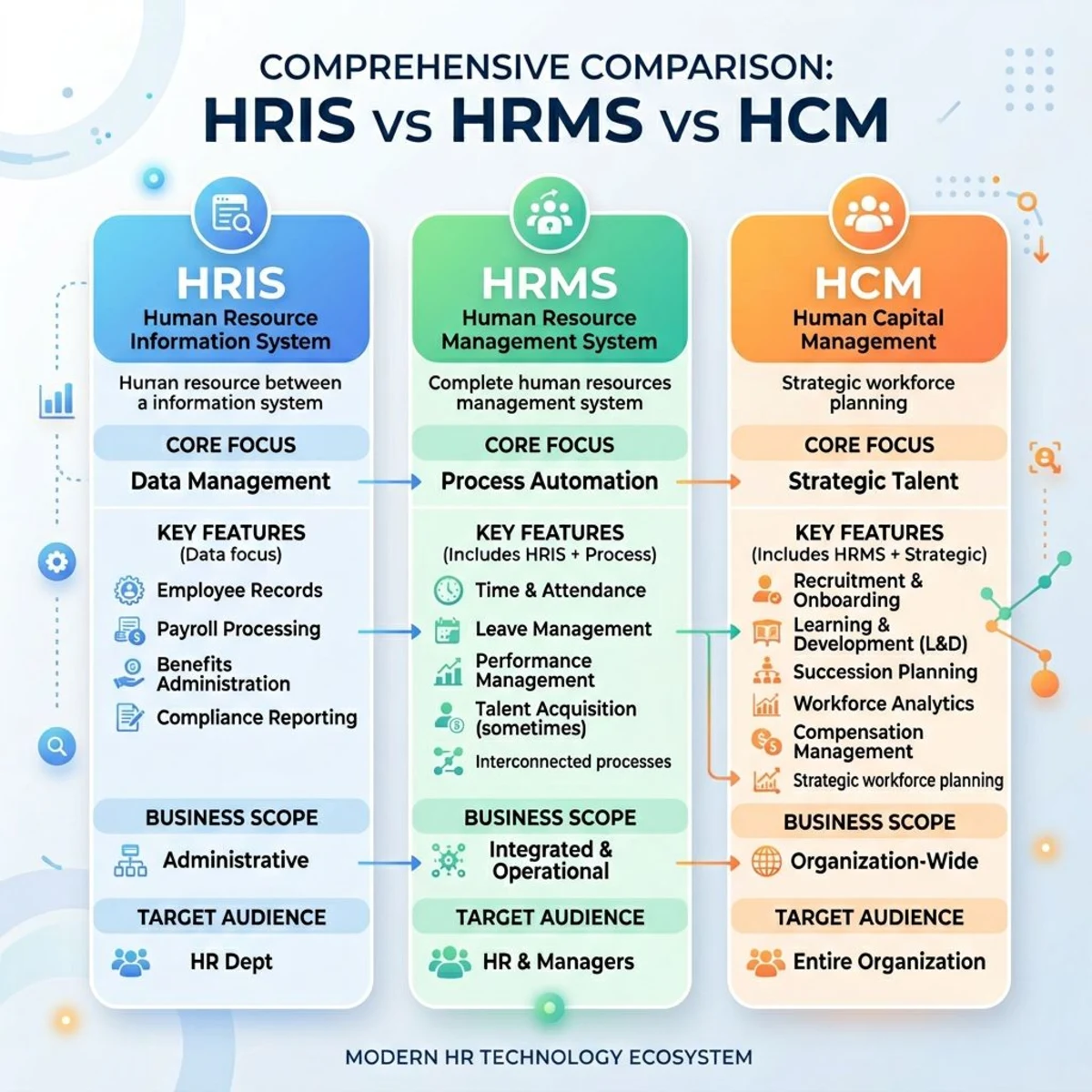
For most small teams, HRIS is the right pick. You can add more features later as you grow. There is no need to pay for tools you will not use yet.
Core HRIS Features
Let us walk through the main features you will find in most HRIS tools. Not every system has all of these, but the good ones cover the basics well.
Employee Database
This is the heart of any HRIS. One central hub for all staff info. Names, job titles, pay details, org charts, contracts, and more.
No more hunting through three folders and two inboxes to find one phone number. It is all in one spot and easy to search. You can also store notes, documents, and custom fields for each person.
When you need to pull a report for a board meeting or an audit, it takes seconds. No more copying and pasting from five different sources.
Time Off and Leave Tracking
Staff submit time-off requests online. Managers approve with one click. The system tracks balances and accruals on its own. It knows how many days each person has left.
This alone saves 2 to 3 hours per month. It also ends the "How many days off do I have left?" question for good. For more, check out our guide to leave management software.
You can set up different leave policies too. Maybe your sales team gets 15 days and your engineers get 20. The HRIS handles the math for each group.
Employee Self-Service
Your team can update their own details. New address? New bank account? They handle it. Your employee directory stays up to date without you lifting a finger.
This frees you up for bigger tasks. No more being a human data entry clerk. Staff can also download their own pay stubs, tax forms, and company docs any time they need them.
Reports and Dashboards
Data is power. But only if you can see it clearly.
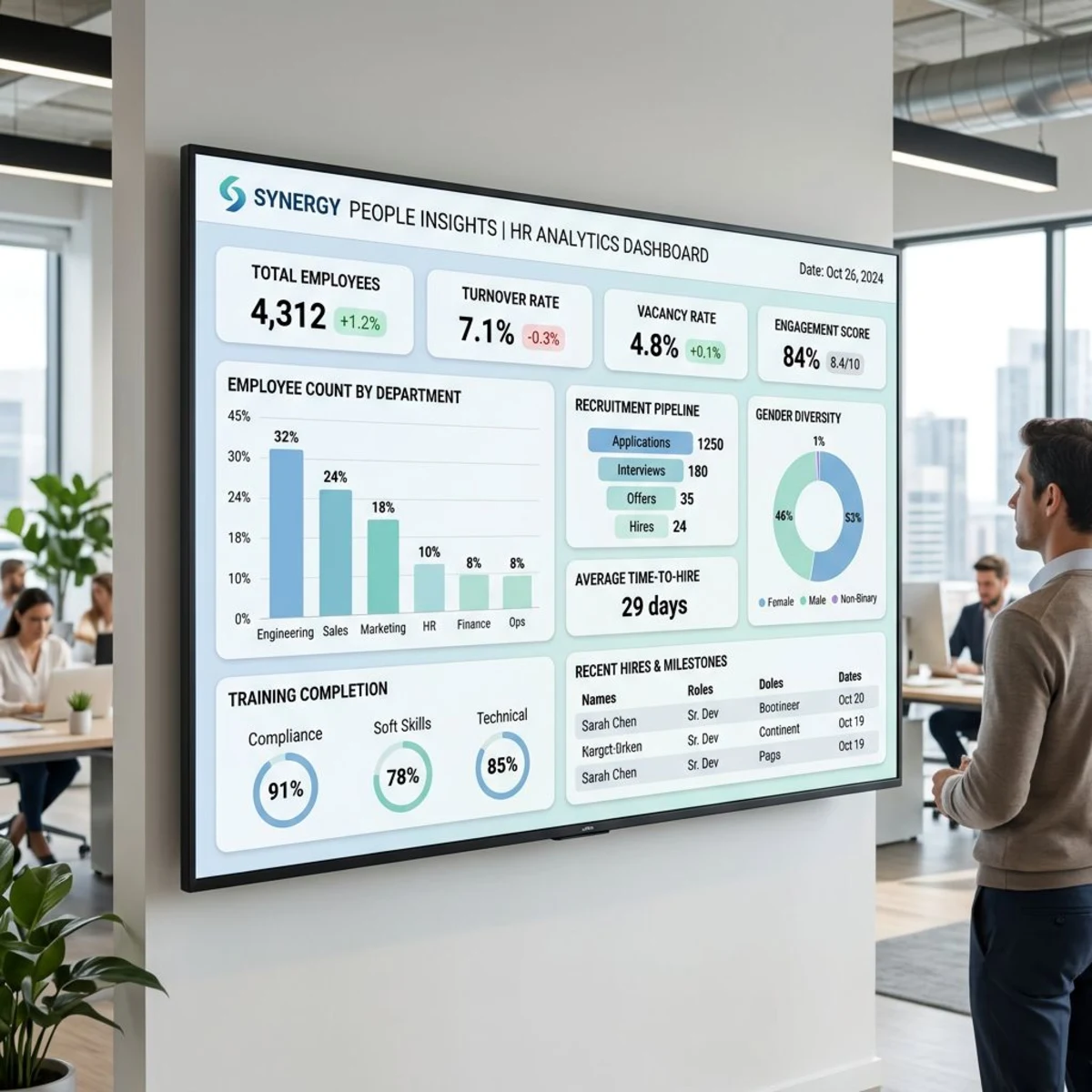
See headcount, turnover, PTO usage, and pay data at a glance. Spot trends before they become problems. Make choices based on real numbers, not gut feeling.
For example, you might notice that one team has twice the turnover of the rest. That is a signal to dig deeper. Without an HRIS, you might not see that pattern for months.
Document Storage
Keep contracts, handbooks, and compliance files in one secure place. Send onboarding packets that new hires fill out online. Ditch the filing cabinet for good.
Every document has a clear audit trail. You can see who viewed it, who signed it, and when. This matters a lot when an auditor comes knocking.
Why Small Teams Need an HRIS
You might think an HRIS is only for big companies. That is not true. Small teams often gain the most from one. Here is why.

Save 5 to 10 Hours Per Week
That is the typical time saved after setting up an HRIS. Here is where it adds up:
- PTO math: Save 2 to 3 hours per month. No more manual accrual math.
- Self-service updates: Save 1 to 2 hours per week. Staff handle their own changes.
- Onboarding: Save 4 to 6 hours per new hire. Forms and tasks are ready to go.
- Review cycles: Save 15 to 20 hours per year. No more chasing schedules.
One 25-person agency spent 12 hours a week on HR admin. After their HRIS, it dropped to 3 hours. That is almost $20,000 saved per year in labor costs alone.
A Better Employee Experience
Today's workers expect self-service tools. They want to check PTO on their phone. They want instant access to pay stubs and policies. They do not want to email HR for every small thing.
A good HRIS also makes great first impressions. A smooth onboarding flow — paired with a solid welcome email — sets the right tone from day one. New hires feel like they joined a well-run company, not a chaotic one.
Stay Compliant
Small firms face real legal risks without proper HR records. An HRIS helps with:
- Audit-ready record keeping. Every change is logged.
- Notes on performance issues that are clear and dated.
- Secure storage for tax forms and I-9 docs.
- Clear audit trails for every HR choice you make.
According to Forbes, the average cost to defend an employment lawsuit is $160,000 — even if you win. Good records cut that risk a lot. An HRIS makes it easy to keep those records clean.
Make Smarter Choices
Without data, you guess. An HRIS shows you which teams have high turnover. It shows if your pay is fair. It spots hiring bottlenecks before they slow you down.
This kind of insight is key when you are managing remote teams or planning your next round of hires. Data beats gut instinct every time.
When Do You Need an HRIS?
By Team Size
- 5 to 10 people: Nice to have. Helpful if you like clean systems.
- 10 to 25 people: Saves real time and keeps things the same for everyone.
- 25 to 50 people: Almost a must. One person cannot handle it all by hand.
- 50 or more: Required for legal and practical reasons. No way around it.
Warning Signs
You have outgrown spreadsheets when:
- PTO tracking is a mess. People do not trust the numbers.
- Each new hire gets a different onboarding experience.
- Reviews keep getting pushed back month after month.
- Payroll prep takes hours every cycle.
- Finding employee info means checking five different places.
- Managers spend more time on admin than leading their teams.
The Quick Math
Say someone spends 10 hours per week on HR admin at $25 per hour. That is $13,000 per year. A basic HRIS costs $300 to $3,600 per year. The net savings are $9,000 or more. The math speaks for itself.
Types of HRIS Systems
Not all HRIS tools are the same. They come in different shapes, sizes, and price ranges. Here is how to sort them out.
Cloud vs On-Premise
Cloud-based is right for 95% of small teams. No IT setup needed. Updates happen on their own. You get mobile access. And the cost is lower up front.
On-premise only makes sense for large firms with strict security rules and a full IT staff on hand. For most small teams, cloud is the clear winner.
All-in-One vs Best-of-Breed
All-in-one tools handle everything in one place. Simple to run. One vendor to deal with. Best for small teams who want things clean and easy.
Best-of-breed means you pick a different tool for each task. More flexible, but harder to manage. You end up with more logins, more bills, and more things to keep in sync. Better for bigger firms with IT staff.
Start with all-in-one. Switch only when you truly outgrow it.
Pricing Models
Per person per month: $5 to $25 each. Grows with your team. Most common setup. Easy to start, but costs rise fast as you hire.
Flat rate: One fixed price per year. Better value as your team grows. Easy to budget. You know the cost up front no matter how many people you add.
Top HRIS Picks for Small Teams
There are dozens of HRIS tools on the market. Most are built for large firms. Here are the ones that work best for small teams with tight budgets.
Tiny Team
- Best for: Teams of 5 to 100 on a budget.
- Price: Free for teams up to 10 people, then $79/month flat for up to 50. All features in every plan.
- Why: No per-seat fees. One flat price as you grow.
BambooHR
- Best for: Teams that value clean design and a great mobile app.
- Price: $6 to $12 per person per month.
- Why: The interface is polished and easy to learn.
Want to compare? Read our BambooHR vs Tiny Team breakdown.
Gusto
- Best for: Teams that want payroll and HR in one tool.
- Price: $6 to $12 per person per month plus payroll fees.
- Why: Payroll is built right in. No need for a separate system.
See how it stacks up in our Gusto vs Tiny Team guide.
Quick Comparison
| System | Team Size | Starting Price | Top Strength |
|---|---|---|---|
| Tiny Team | 5–100 | Free up to 10 · $79/mo up to 50 | No per-seat cost |
| BambooHR | 10–500 | $6/person/month | Best design |
| Gusto | 5–100 | $6/person/month | Payroll built in |
| Workday | 50–5,000 | $15+/person/month | Big company tools |
| ADP | 25–1,000 | $10+/person/month | Compliance focus |
How to Pick the Right HRIS
Picking an HRIS can feel overwhelming. There are so many options. But the process is simple if you break it into steps.
Step 1: List Your Must-Haves
What do you truly need right now? For most small teams: a staff database, time-off tracking, and basic reports. Start there. You can always add more later.
Step 2: Think About Growth
Where will your team be in 2 to 3 years? Pick a tool that scales with you. Switching HRIS platforms is costly and painful. Get it right the first time.
Step 3: Try Before You Buy
Demo 3 to 5 systems. Watch how your team reacts. If it feels clunky in the demo, it will feel worse in real life. A tool nobody uses is a waste of money.
Step 4: Vet the Vendor
How long have they been around? What is their support like? Do they have clients your size? Ask for case studies and references. Talk to real users if you can.
Key Demo Questions
- How easy is it to add a new hire?
- Does it link to our payroll system?
- What training comes with setup?
- Can we export our data if we leave?
- How does pricing shift as we add people?

Your Next Steps
You are ready for an HRIS if 3 or more of these are true:
- Someone spends 8 or more hours a week on HR admin.
- Staff keep asking about PTO balances.
- Onboarding takes days and involves many people.
- Reviews are stressful to plan and run.
- You have had compliance close calls.
- Managers gripe about admin tasks eating their day.
Hold off if:
- Your team is under 10 and stable. No big changes coming.
- Current systems work just fine for now.
- Budget is very tight right now.
A Simple Plan
- Month 1: Research. Demo 3 to 5 tools. Talk to their sales teams.
- Month 2: Set up the system. Move data over. Train your managers.
- Month 3: Full launch. Get feedback from the team. Fine-tune your setup.
The payoff comes fast. And the gains grow over time as you add more staff and more features.
Frequently Asked Questions
Here are the most common questions we hear from small teams thinking about their first HRIS.
What is the difference between HRIS and payroll software?
HRIS handles all employee data and HR workflows. Payroll software just handles paychecks. Many HRIS tools include payroll, but they do much more on top of it.
How long does HRIS setup take?
For small teams of 5 to 50, plan for 2 to 6 weeks. That covers data moves, system setup, and staff training. Gartner recommends a phased rollout to minimize disruption. Bigger teams or complex setups may take a bit longer.
Can we switch systems later?
Yes, but moving data can be tricky and costly. Pick a tool that fits your needs for at least 3 to 5 years. Most vendors offer data export tools to help.
Do we need an HRIS if we already have payroll software?
If payroll is your only pain point, maybe not. But if you also struggle with leave tracking, reviews, or offboarding, an HRIS adds a lot of value on top of what payroll alone can do.
How do we keep employee data safe in a cloud HRIS?
Look for SOC 2 certification and data encryption. Ask about backups and access controls. Good HRIS vendors have better security than most small firms can build on their own. Your data is likely safer with them than in a shared Google Sheet.
Want an HRIS built for small teams? Tiny Team has all the core HR features — free for teams up to 10, then $79/month flat for up to 50. The paid plan includes a 30-day free trial (credit card required).