Buffer Pricing & Review (2026): Per-Channel Costs, Pros & Cons
Buffer pricing starts with a Free plan for up to 3 channels. Paid plans are billed per connected channel: Essentials costs $6 per channel a month ($5 billed yearly) for one user, and Team costs $12 ($10 billed yearly) with unlimited users and approvals. Per-channel rates drop above 10 channels (prices as of November 2026).
Which plan you need mostly depends on how many people log in. If you work alone, Free or Essentials covers you. Two or more people, or any approval step, means Team.
Buffer Plans and Pricing at a Glance (as of November 2026)
Buffer sells three plans: Free, Essentials and Team.
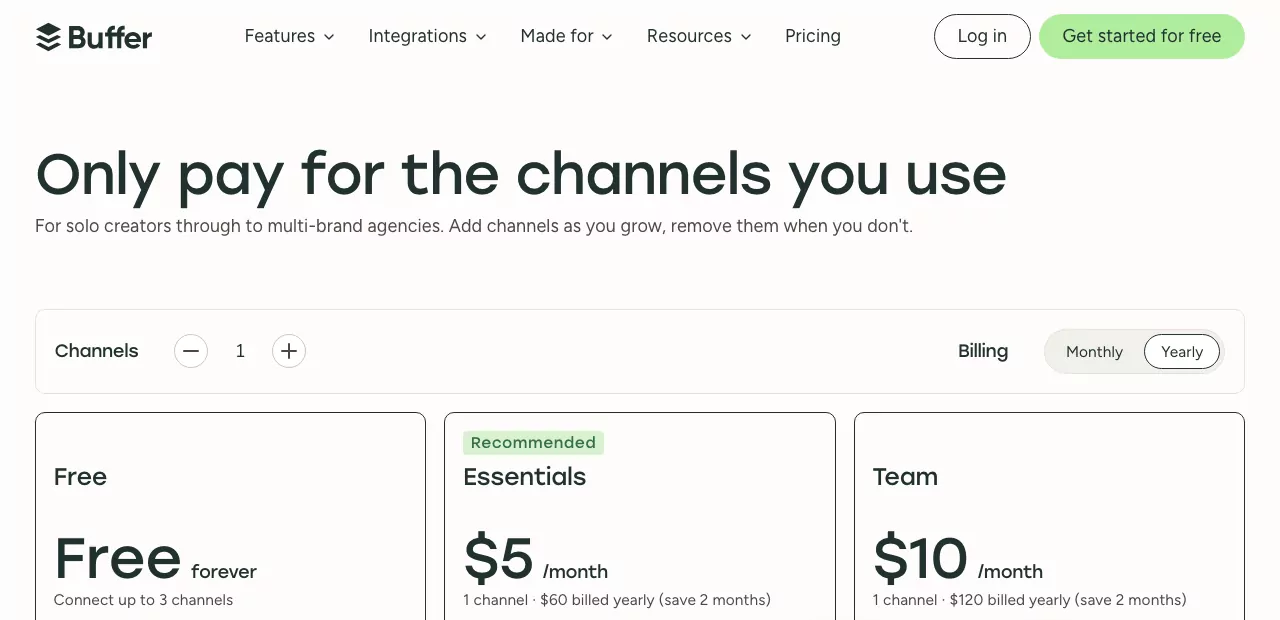
| Plan | Monthly billing (per month) | Yearly billing (per month) | Users included | Scheduled posts | Best for |
|---|---|---|---|---|---|
| Free | $0 | $0 | 1 | 10 per channel at a time | Trying Buffer on a few accounts |
| Essentials | $6 per channel | $5 per channel ($60 a year) | 1 | Unlimited (5,000 fair use cap) | Solo founders and marketers |
| Team | $12 per channel | $10 per channel ($120 a year) | Unlimited | Unlimited (5,000 fair use cap) | Teams of two or more |
Rates are for channels 1 to 10, as listed on Buffer's pricing page as of November 2026. Buffer's FAQ dates its current pricing to November 2025. Its help center calls Pro, Premium and Business legacy plans, so guides that still quote them are out of date.
How Buffer Pricing Works: Per-Channel Billing
Buffer's paid plans charge per channel, not per user or per brand. Other team tools pick different units, such as tracked users in Canny pricing, makers in Productboard pricing and monthly active users in Beamer pricing.
What Counts as a Channel
A channel is one connected social account: an Instagram account, a Facebook page, a LinkedIn page or a TikTok account. Buffer's own example is five brands with an Instagram and a Facebook page each. That makes 10 channels.
Buffer lists LinkedIn profiles and LinkedIn pages as separate channel types. A founder who posts as themselves and as the company pays for two channels.
Volume Rates Above 10 Channels
The first 10 channels always cost the standard rate. Channels after that cost less.
| Channels | Essentials (per channel, monthly) | Team (per channel, monthly) |
|---|---|---|
| 1 to 10 | $6 | $12 |
| 11 to 25 | $4 | $4 |
| 26 to 50 | $3 | $3 |
| 51 and up | $1 | $2 |
From channel 11 to 50, both plans charge the same rate. Up to 50 channels, the extra cost of Team sits on the first 10 channels only. From channel 51, Team costs $2 a channel against $1 on Essentials.

Free Channels Are Billed Once You Upgrade
When you move to a paid plan, Buffer bills every channel, including the 3 you had on Free. A team on 3 free channels that upgrades to add a fourth pays for 4 channels, not 1.
Monthly vs Yearly Billing
Yearly billing is paid upfront. Buffer's pricing page says it saves 2 months: $5 instead of $6 a channel on Essentials, and $10 instead of $12 on Team. Its FAQ says you can switch between the two at any time, with any prorations or refunds applied automatically.
Buffer takes cards only, with no PayPal, checks or bank transfers. Nonprofits and charities get 50% off paid plans, per Buffer's help center.
Buffer's Free Plan: What You Get and Where It Stops
The Buffer free plan covers up to 3 channels and one user, with no time limit.
- 10 scheduled posts per channel at any one time. A slot refills when a post goes out.
- 100 saved ideas.
- Insights with 30 days of history.
- The AI Assistant and a community inbox for replying to comments.
- Limited API access.
Where it stops: no first comment scheduling, hashtag manager, channel groups or reports, and no approvals.
Free also allows 1 threaded post (unlimited on paid plans), 5 AI reply suggestions a week and 1 saved reply. The AI Assistant itself is not capped.
Buffer Essentials vs Team: Which Plan a Small Team Needs
Buffer Essentials Plan: One User, Every Publishing Feature
The Buffer Essentials plan unlocks the full publishing toolkit for one person. You get unlimited scheduled posts per channel (fair use cap of 5,000), unlimited ideas and advanced analytics. Reports export as CSV, PDF or markdown, and you can set custom UTM parameters.
It also adds the hashtag manager, first comment scheduling for Instagram and LinkedIn, channel groups and custom video covers.
Team: Unlimited Users, Approvals and Access Levels
Team includes everything in Essentials. It adds unlimited team members and content approval workflows. Access levels let you choose which channels each person can use, and reports can carry your branding.
The One-User Rule Decides It for Most Teams
Essentials includes exactly one user account. If two people need their own login, you land on Team. Team adds $6 a channel on channels 1 to 10 and nothing from 11 to 50, so a second login costs at most $60 a month ($50 billed yearly) up to 50 channels.

A rule of thumb:
- Free: you work alone on 3 channels or fewer.
- Essentials: you work alone but need more than 3 channels or more than 10 queued posts per channel.
- Team: two or more people need access, or anyone needs approvals.
Every plan includes the AI Assistant and API access, though paid plans raise API limits (1 key on Free, 3 on Essentials, 5 on Team). So the AI Assistant alone is not a reason to pay more.
What Buffer Costs as a Small Team Adds Networks
The table maps Buffer's own example costs to common small-team setups. Figures are per month, from Buffer's pricing page as of November 2026.
| Scenario | Channels | Plan | Monthly billing | Yearly billing (per month) |
|---|---|---|---|---|
| Solo founder on 3 networks | 3 | Free, or Essentials | $0, or $18 | $0, or $15 |
| Founder on 5 networks with a busy queue | 5 | Essentials | $30 | $25 |
| Two-person team on 5 networks | 5 | Team | $60 | $50 |
| Team running two brands on 5 networks each | 10 | Team | $120 | $100 |
| Multi-brand team or small agency | 25 | Team (Essentials) | $180 ($120) | $150 ($100) |
At 10 channels on Team, yearly billing comes to $1,200 a year. For any other channel count, use the channel selector on buffer.com/pricing rather than multiplying by hand. The rate changes at 11, 26 and 51 channels.

Buffer Pros and Cons
Pros
- A real Free plan for up to 3 channels.
- 12 networks, including Google Business Profile, Mastodon, Threads, Bluesky and Substack.
- Integrations on every plan, Free included: Canva, Google Drive, Dropbox, Zapier, Make, n8n and WordPress, plus link shortening and a browser extension.
- AI Assistant, community inbox and API access on every plan.
- Team has no per-user fee.
- A 14-day free trial on paid plans.
- 50% off for nonprofits and charities.
Cons
- Advanced analytics cover only Facebook pages, Instagram business and creator accounts, LinkedIn pages and X. Bluesky, Mastodon, Threads, TikTok, YouTube, Pinterest business accounts and LinkedIn profiles get basic analytics, and Google Business Profiles get none.
- Essentials allows one user, so a team of two jumps to Team.
- Free channels are billed after an upgrade.
- Approvals and access levels are Team-only.
- Yearly billing is paid upfront, and cards are the only way to pay.
- "Unlimited" scheduling has a fair use cap of 5,000 posts per channel.
- Some channel types get reminder (notification) publishing only, such as Instagram personal profiles and Facebook groups. Check yours before you pay.
Buffer Alternatives to Price Before You Commit
Each tool below bills on a different basis, which changes who pays more as a team grows.

| Tool | Pricing basis | Starting paid price (as of November 2026) | Free plan or trial | Best for |
|---|---|---|---|---|
| Hootsuite | Per user | $99 per user a month, billed annually | 14-day free trial | Teams that need an inbox and monitoring |
| Sprout Social | Per seat | $79 per seat a month, billed annually ($99 monthly) | 30-day free trial | Teams that need listening and deep reporting |
| Later | Per social set | $18.75 a month, billed yearly | 14-day free trial | Instagram-first teams |
| Metricool | Per brand | $20 a month, billed annually ($25 monthly) | Free plan for 1 brand | Analytics on a budget |
| Tiny Team Social Media | Per-module plan for the whole organization | See current module plans and prices | See current module plans | Scheduling to nine networks from one shared calendar |
1. Hootsuite: Best for Teams That Need an Inbox and Monitoring
Hootsuite is priced per user. As of November 2026, Standard costs $99 per user a month billed annually and manages up to 10 social accounts. Professional is $199 and Advanced $399 per user a month, each with a 14-day free trial.
Two users on Standard cost $198 a month billed annually, against $100 for Buffer's Team plan on 10 channels billed yearly. Standard includes the inbox and brand monitoring, while content approvals sit on Advanced.
2. Sprout Social: Best for Teams That Need Listening and Deep Reporting
Sprout Social is priced per seat. As of November 2026, Essentials costs $79 per seat a month billed annually ($99 billed monthly) for up to 5 social profiles. Standard is $199 per seat a month billed annually, and the free trial runs 30 days.
Two seats on Essentials cost $158 a month billed annually, against $50 for Buffer's Team plan on 5 channels billed yearly. Listening is sold as an add-on on Standard and higher plans.
3. Later: Best for Instagram-First Teams
Later bills by social set, a bundle of one profile per network. As of November 2026, Starter costs $18.75 a month billed yearly for 1 social set (8 profiles) and 1 user. Growth is $37.50 a month billed yearly for 2 sets and 2 users, and both come with a 14-day free trial.
Later schedules Instagram Reels and Stories and includes a Link in Bio page.
4. Metricool: Best for Analytics on a Budget
Metricool prices by brand. As of November 2026, its Free plan covers 1 brand and 20 scheduled posts a month, but leaves out LinkedIn and X. Starter is $20 a month billed annually ($25 monthly) for up to 5 brands.
It suits teams that care most about reports and competitor tracking. Team roles and a post approval system start on its Advanced plan.
5. Tiny Team Social Media: Best for Small Teams That Want a Shared Scheduling Calendar
Tiny Team's Social Media module is a web app for scheduling to nine networks: Instagram, Facebook, TikTok, X, LinkedIn profiles and company pages, Pinterest, Bluesky, Threads and YouTube. It has Month, Week and List calendars, a composer with shared or per-account captions, weekly queues and hashtag lists. A Social Publisher role lets teammates schedule posts.
It offers a module plan for the whole organization, with no per-seat fees. Review current prices, payment timing and renewal terms before paying. It counts likes and comments, but not reach, impressions or followers. It has no approval workflows, social inbox, AI captions, Reels or Stories, link-in-bio, mobile app or imports from other tools.
Best for small teams that want one shared calendar without those extras. See the Social Media module page.
How These Tools Were Compared
Prices and plan limits were checked on each vendor's pricing page and help center on November 10, 2026. Feature claims come from vendors' public pages and docs. No hands-on testing, trial use, ratings or scores went into this guide.
Bottom Line: Is Buffer Worth It for a Small Team?
Buffer is a fair, transparent deal for a solo founder or a small team on a handful of channels. The Free plan is a real starting point. The cost climbs with every account you connect and with the second user, so count both before you pick a plan.
Look elsewhere if you need social listening or deep inbox workflows, would rather pay per user or per brand, or run many brands with heavy client reporting.
If a shared calendar, weekly queues and scheduling to nine networks cover what your team needs, Tiny Team's Social Media module is worth a look. It offers a module plan for your whole organization, with no per-seat fees. See current prices. New workspace access starts after the first module payment is confirmed.
Frequently Asked Questions
Is Buffer free?
Yes. Buffer's Free plan covers up to 3 channels, 10 scheduled posts per channel at a time and 1 user. It also includes the AI Assistant, the community inbox and 30 days of insights.
How much does Buffer cost?
Buffer costs $6 per channel a month on Essentials ($5 billed yearly) and $12 per channel a month on Team ($10 billed yearly), as of November 2026. Rates drop above 10 channels, down to $1 a channel on Essentials and $2 on Team from channel 51.
What does Buffer do?
Buffer is a social media tool that plans, schedules and publishes posts to your connected social accounts. It has a queue and calendar, an AI Assistant, analytics and a community inbox for replying to comments.
Does Buffer have a free trial?
Yes. Paid plans come with a 14-day free trial. If you don't add payment details by the end, the account drops to the Free plan and channels beyond 3 are locked.
What is better than Buffer?
It depends on what Buffer lacks for you. Hootsuite or Sprout Social fit teams that need an inbox and listening, Later suits Instagram-first work, and Metricool offers analytics on a budget.