Social media scheduler · Tiny Team module
Plan your social posts in one shared calendar
Write once, adapt captions and media per account, and check delivery and engagement in one place. Try it free for 30 days, then pay once for lifetime access.
No credit card. Nothing is charged automatically.
Lifetime access
$249
One payment for your whole organization. No per-seat fees.
Pricing and what’s includedInside Social Media
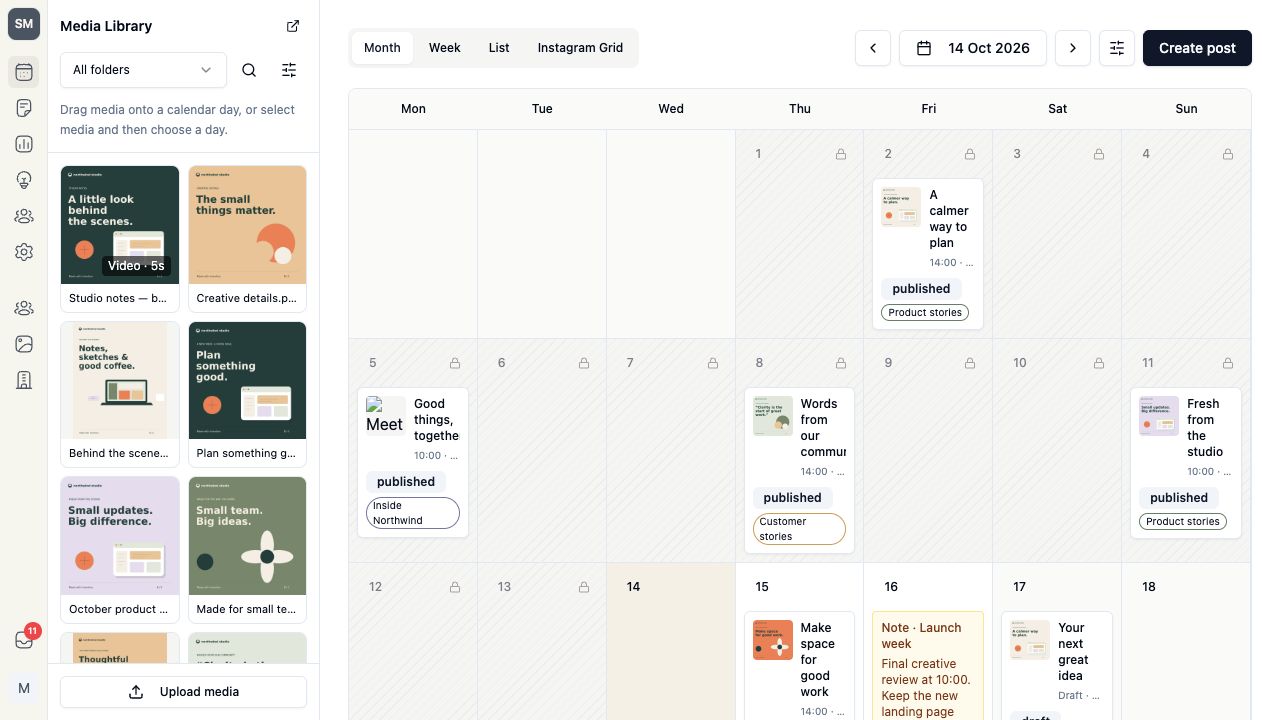
Screenshots show a fictional demo organization.
What you can do with Social Media
Nine networks, one calendar
Connect Instagram, Facebook, TikTok, X, LinkedIn, Pinterest, Bluesky, Threads and YouTube. Plan in Month, Week or List views and drag media into a popup composer.
Adapt each destination
Use one shared caption and media selection, or choose different captions and images or video per account. Each destination gets its own format and required-field checks.
Publish with a repeatable plan
Schedule a post, use a weekly queue or create a bounded recurring series. See delivery per account and retry only destinations that have confirmed failures.
See reported engagement
Compare likes or reactions and comments or replies in one graph. Filter by account, platform and publication date; metrics the network cannot report stay unavailable.
Pay once for Social Media
One purchase covers your whole organization. No subscription or per-seat fees.
Social Media
Lifetime access · One organization
$249one-time payment
Try it for 30 days first. No credit card.
What’s included and default allowances
- Connections for Instagram, Facebook, TikTok, X, LinkedIn, Pinterest, Bluesky, Threads and YouTube
- Month, Week and List calendars with filters and notes
- Instagram grid with upcoming and recent published posts
- Popup composer opened from the calendar or a media drop
- Shared captions and optional per-account captions and media
- Destination previews, character counts and required-field checks
- Pinterest boards, YouTube titles and visibility, and TikTok privacy controls
- Shared Media Library picker for images and videos
- Publish now or schedule in your organization’s time zone
- Ideas, campaign labels and reusable hashtag lists
- Weekly queues and bounded recurring series
- Duplicate posts as new drafts
- Per-account delivery, published links and retries for confirmed failures
- Likes/reactions and comments/replies analytics with account and date filters
Default allowances
- Account publications
- 1,000 per month
- Default with lifetime access, per UTC calendar month. Counts successful publications: one post sent to 3 accounts counts as 3. The free trial includes 1,000 in total.
- Media Library storage
- 10 GB per organization
- Default. Shared by the whole workspace, not only Social Media.
Usage is available in Organization → Limits.
Prices exclude tax, calculated at checkout in the app. Nothing is charged automatically. Every purchase includes a 60-day money-back guarantee.
Social Media FAQ
Instagram, Facebook, TikTok, X, LinkedIn (profiles and company pages), Pinterest, Bluesky, Threads and YouTube. An organization admin connects each account through a secure authorization step. Bluesky uses your handle and an app password.
Organization admins connect and disconnect accounts. Admins and teammates with the Social Publisher role create, schedule and publish posts. Other members can view the calendar and posts while the module is active.
Use up to four images or one video per destination, or text alone where the network allows it. Start with shared media or choose different media per account. Instagram, Pinterest, TikTok and YouTube need media, and YouTube needs a video. Each destination is checked before submission; its network restrictions still apply.
Each account a post is successfully published to counts as one publication. By default, lifetime access includes 1,000 per UTC calendar month, and the trial includes 1,000 in total. Drafts and scheduled posts don't use the allowance until they go out. Admins can see usage in Organization → Limits.
No. During the free trial, posts, queues and recurring series can only be scheduled before the trial ends. Buy lifetime access to plan further ahead. If the trial ends first, the module locks and your posts, ideas, queues and settings stay saved.
Yes. Paste the short URL into your caption like any other link. If your organization also uses Tiny Team Links, create or copy the URL there first. The composer does not automatically shorten URLs.
You pay for a module once, and your organization keeps access to it for as long as we provide Tiny Team and that module, with no subscription and no renewal. Each purchase covers one module for one organization. Modules added later are sold separately, with their own price and trial. If we ever close a module, we email admins at least 90 days in advance and export your data on request.
Create your organization for free, open a module and choose Start 30-day trial. Each module has its own 30-day period, starting only when you activate it. Start with Social Media whenever you're ready. Each organization gets one trial per module.
No. Each module is a one-time payment for your whole organization. There are no monthly or yearly charges and no per-person fees. Prices exclude tax, which is calculated at checkout.