Talent management software helps you hire, grow, and keep great people. The right tool turns messy HR tasks into a smooth system. It grows with your team so nothing falls through the cracks.
Most listicles push tools that cost $20–50 per person each month. That is way too much for teams under 100 people. This guide covers tools built for small and mid-size teams. We share real pricing, honest feature reviews, and tips to help you pick the right one.
The global talent management market will hit $15.3 billion by 2026. But bigger is not always better for a growing team.
What Is Talent Management Software?
Talent management software covers the full employee life cycle. It helps you hire, train, review, and keep your team happy. Here are the main parts:
- Hiring and tracking: Post jobs, manage candidates, and run hiring steps.
- Onboarding: Set up new hires with docs and training. Need a checklist? See our new hire onboarding checklist.
- Performance reviews: Set goals, give feedback, and run review cycles. Check out our performance review examples for ideas.
- Learning: Track skills, run training, and plan career growth.
- Succession: Spot and grow future leaders within your team.
- Engagement: Run surveys, collect feedback, and track how happy people are.

How is it different from basic HR software? Payroll systems track pay. HRIS stores employee data. Talent management is about helping people grow, do better work, and stay engaged. It fills the gap between admin tasks and real people development.
How We Picked These Tools
We tested each platform with small teams in mind. Here is what we scored and how we weighted each factor:
- Features (40%): Core tools, ease of use, and how well they work together.
- Pricing (25%): Total cost vs. value. We hate hidden fees.
- Small team fit (20%): Can you set it up without an HR team?
- Support (10%): Docs, response time, and onboarding help.
- Growth (5%): Will it still work when your team doubles?
We picked tools that do not need a full HR department to run. If a solo founder or first HR hire can manage it, it made the list.
10 Best Talent Management Software for 2026
1. Tiny Team — Best Value for Small Teams
Best for: Teams up to 50 who want all HR features at a flat price.
Tiny Team puts talent tools and core HR in one place. It uses flat pricing instead of per-seat fees. It is free for teams up to 10 people, then a flat $79/month for up to 50. There are no surprise costs.
Key features:
- Hiring pipeline with custom stages and candidate notes
- Performance review cycles with goal tracking and feedback
- Employee directory with pay and asset tracking
- Doc hub for policies, guides, and team knowledge
- Team calendar with PTO tracking and custom holidays
- Company timeline for news and updates
Pricing:
- Free for teams up to 10 people — every feature, no credit card
- Flat $79/month for up to 50 people (all features, not per-seat)
- 30-day free trial on the paid plan (credit card required)
Pros: Fixed price no matter how many join. All features in every plan. No setup fees at all.
Cons: Newer platform with a smaller user base. No payroll yet. Caps at 50 people.
Why we like it: A 50-person team pays a flat $79/month. Most rivals charge $6,000+ a year for the same team size. That is a huge gap.
2. BambooHR — Best for Mid-Size Teams
Best for: Companies of 25–500 with at least one HR person.
BambooHR is the default pick for growing companies. It has deep reporting and strong compliance tools. The mobile app lets employees handle tasks on their own.
Key features:
- Smart applicant tracking with auto workflows
- Custom performance review templates
- Employee self-service portal and mobile app
- Time-off tracking with approval chains
- Custom reports and people analytics
- 100+ app integrations out of the box
Pricing: Core plan runs ~$6–10/person/month. Pro plan is ~$10–15/person/month. No free plan.
Pros: Mature, proven platform. Great analytics. Big library of integrations. Strong mobile app.
Cons: Gets pricey as you grow. Setup needs HR know-how. Too much for teams under 20.
3. Lattice — Best for Performance Reviews
Best for: Teams that want regular feedback instead of yearly reviews.
Lattice is built for modern performance management. It replaces the yearly review with ongoing check-ins and clear goal tracking.
Key features:
- OKR management to align the whole team
- 1:1 meeting templates and tracking
- 360-degree feedback from peers and managers
- Employee engagement surveys
- Growth plans and career pathing
Pricing: Starts at $11/person/month. Full plan is $19/person/month. Free trial offered.
Pros: Clean, modern interface. Strong goal tools. Frequent product updates.
Cons: Weak hiring features. You may need a separate HRIS. Full access costs more.
4. 15Five — Best for Weekly Check-ins
Best for: Remote teams that value regular talks with their managers.
15Five was built around the 15-minute weekly check-in. It helps managers stay close to their teams even when everyone works from home. Great for remote team management.
Key features:
- Weekly employee check-ins that take 15 minutes
- OKR tracking tied to company goals
- Peer shout-outs and recognition
- Pulse surveys and engagement scores
- Review automation for managers
Pricing: Starts at $4/person/month. Top plan is $16/person/month. 14-day trial.
Pros: Simple and focused. Great for remote teams. Cheap to start. Easy to adopt.
Cons: Limited HR features outside performance. No hiring or recruiting tools.
5. Culture Amp — Best for Engagement Data
Best for: Teams that want to measure culture with real data.
Culture Amp leads in engagement surveys and analytics. It helps you spot trends before they become problems. Their methods are backed by research.
Key features:
- Engagement surveys with industry benchmarks
- Exit and stay interview tools
- Performance review cycles
- Manager coaching programs
- Culture analytics dashboard
Pricing: About $5/person/month per module. Custom pricing for bundles.
Pros: Best survey tools in the market. Research-backed methods. Strong insights.
Cons: Mostly survey-focused. Can overwhelm teams new to data. Steep curve for managers.
6. Leapsome — Best for EU Companies
Best for: European teams that need strong data privacy and GDPR rules.
Leapsome offers privacy controls with EU data hosting. It covers performance, learning, and engagement in one tool. Popular in Germany and across Europe.
Key features:
- Custom review cycles and continuous feedback
- 1:1 meeting tools and goal tracking
- Learning management system
- Pulse surveys and engagement checks
- People analytics dashboard
Pricing: From €8/person/month. Full platform is €12/person/month. 14-day trial.
Pros: Strong data privacy. All-in-one tool. Good EU integrations.
Cons: Less known in North America. Smaller user community. Euro pricing may fluctuate.
7. HiBob — Best for Modern Growing Companies
Best for: Tech companies of 50–500 people who want a modern feel.
HiBob, also called Bob, looks and feels like a social app. It has a slick interface and strong culture features. Employees actually enjoy using it.
Key features:
- Modern employee profiles and org charts
- Time-off and attendance management
- Performance reviews with ongoing feedback
- Pay and equity tracking
- Employee surveys and culture reports
- Mobile app with social features
Pricing: Starts at $7/person/month. Advanced plan has custom pricing.
Pros: Beautiful design. Great mobile app. Good culture tools. Employees love it.
Cons: Premium pricing. Not ideal for very small teams. Some features locked to top tiers.
8. Workday — Best for Large Teams (200+)
Best for: Big companies that need deep analytics and global scale.
Workday is the enterprise standard. It covers hiring, performance, payroll, and planning. But it takes months to set up and costs a lot.
Pricing: Custom only. Expect $100–300+ per person per year. Add setup fees on top.
Pros: Scales to thousands. Powerful analytics. Strong security and compliance.
Cons: Very expensive. Complex setup takes months. Needs full-time HR and IT staff.
9. SAP SuccessFactors — Best for Global Enterprises
Best for: Big global companies with compliance needs in many countries.
SAP SuccessFactors handles multi-country HR at scale. It is built for large, complex organizations with hundreds or thousands of staff.
Pricing: Modules start around $10/person/month. Full suite runs $50–100+/person/month. Setup often exceeds $100,000.
Pros: Handles global compliance. Highly flexible. Ties into other SAP tools.
Cons: Very complex. Setup takes 6–18 months. Best for 500+ employees only.
10. Deel HR — Best for Global Remote Teams
Best for: Remote-first companies that hire across many countries.
Deel HR pairs talent management with global compliance support. It handles hiring, payroll, and leave in dozens of countries.
Key features:
- Global hiring and onboarding workflows
- Multi-country compliance and legal support
- Multi-currency pay tracking
- Global leave management
- Self-service in many languages
Pricing: HR plan is $19/person/month. Payroll adds $29/person/month. 30-day trial.
Pros: Great for global teams. Strong compliance support. Modern design.
Cons: Pricey for small teams. Overkill if you only hire locally.
Quick Comparison Table
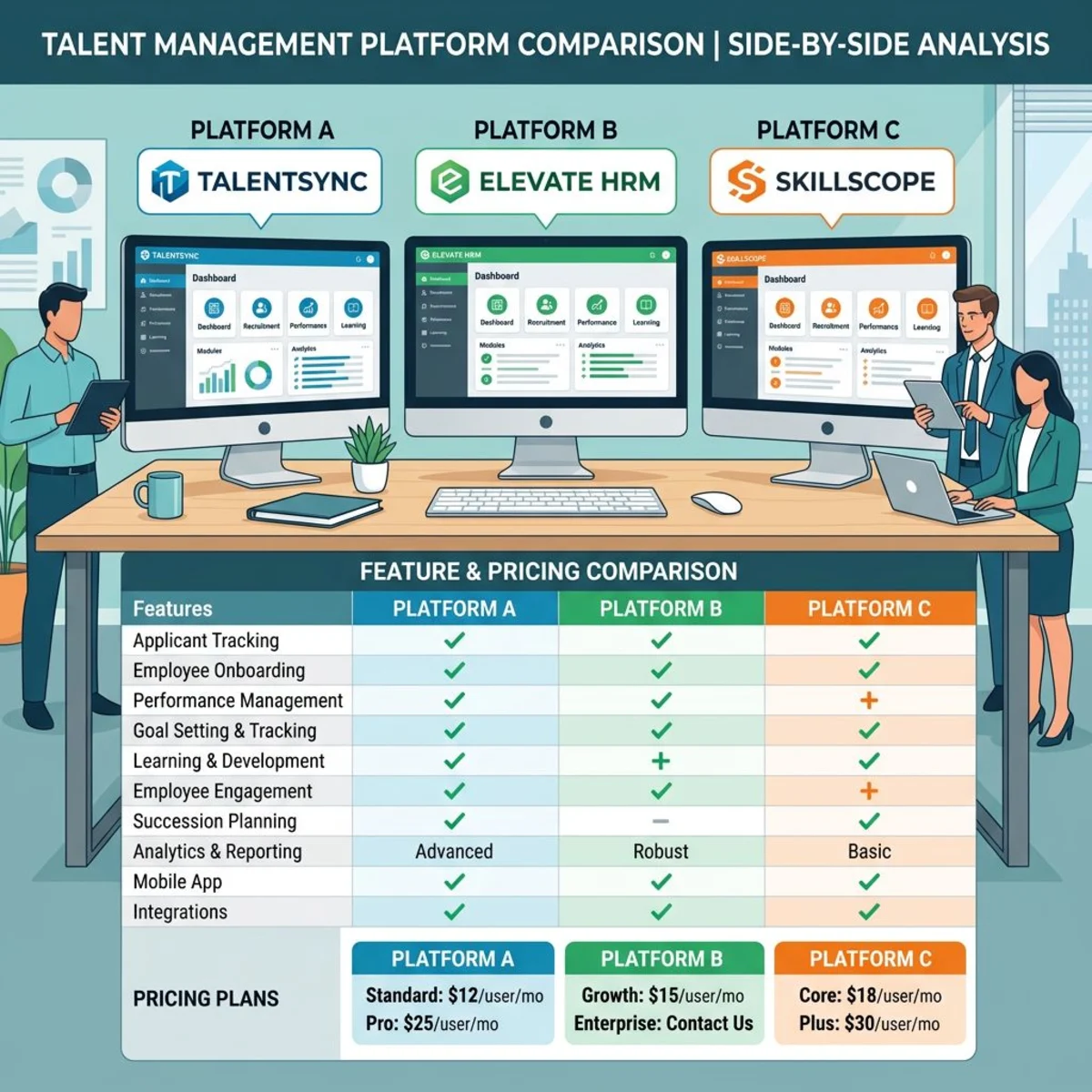
| Tool | Best For | Starting Price | Team Size | Free Trial |
|---|---|---|---|---|
| Tiny Team | Small teams | Free ≤10, $79/mo flat ≤50 | Up to 50 | 30 days (card required) |
| BambooHR | Mid-size businesses | ~$6/person/mo | 25–500 | Demo |
| Lattice | Performance focus | $11/person/mo | 20–1000 | Yes |
| 15Five | Weekly check-ins | $4/person/mo | 10–500 | 14 days |
| Culture Amp | Engagement data | $5/person/mo | 25–5000 | Demo |
| Leapsome | EU companies | €8/person/mo | 20–1000 | 14 days |
| HiBob | Modern HR | $7/person/mo | 50–500 | Demo |
| Workday | Enterprise | $100+/person/yr | 200+ | Demo |
| SAP | Global enterprise | $50+/person/mo | 500+ | Demo |
| Deel HR | Global remote | $19/person/mo | 10–1000 | 30 days |
How to Choose the Right Tool
Think About Team Size
- 5–25 people: Keep it simple and cheap. Try Tiny Team or 15Five.
- 25–100 people: Look for tools that scale well. BambooHR or Lattice fit here.
- 100+ people: You may need bigger tools like HiBob or Workday.
Fast-growing teams should pick a tool that handles rapid growth without big price jumps.
Pick Your Must-Have Features
Do you need hiring tools? Performance reviews? Engagement surveys? Start with your biggest pain point. Do not pay for features you will never use.
If your main issue is performance, Lattice or 15Five may be enough. If you need a full HR system, look at Tiny Team or BambooHR.
Watch the True Cost
Per-person pricing adds up fast. A 50-person team at $15/person/month costs $9,000 a year. Tiny Team covers that same team for a flat $79/month. That is a huge gap.
Always add up setup fees, training time, and integration costs. The sticker price is rarely the full picture.
Check Your Integrations
Make sure the tool works with your current stack. Look for Slack, Google, or Microsoft links. If security matters, check for single sign-on support.
According to SHRM's technology guide, poor integration is the top reason HR tools fail after launch.
Getting Started: A Simple Rollout Plan
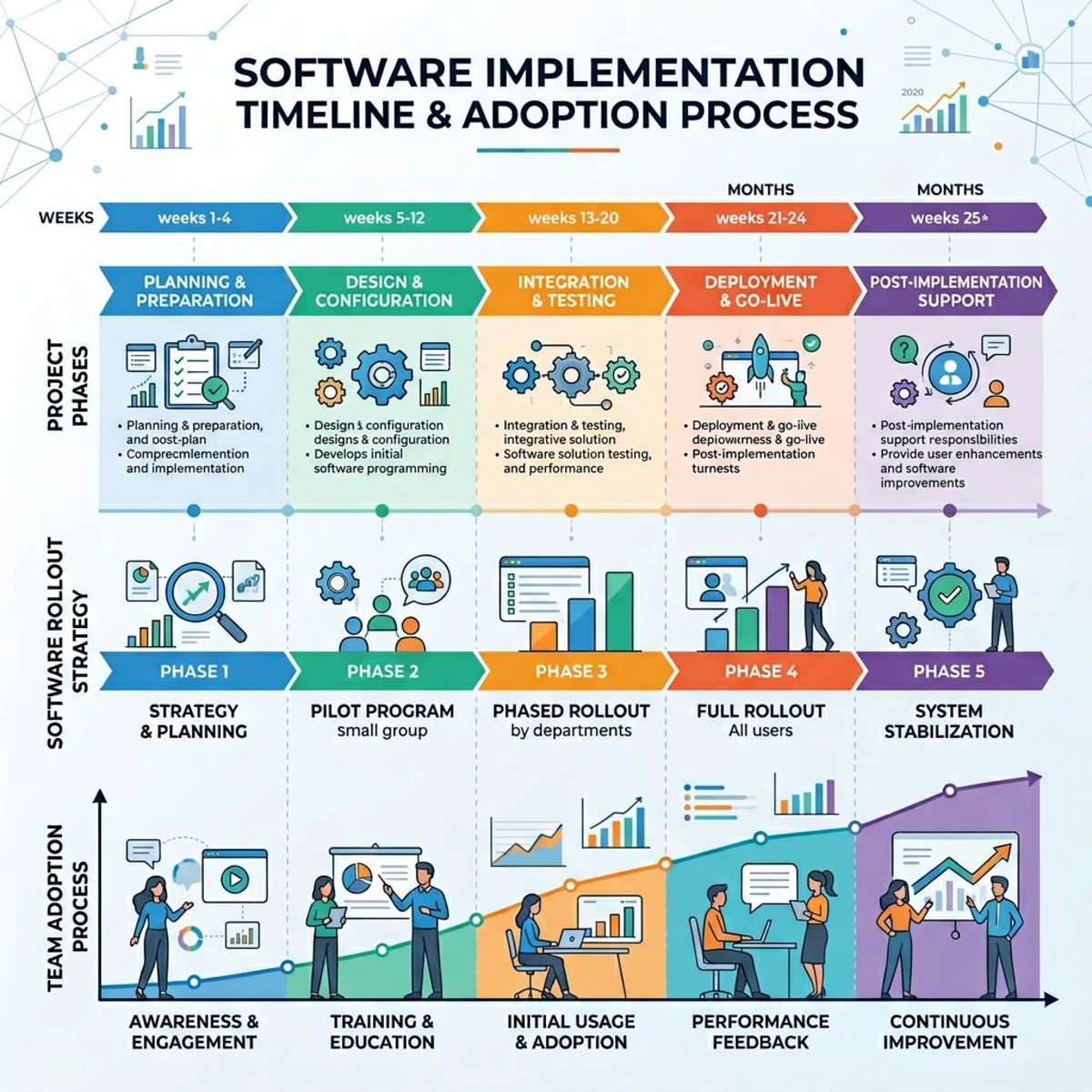
Week 1–2: Plan. Write down your goals. What problems do you want to fix? Audit your current HR process. Get your team leads on board.
Week 3–6: Test. Start free trials for 2–3 tools. Use real tasks and real data. Import your employee info. Set up basic workflows.
Week 7–10: Pilot. Run a small group test. Ask for honest feedback. Tweak your setup based on what you hear.
Week 11–12: Launch. Roll it out to everyone. Name a go-to person for questions. Track who logs in and who does not. Keep tweaking for the first month.
Start with core features first. Add fancy stuff later once your team is comfortable.
Talent Management vs Performance Management
People mix these up all the time. They are not the same thing.
Talent management covers the full employee journey. It starts with hiring and goes all the way to retention. It includes recruiting, onboarding, reviews, learning, and succession planning. Think of it as the big picture.
Performance management is just one slice. It focuses on how well people do their jobs. It includes goal setting, feedback, reviews, and coaching. Tools like Lattice and 15Five live in this space.
Many teams start with a performance tool and add broader talent features later. Others pick an all-in-one platform from the start. Both paths work. The right choice depends on your biggest pain point today.
If you just need better reviews, a focused tool is fine. If you want to manage the whole employee journey, go all-in-one. Tools like Tiny Team and BambooHR cover both sides.
Key Trends in Talent Management for 2026
The talent management space keeps changing. Here are the biggest trends to watch this year.
Skills-based hiring is rising. More companies care about what you can do, not just your degree. Tools that track skills and map career paths are in high demand.
Continuous feedback beats annual reviews. The yearly review is dying. Teams want real-time feedback loops. Weekly check-ins and pulse surveys are the new normal.
Employee experience matters more. Happy people stay longer. Tools now focus on the full employee experience, not just HR admin. Culture features and engagement data drive real decisions.
AI is entering HR tools. Some platforms add AI for resume screening, writing review drafts, and spotting flight risks. It is still early, but the trend is clear.
Remote-friendly tools win. With hybrid work here to stay, tools must work for spread-out teams. Mobile apps, async updates, and global compliance are table stakes now.

Common Mistakes to Avoid
Picking the wrong tool wastes time and money. Here are the top mistakes we see.
Buying too big. Enterprise tools look impressive, but they crush small teams. You do not need Workday for a 30-person company. Start simple. Grow into more features later.
Ignoring adoption. The best tool is useless if no one logs in. Pick something your team will actually use. A simple tool with high adoption beats a fancy one that gathers dust.
Skipping the trial. Always test before you buy. Run a real pilot with real data. Get feedback from both managers and employees. Two weeks of testing saves months of regret.
Forgetting about cost creep. Per-seat pricing grows with your team. A tool that costs $500/month today may cost $2,000/month in a year. Plan for growth when you set your budget.
Not training your managers. Managers drive adoption. If they do not know how to run reviews or set goals in the tool, it will not work. Invest in training from day one.
Frequently Asked Questions
What is the difference between talent management and HR software?
HR software handles admin tasks like payroll, benefits, and compliance. Talent management focuses on people growth. It covers performance reviews, goal setting, career paths, and engagement. Many modern tools blend both, but the focus is different.
How much does talent management software cost?
It varies a lot by team size and tool:
- Budget (5–50 people): $1–8 per person per month
- Mid-range (25–200): $8–20 per person per month
- Enterprise (200+): $20–100+ per person per month
Flat-price tools like Tiny Team can save a lot for teams within their size limits. A 50-person team saves over $5,000 a year vs. per-seat rivals.
Do small businesses need talent management software?
Yes, once you hit around 15–20 people. At that point, you likely have multiple managers and departments. Tracking performance in spreadsheets gets messy fast. A proper tool saves hours each week and keeps nothing from slipping through the cracks.
Teams under 10 can often get by with Google Sheets and regular one-on-one chats. But once you start losing track of reviews or goals, it is time to upgrade.
What features matter most for growing teams?
Focus on these five things first:
- Performance reviews with goal setting
- Hiring and onboarding workflows
- Employee development and skill tracking
- Manager tools, templates, and guides
- Basic reports and analytics
Extras like succession planning matter more once you pass 50–100 people.
How long does setup take?
It depends on the tool:
- Simple tools (Tiny Team, 15Five): 1–2 weeks for setup. 4–6 weeks for full adoption.
- Mid-range (BambooHR, Lattice): 4–8 weeks for setup. 2–3 months to fine-tune.
- Enterprise (Workday, SAP): 6–18 months for full rollout.
Start with core features. Add more over time. Do not try to do everything at once.
Can these tools work with my current apps?
Most modern platforms link with common tools like Slack, Google, Microsoft Teams, and job boards. Many offer single sign-on with Okta or Azure AD. Enterprise tools have the most options. Simpler tools may have fewer links, but they cover the basics well.
Check integration lists before you buy. A tool that does not fit your stack will cause headaches down the road.