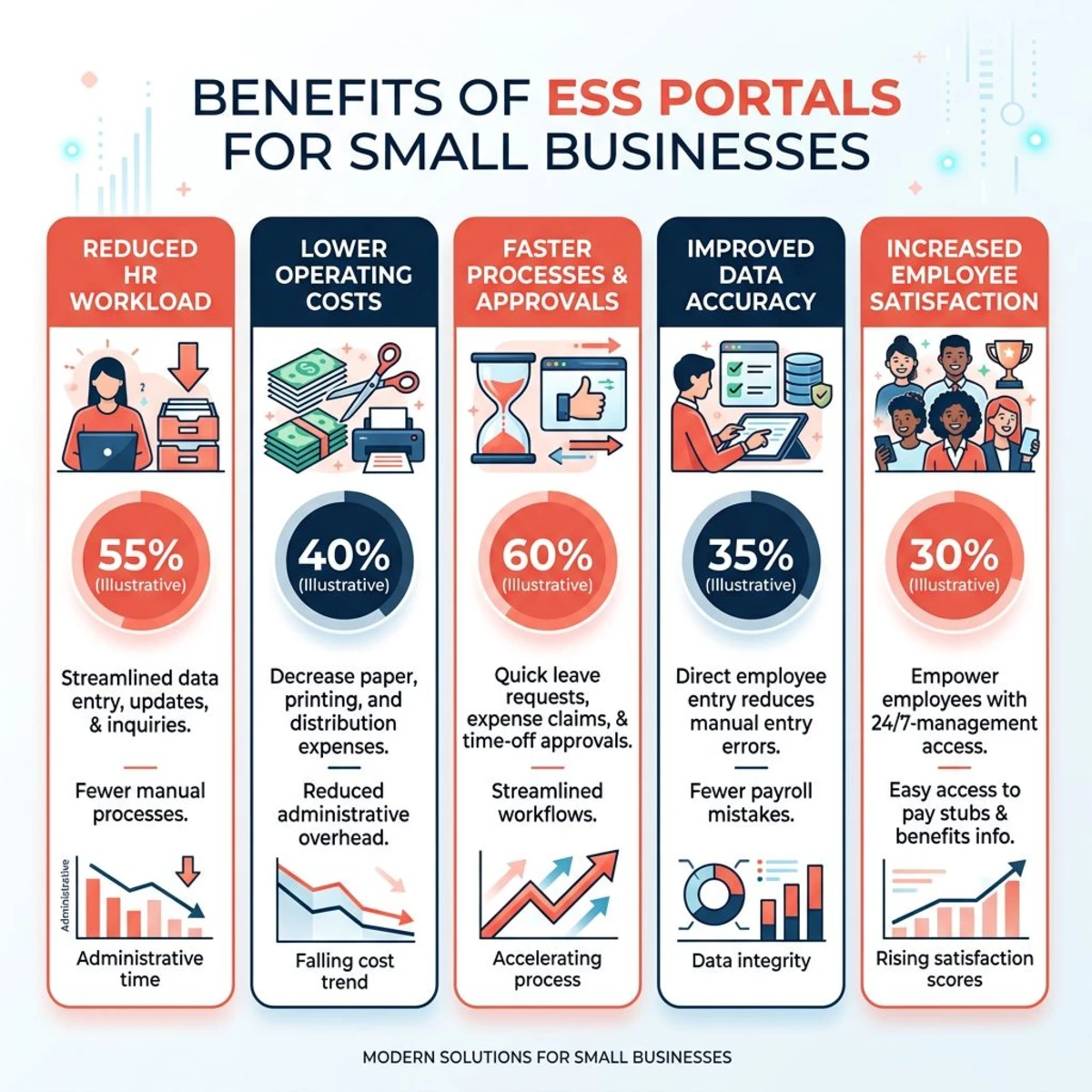
An employee self-service portal is a secure digital platform that allows workers to access and manage their personal information, time off, and other HR-related tasks without requiring assistance from managers or HR staff. For small teams, implementing an employee self-service portal can reduce administrative burden by up to 40% while improving employee satisfaction and data accuracy.
Traditional HR processes create bottlenecks: employees ask managers for PTO approval, request pay stubs from accounting, or wait for HR to update their personal information. An ESS employee self-service system eliminates these friction points by giving workers direct access to the information and tools they need.
According to SHRM's 2025 HR Technology Survey, 78% of employees prefer self-service options for routine HR tasks, and companies with ESS portals report 60% fewer HR administrative requests. This guide covers how employee self-service portals work, their benefits, essential features, and the best tools available in 2026.
What Is an Employee Self-Service Portal?
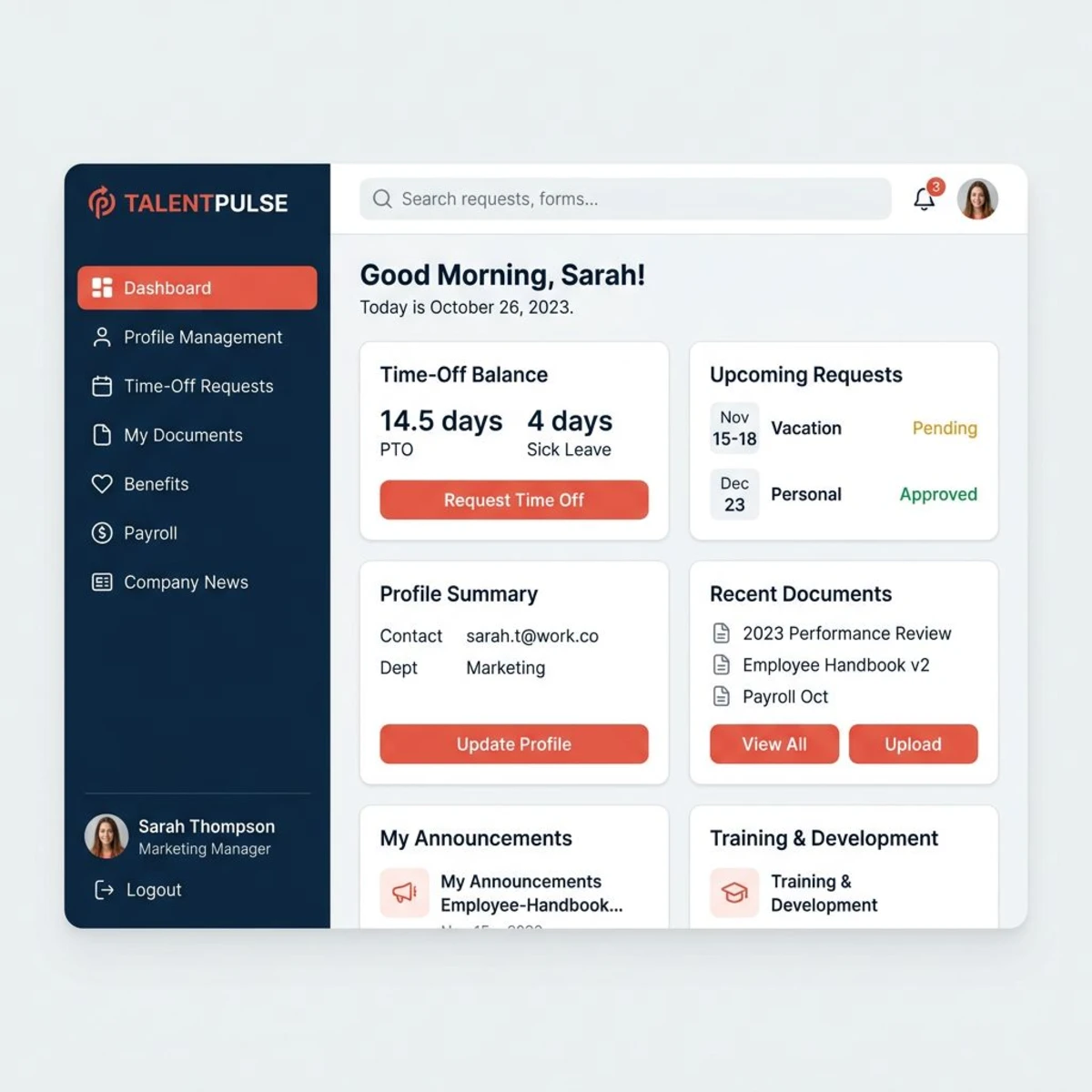
An employee self-service (ESS) portal is a web-based platform that empowers employees to handle routine HR tasks independently. Instead of submitting requests through managers or HR departments, workers can directly access their employment information, request time off, update personal details, and complete administrative tasks through a secure online interface.
A typical ESS employee portal connects several HR functions into one centralized hub. If you're evaluating broader HR platforms, our guide to what is an HRIS explains how self-service portals fit within larger HR technology ecosystems.
Real-World Example: A 25-person startup in Austin had their founder spending 2-3 hours weekly fielding HR requests — updating employee addresses, providing pay stub copies, and tracking vacation requests in spreadsheets. After implementing an ESS portal, these requests dropped to nearly zero, freeing up time for product strategy and customer development.
The portal works through role-based access: employees see their own profiles and submit requests, managers see team schedules and approval queues, and administrators configure workflows and permissions. Common processes like PTO requests, address changes, and document uploads follow automated workflows with instant notifications at every step.
How ESS Differs from Traditional HR
In a traditional setup, an employee who needs to update their home address emails HR, who manually enters it into a spreadsheet or legacy system. That change might take days to propagate across payroll, benefits, and emergency contact records.
With an ESS portal, the employee logs in, updates their address once, and the change instantly reflects across all connected systems. No emails, no waiting, no human error from manual re-entry.
Why Your Small Team Needs an ESS Portal
Small teams face unique challenges that make employee self-service portals particularly valuable: limited HR resources, close working relationships that can complicate formal processes, and the need for operational efficiency as the company grows.
Reduced Administrative Burden
HR professionals spend an average of 14 hours per week on routine administrative tasks that ESS portals can automate. For small teams where HR responsibilities fall to founders or office managers, this time savings is critical for focusing on strategic work.
Managers report 70% fewer routine requests from employees after implementing ESS portals. This lets leadership focus on coaching, strategic planning, and business development rather than fielding questions about PTO balances or pay stub access. Pair this with a solid employee directory software solution and your team can find any information they need without ever pinging HR.
Employee Empowerment and Accuracy
When employees update their own information directly, data accuracy improves significantly compared to second-hand updates through managers or HR staff. ESS portals display real-time information instantly — no confusion about PTO balances, enrollment deadlines, or policy changes.
Workers become more self-sufficient with 24/7 access to handle personal HR tasks outside business hours. This is especially valuable for remote employees, working parents, and those with non-standard schedules who can't always reach HR during office hours.
Digital workflows also create automatic audit trails of who made changes and when, supporting compliance requirements and reducing data entry errors across the organization.
Cost Efficiency
Small companies can delay hiring dedicated HR personnel by automating routine tasks through ESS portals. Digital document storage eliminates printing, filing, and physical storage costs. Automated workflows ensure consistent policy application without manual oversight.
The ROI breakdown: Companies with 20-50 employees typically see $2,000-5,000 in annual savings from reduced administrative time, improved accuracy, and delayed HR hiring needs. According to Forbes, small businesses that invest in HR technology see productivity improvements within the first quarter.
Key Features to Look For in Employee Portal Software
Not all ESS portals offer the same functionality. Focus on features that address your team's specific needs while ensuring room for growth as your company expands.
Essential Features
| Feature Area | What to Look For |
|---|---|
| Personal Info Management | Contact details, emergency contacts, banking info, tax withholdings, address updates |
| Time-Off Management | PTO requests, accrual tracking, team calendar, manager approval workflows |
| Document Access | Pay stubs, tax documents, company handbook, HR document management |
| Company Directory | Org charts, department directories, skills databases, contact lookups |
| Performance Integration | Goal tracking, review cycles, feedback submission, development plans |
Advanced Capabilities Worth Considering
Beyond the basics, look for communication tools (internal announcements, recognition features), expense management, and learning management integration. Teams planning international expansion should prioritize multi-language support and local compliance features.
Security Must-Haves
Any employee self-service system handling personal data needs multi-factor authentication, role-based permissions, encryption of sensitive financial data, and comprehensive change logs for compliance auditing. Choose providers with SOC 2 compliance and strong security track records. The U.S. Department of Labor provides additional guidance on protecting employee data in digital systems.
Best Employee Self-Service Portal Software
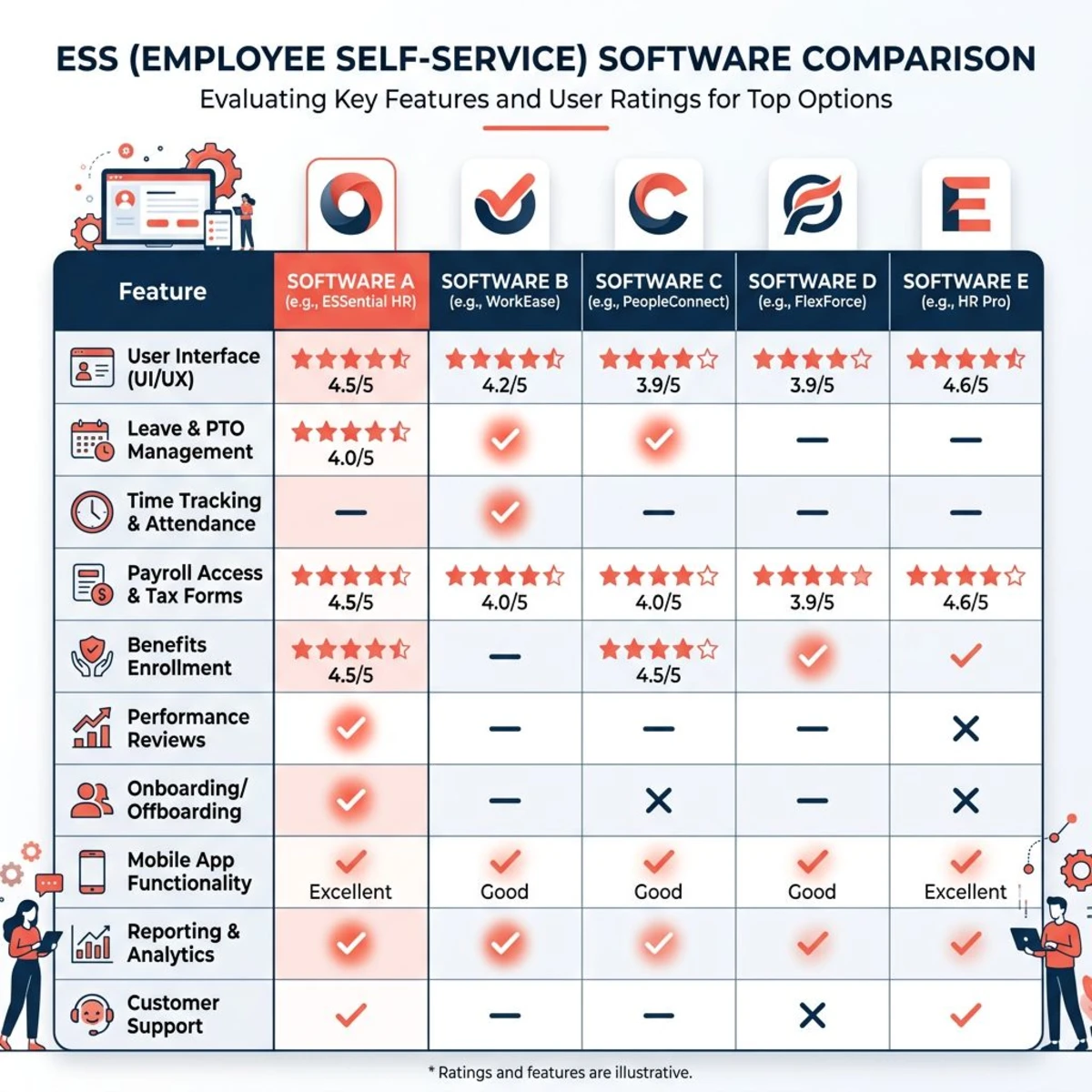
Here are the top ESS portal options for small teams in 2026. For a broader comparison, see our roundup of the best HR software for small business. Each tool offers different strengths — the right choice depends on your team size, budget, and which features matter most for your workflow.
Tiny Team
Best for: Small teams (5-100 employees) wanting comprehensive HR in one platform
Tiny Team's People Management includes a self-service portal integrated with time-off tracking, company directory, and document management. Employees access personal profiles, submit PTO requests, and stay connected through the Company Timeline. The platform covers the full employee lifecycle from hiring through offboarding.
Tiny Team offers one-time lifetime access to HR and Document Spaces per organization. Choose one module or buy several in a single payment. Each module has its own 30-day free trial, starting when you activate it. No credit card, automatic charges or per-person fees. See current module pricing.
BambooHR
Best for: Growing companies (25-500 employees) needing full-featured HRIS
Comprehensive self-service capabilities with strong reporting, workflow automation, and a polished mobile app. Excellent for teams needing advanced analytics alongside ESS functionality.
Pricing: Starting at $99/month plus $8.25/employee Standout: Robust reporting helps managers understand team patterns and needs
Gusto
Best for: Small businesses (5-200 employees) prioritizing payroll integration
Gusto combines payroll processing with employee self-service — pay stub access, tax document retrieval, time tracking, and direct deposit management in one seamless interface.
Pricing: $40/month base plus $6/employee Standout: Seamless payroll integration ensures real-time compensation accuracy in the ESS portal
Rippling
Best for: Tech-savvy teams (10-1000+ employees) wanting extensive integrations
Sophisticated ESS with unified identity management across business applications. Manages not just HR self-service but also IT equipment, software access, and app provisioning from a single dashboard.
Pricing: $8/employee/month for Core HR Standout: Integration breadth connects the ESS portal with virtually any business software
Factorial HR
Best for: International small businesses (5-200 employees) with budget constraints
Solid ESS functionality with multi-language support, digital signatures, and strong international compliance at competitive pricing. Good choice for teams with employees in multiple countries.
Pricing: Starting at $4/employee/month Standout: Affordable multi-country compliance support
Zoho People
Best for: Small businesses (5-100 employees) already using the Zoho ecosystem
Integrates seamlessly with Zoho CRM, Projects, and Books. Custom workflow builder lets you create unique approval processes tailored to your team's needs.
Pricing: $1.25-4.50/employee/month depending on features Standout: Deep Zoho ecosystem integration creates seamless business operations
| Solution | Team Size | Monthly Cost | Key Strength |
|---|---|---|---|
| Tiny Team | Up to 50 | One-time lifetime module pricing; see current prices | Choose HR and/or Document Spaces |
| BambooHR | 25-500 | $99+ | Full HR suite, reporting |
| Gusto | 5-200 | $40+ | Payroll integration |
| Rippling | 10-1000+ | $8/ee | Third-party integrations |
| Factorial | 5-200 | $4/ee | International support |
| Zoho People | 5-100 | $1.25/ee | Zoho ecosystem |
How to Implement an Employee Self-Service Portal
Successful implementation requires planning, clear communication, and gradual rollout. A proper new hire onboarding checklist should include ESS portal training as a day-one priority.
Step 1: Choose Your Tool
Evaluate your team's specific requirements — do you need payroll integration, performance management, or international compliance? Consider total cost of ownership including setup fees, training time, and ongoing administration. Most providers offer free trials, so test actual workflows with real employee scenarios before committing.
Step 2: Migrate Data
Review existing employee records for accuracy and completeness before migration. Clean up inconsistent formatting, missing information, and outdated records. Establish user permissions and approval workflows, then thoroughly test data synchronization with existing systems. Maintain backups and create rollback procedures in case issues arise.
Step 3: Train Your Team
Start with managers so they understand approval workflows and reporting features before general rollout. Then launch with enthusiastic early adopters, gather feedback, and iterate before the company-wide deployment. Provide written guides, video tutorials, and live sessions to accommodate different learning styles.
Step 4: Set Permissions and Go Live
Configure role-based access for employees, managers, and administrators. Ensure employees can only access appropriate information while maintaining necessary visibility for managers and HR. Schedule periodic permission audits as roles and responsibilities evolve.
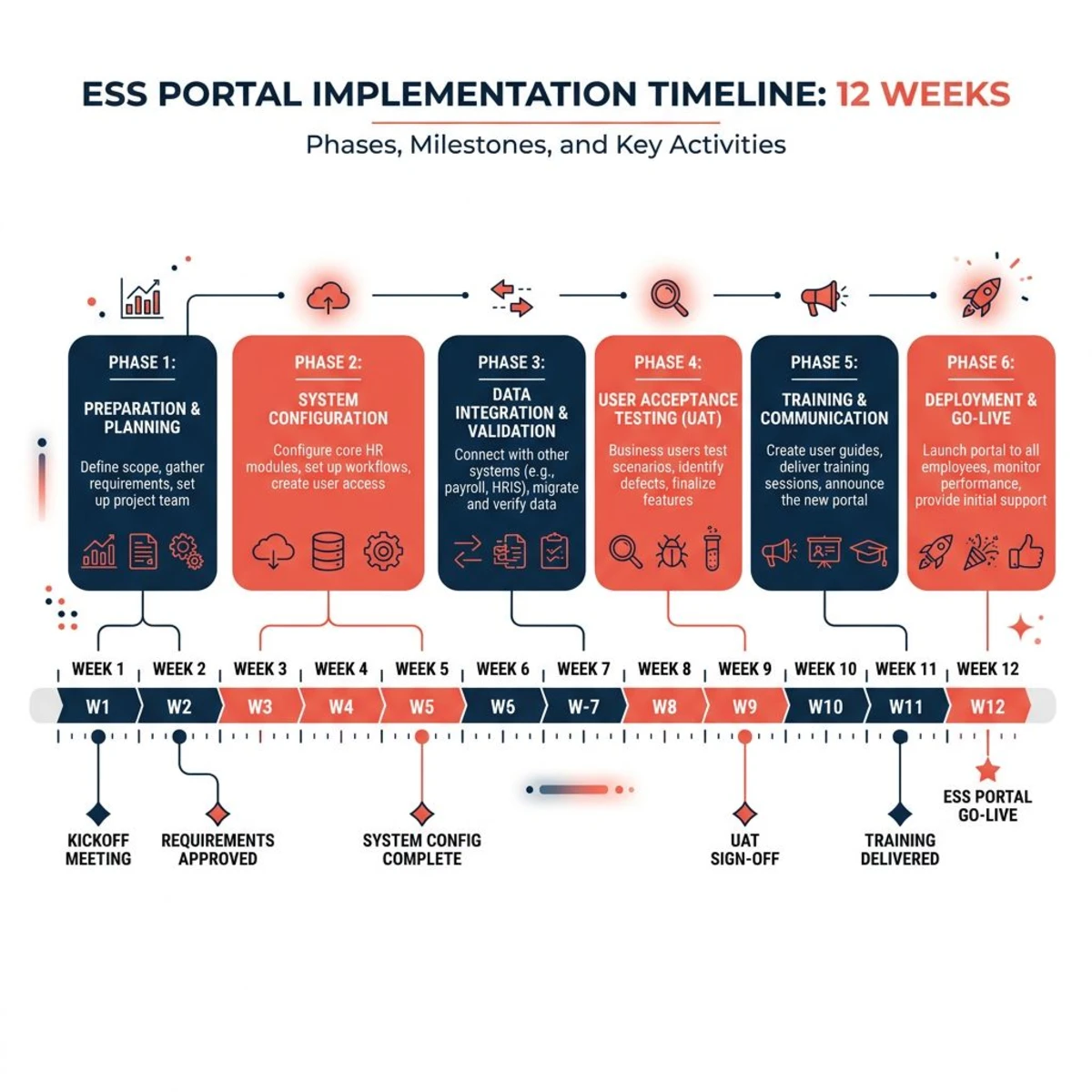
Typical Timeline:
- Weeks 1-2: System setup, data migration, admin training
- Week 3: Manager training and pilot group testing
- Week 4: Company-wide rollout with training sessions
- Weeks 5-12: Support period, optimization, and full implementation review
ESS Portal Best Practices
Driving Employee Adoption
Explain benefits to employees in terms they care about — emphasize convenience, faster response times, and 24/7 access rather than cost savings for the business. Create simple visual guides where common tasks take 2-3 clicks. Roll out core functionality first, then gradually introduce advanced features as users become comfortable.
Schedule quarterly "lunch and learn" sessions covering new features, addressing common questions, and sharing success stories from within the team.
Measure what matters: Track login frequency, feature adoption rates, and the volume of manual HR requests that should now be self-service. If PTO requests are still coming via email three months after launch, that's a training gap — not a technology problem.
Maintaining Security
Require multi-factor authentication for portal access, especially for remote employees accessing personal financial information. Conduct quarterly access reviews and remove former employee access immediately upon departure. Train staff to recognize phishing attempts targeting their ESS login credentials.
Keeping Information Current
Send automated reminders asking employees to review and update personal information periodically — especially before open enrollment periods. Regularly test integrations between the ESS portal and other business systems to catch synchronization issues early. When company policies change, update portal content immediately and notify affected employees through the system.
Frequently Asked Questions
What does ESS stand for in HR?
ESS stands for Employee Self-Service, referring to digital platforms that allow employees to handle routine HR tasks independently. ESS systems typically include personal information updates, time-off requests, document access, and company directory features.
What can employees do in a self-service portal?
Modern employee self-service portals let workers update personal information, request and track time off, access pay stubs and tax documents, view company policies, participate in performance reviews, and browse the company directory. Specific capabilities depend on the chosen platform and company configuration.
Is employee self-service portal software secure?
Reputable ESS platforms use enterprise-grade security measures including data encryption, multi-factor authentication, role-based access controls, and regular audits. Choose providers with SOC 2 compliance. Security also depends on proper implementation and ongoing management — check our HR compliance checklist for guidance on protecting employee data.
How much does an ESS portal cost?
Pricing ranges from $1-4 per employee per month for budget options to $8-15+ for comprehensive platforms. Tiny Team's current module pricing offers one-time lifetime access per organization, with a separate 30-day free trial for each module. No card or automatic charges.
Can small businesses benefit from ESS portals?
Absolutely. Small businesses often benefit more than large companies because they have limited HR resources. ESS portals can eliminate 60-80% of routine HR inquiries, letting owners and managers focus on strategic work rather than administrative tasks. Even teams of 10-15 employees see significant time savings and improved employee satisfaction.
Employee self-service portals shift HR from reactive administration to proactive employee empowerment. For small teams, they offer the opportunity to scale HR operations without proportional increases in administrative overhead.
Start by identifying your team's biggest HR administrative pain points, then evaluate ESS solutions that directly address those challenges. Most platforms offer free trials — take advantage of them to test real workflows before committing.
The investment in employee self-service capabilities typically pays for itself within 6-12 months through reduced administrative time and improved satisfaction. As your team grows, a well-implemented ESS portal becomes the backbone of your HR operations.