Best Customer Feedback Tools for Small Business (2026): 10 Tools Compared
Customer feedback tools help a business collect, organize and act on what its customers say. For a small SaaS or product team, the main jobs are a voting board for feature requests, a public roadmap, a changelog that tells users what shipped, and short in-app surveys such as NPS and CSAT. Most teams need two or three of these.
Search for the best customer feedback tools and most lists mix these jobs with survey platforms, review sites, bug reporters and enterprise suites. Pricing is just as mixed: some vendors bill by tracked users, others by seats, survey responses, monthly active users or a flat plan. This guide sorts 10 tools by the job they do, explains each pricing model and dates every price.
Quick Picks: The Best Customer Feedback Tools at a Glance
- Canny: AI feedback capture and deep integrations.
- Featurebase: feedback boards plus a help desk in one product.
- Frill: a flat monthly price with unlimited admins.
- Nolt: unlimited users on a plan priced by boards.
- Upvoty: a low-cost board with unlimited tracked users.
- Survicate: multichannel surveys and feedback analysis.
- Refiner: in-app microsurveys priced by active users.
- Beamer: in-app changelog announcements.
- AnnounceKit: buy only the products you need.
- Tiny Team Feedback: boards, roadmap, changelog and surveys with organization-wide module pricing.
Types of Customer Feedback Tools (and Which Ones Small Teams Need)
A customer feedback management system is the set of tools a team uses to collect, organize, decide on and announce feedback. For most small product teams, that system has four parts.
Feature voting boards and public roadmaps
A voting board gives customers one place to post ideas, vote on them and comment. Your team sets a status on each request, such as planned or in progress. A public roadmap then shows those statuses in columns.
Votes show demand at a glance, and the roadmap answers "is this coming?" before anyone asks. Canny, Featurebase, Frill, Nolt and Upvoty start here.
Changelogs and product update tools
A changelog tells users what shipped. The good ones link each release note to the requests it solves, so the people who asked hear about it.
That last step is often called closing the loop. Beamer and AnnounceKit are changelog-first tools, and several voting boards include a simpler changelog of their own.
In-app and website survey tools
Survey tools show short questions inside your product or on your website. The common ones are NPS, CSAT, customer effort and product-market fit surveys. Survicate and Refiner are built for this job.
Net Promoter Score asks how likely a customer is to recommend you on a 0 to 10 scale. It then subtracts the share of detractors (0 to 6) from the share of promoters (9 or 10), as Bain's guide to measuring NPS explains.
Customer effort score asks how easy it was to get something done. The idea comes from the 2010 Harvard Business Review article "Stop Trying to Delight Your Customers". CSAT simply asks how satisfied someone was, often on a 1 to 5 scale.
Survey platforms, VoC suites and other jobs
Many lists of customer feedback tools also include tools that do a different job:
- Survey platforms and form builders such as SurveyMonkey, Typeform and Google Forms, for research and email surveys.
- Voice-of-customer suites such as Qualtrics and Medallia, for large CX programs across many channels.
- Help desk and CRM feedback from tools such as HubSpot and Zendesk.
- Review platforms such as Trustpilot and G2.
- Visual bug reporting tools such as Usersnap and BugHerd.
This guide leaves those jobs out and sticks to boards, roadmaps, changelogs and in-app surveys. If you need email surveys, review collection or a bug reporter, shortlist from those categories instead.
Want feedback from your own staff rather than from customers? That is a separate job, covered in this guide to feedback tools for your own team.
Most small teams start with a board plus a changelog, then add surveys once they have steady traffic.

Customer Feedback Tools Compared
The table compares all 10 tools on pricing model, free options and the four core jobs. Prices were checked on each vendor's pricing page on November 10, 2026.
| Tool | Main job | Pricing model | Paid plans from (as of November 2026) | Free plan | Board and roadmap | Changelog | Surveys | AI features | Integrations or API |
|---|---|---|---|---|---|---|---|---|---|
| Canny | Voting board, roadmap and changelog | Per tracked user | Pro from $79 a month, billed yearly | Yes (25 tracked users) | Yes | Yes | Not listed | Yes | Yes |
| Featurebase | Feedback plus a help desk | Per seat, plus an AI fee per resolution | Growth $29 per seat a month, billed yearly | Yes (1 seat) | Yes | Yes | Yes (500 shows a month on Free) | Yes | Yes |
| Frill | Voting board, roadmap and changelog | Flat plans with idea and survey limits | Startup $25 a month, billed monthly | No (14-day trial) | Yes | Yes | Yes | Yes | Yes |
| Nolt | Voting board, roadmap and changelog | Flat plans by number of boards | Essential $29 a month, billed annually ($39 monthly) | No (10-day trial) | Yes | Yes | Not listed | Yes | Yes |
| Upvoty | Low-cost voting board | Flat monthly price per project | Power $15 a month, billed monthly | No (14-day trial) | Yes | Yes (from Super) | Not listed | Yes | Yes (from Super) |
| Survicate | Multichannel surveys | Per survey response | Growth $56 a month, billed annually (100 responses) | Yes (25 responses a month) | Not listed | Not listed | Yes | Yes | Yes |
| Refiner | In-app microsurveys | Per monthly active user | Essentials $149 a month for 5,000 MAU, billed monthly | Yes (25 responses a month) | Not listed | Not listed | Yes | Yes | Yes |
| Beamer | In-app changelog | Per monthly active user, plus add-ons | Starter $49 a month for 5,000 MAU, billed yearly | Yes (under 1,000 MAU) | Yes (free public tier; Pro add-on) | Yes | NPS (free up to 500 a month; Pro add-on) | Not listed | Yes |
| AnnounceKit | Changelog plus optional products | Per product, prices add up | Changelog $59 a month, billed monthly ($49 billed annually) | No (15-day trial) | Yes (separate product) | Yes | NPS product | Yes | Yes |
| Tiny Team Feedback | Boards, roadmap, changelog and surveys | Per-module plan for the organization | Per-module pricing; see current prices | See current module plans | Yes | Yes | Yes | No | No |
Read the pricing model column before the price column. A low entry price can climb fast when the bill follows voters, responses or active users. A flat plan stays put until you hit a plan limit.
"Not listed" means the vendor's own pages did not confirm the feature on the day of the check. Ask the vendor if it matters to you.
How These Tools Were Compared
Each tool was compared on which feedback jobs it covers (board, roadmap, changelog and surveys) and on how its price grows: by tracked users, seats, responses, active users, boards or products.
The comparison also looked at free plans and trials, AI features, integrations, single sign-on and fit for teams of 5 to 100 people. Prices and plan limits were checked on each vendor's pricing page on November 10, 2026.
No tool was tested hands-on. The comparison uses public pricing pages, feature pages and help docs, and it gives no ratings or scores.
The 10 Best Customer Feedback Tools for Small Business
1. Canny: Best for AI Feedback Capture and Deep Integrations
Type: Voting board.
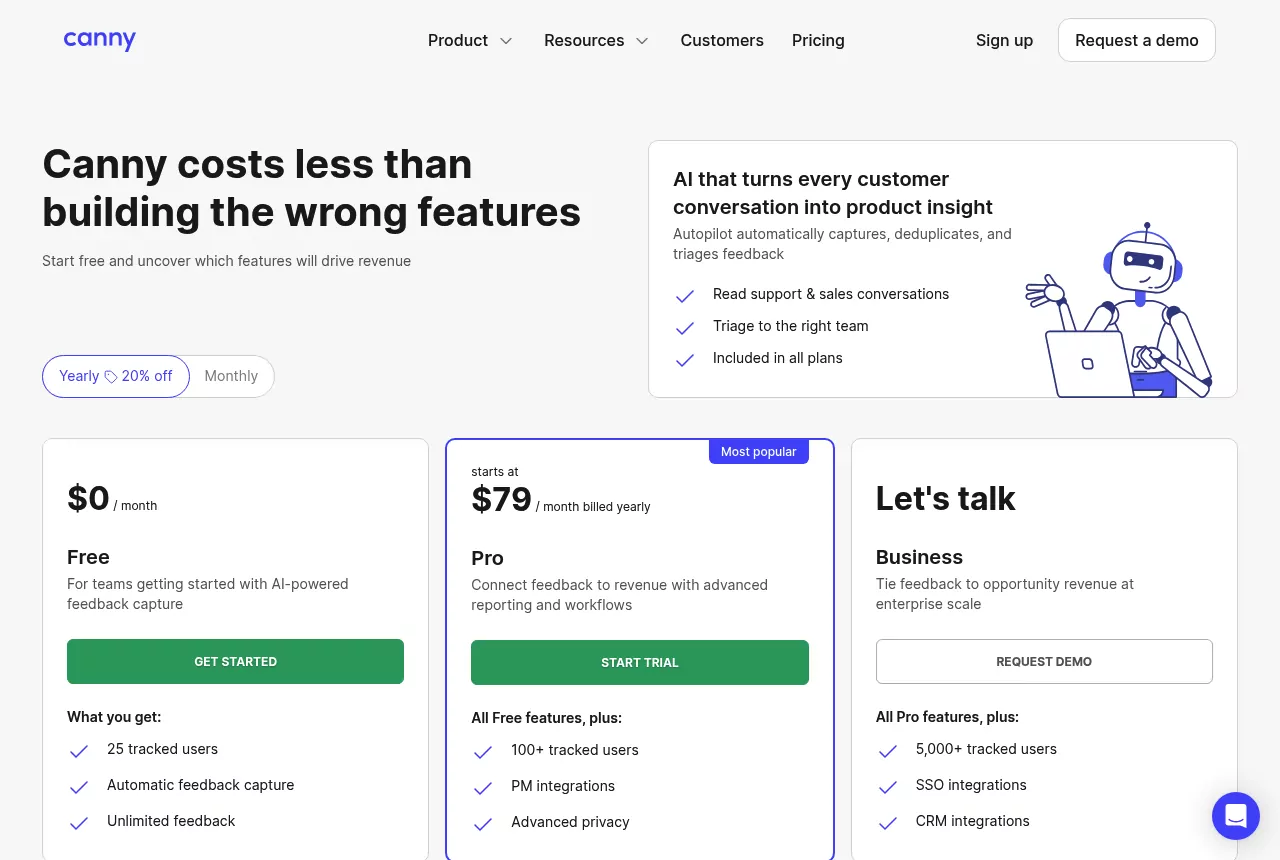
Canny is a feedback board with a roadmap and a changelog, sold as AI feedback software. Its Autopilot AI reads support and sales conversations and pulls feature requests out of them.
Key features:
- Feedback boards, a public roadmap and a changelog.
- Autopilot, on every plan, captures feedback from Intercom, Zendesk, Gong, Zoom and more, then removes duplicates and triages it.
- Portal basics such as status updates, single sign-on, voting on behalf of users, tags and a widget.
- Project management integrations such as Jira, Linear, ClickUp and GitHub on Pro, plus HubSpot and Salesforce on Business.
Pricing: Canny charges by tracked users. A tracked user is anyone who posts, votes or comments, even when an admin or Autopilot does it for them.
As of November 2026, Canny's pricing page lists Free at $0 for 25 tracked users and Pro from $79 a month billed yearly for up to 100 tracked users, rising in published steps. Tracked users don't reset each month.
Business starts at 5,000 tracked users and is priced on request. If you pass a limit without a spend cap, Canny moves you to the next tier.
Pros:
- AI capture from support and sales tools is included on every plan, even Free.
- Deep integrations for project management, and CRM on Business.
- A free plan to start, plus a monthly spend limit you can set.
Where it falls short:
- Cost follows customer engagement, not team size. More voters means a higher tier.
- Customers that Autopilot finds in your tools also count as tracked users.
- CRM integrations and single sign-on integrations such as Okta and Entra ID sit on Business.
Best for: teams that get most feedback through support and sales tools and want AI to collect it.
The Canny pricing guide shows how tracked users add up, and these Canny alternatives use other models.
2. Featurebase: Best for Feedback and a Help Desk in One Tool
Type: Voting board.
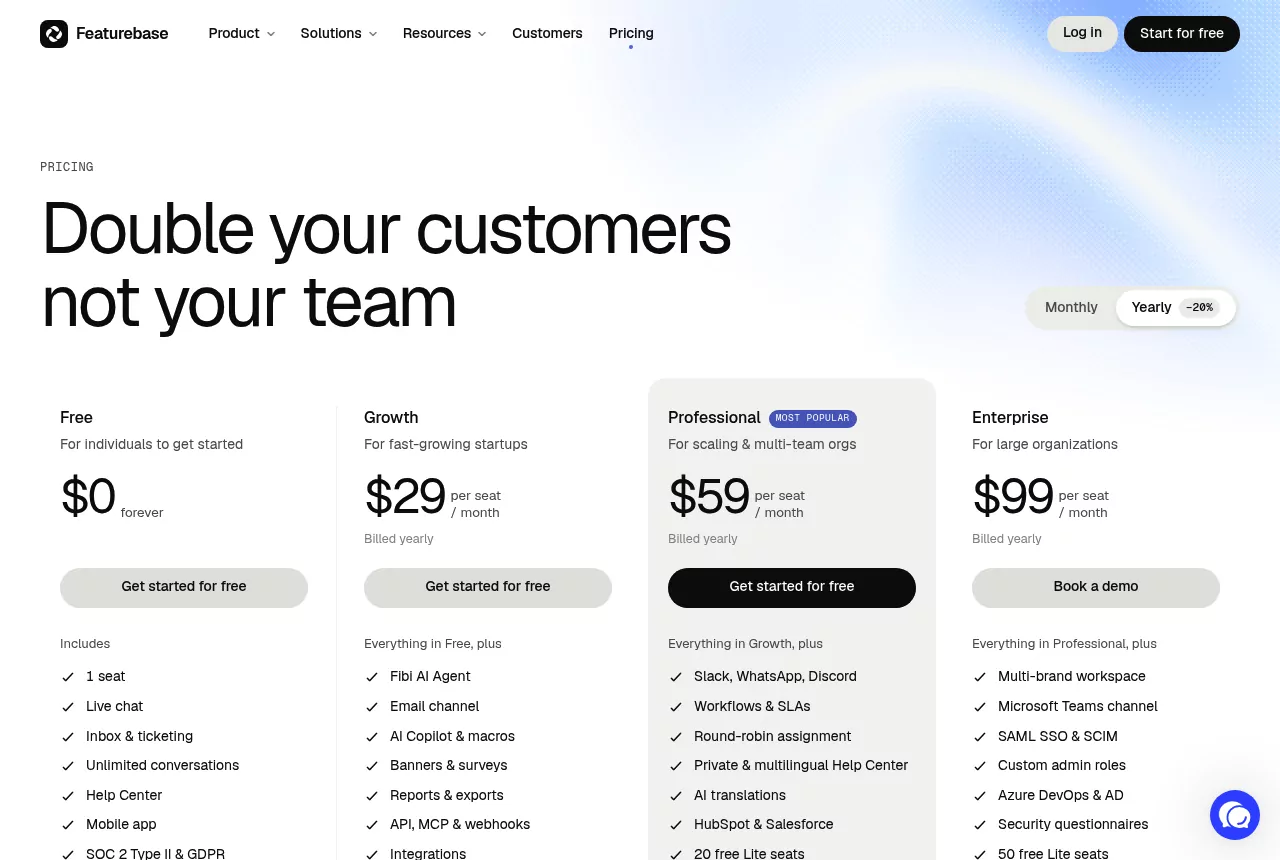
Featurebase started as a feedback board and now sells help desk tools too. Its pricing page leads with live chat, ticketing and a help center, with feedback boards, roadmaps and a changelog in its feature table.
Key features:
- Feedback boards and roadmaps: 1 of each on Free, 5 on Growth and 10 on Professional.
- A public changelog and banners on every plan, plus NPS and CSAT surveys (500 shows a month on Free, more on paid plans).
- AI duplicate detection and tagging for feedback, plus the Fibi AI agent for support chats.
- API, webhooks and integrations from Growth, with HubSpot and Salesforce from Professional.
Pricing: Featurebase charges per seat. As of November 2026, its pricing page lists Free at $0 for 1 seat. Growth is $29, Professional $59 and Enterprise $99 per seat per month, billed yearly.
The Fibi AI agent adds $0.49 for each conversation it fully resolves. Outbound email is free up to 5,000, then usage-based. Paid plans have a 10-day free trial with no credit card.
Pros:
- A real free plan for a solo founder.
- Support and feedback in one product.
- AI tools, an API and integrations from the first paid plan.
Where it falls short:
- Per-seat pricing plus usage fees for AI resolutions and extra email.
- Help desk features that a board-only team may never use.
- Board and roadmap counts are capped on each plan below Enterprise.
Best for: teams that want feedback boards and customer support in one tool.
See the Featurebase pricing breakdown for seats, AI fees and plan limits.
3. Frill: Best Flat Monthly Price With Unlimited Admins
Type: Voting board.
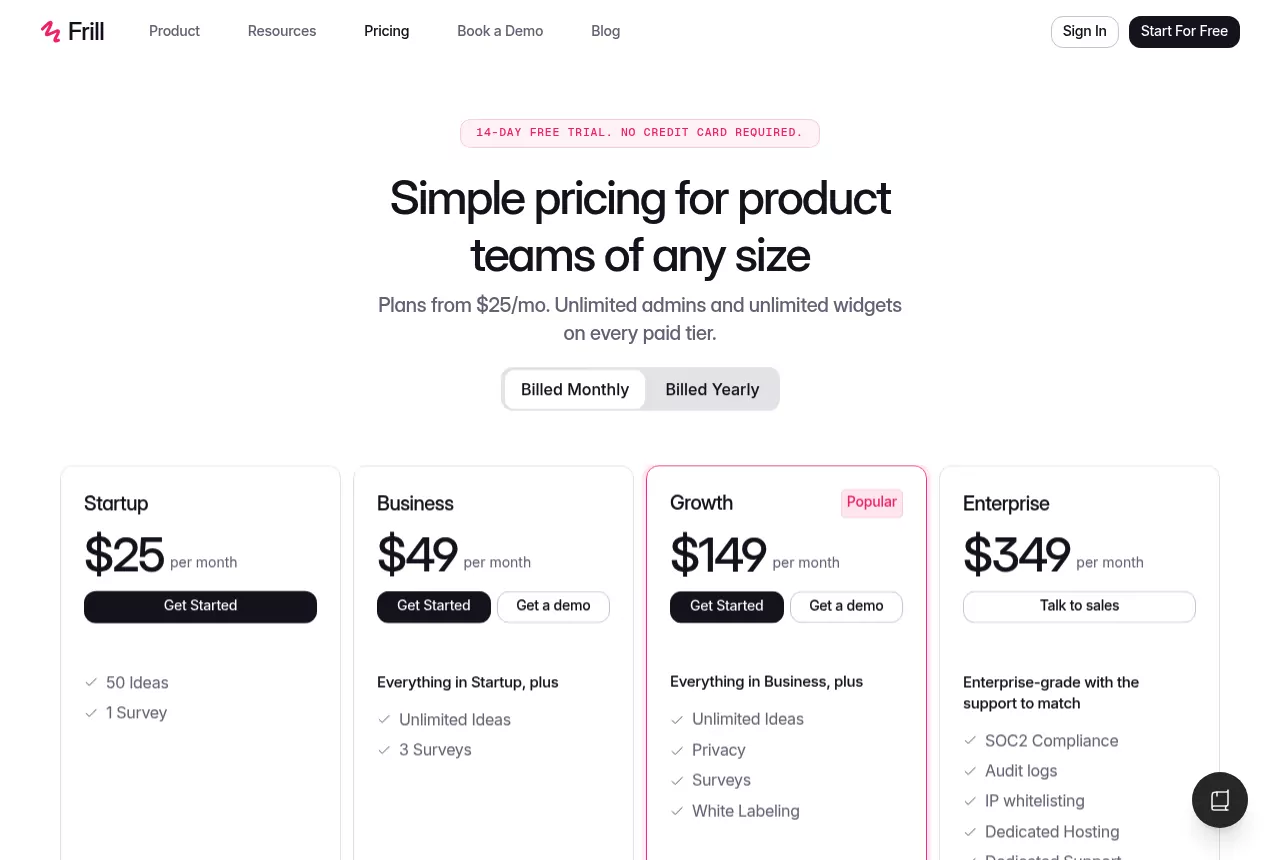
Frill is a feedback tool with one board split into topics, a roadmap, a changelog it calls Announcements, and surveys. Every paid plan includes unlimited admins and unlimited widgets.
Key features:
- An ideas board with topics, voting, a drag and drop roadmap and scheduled announcements.
- NPS, CSAT, open feedback and poll surveys embedded in your product.
- Single sign-on, webhooks, a developer API, a custom domain and translations.
- A priority matrix, similar idea detection, voting on behalf, CSV import and export, and a Canny importer.
Pricing: Frill sells flat monthly plans with limits on ideas and surveys. As of November 2026, its pricing page lists Startup at $25 a month (50 ideas, 1 survey) and Business at $49 (unlimited ideas, 3 surveys). Growth is $149 and Enterprise $349 a month, all billed monthly.
The 14-day trial needs no credit card, and there is no free plan.
Pros:
- The price doesn't grow with admins or tracked users.
- Changelog and surveys are part of the product, not separate tools.
- Admin extras such as a priority matrix and import from Canny.
Where it falls short:
- Startup caps active ideas at 50 and surveys at 1.
- Privacy features and white labeling sit on Growth or cost extra as add-ons.
Best for: teams that want a predictable monthly bill and room for several admins.
See the Frill pricing guide for what each plan and add-on includes.
4. Nolt: Best for Unlimited Users on a Per-Board Plan
Type: Voting board.
Nolt is a feedback board with a roadmap and a changelog. Every plan includes unlimited users, unlimited content and unlimited admins, so the price follows the number of boards.
Key features:
- Boards with custom statuses, custom fields and private boards, plus a roadmap.
- A changelog with AI drafts from completed requests or GitHub commits, scheduling and email updates.
- JWT single sign-on and Slack, Discord, GitHub and Trello integrations on the entry plan.
- Jira, Linear, Intercom and Zapier integrations, data export APIs, moderation and password-protected boards on Pro.
Pricing: As of November 2026, Nolt's pricing page lists Essential at $29 a month billed annually ($348 a year), or $39 month to month, for 1 board. Pro is $69 a month billed annually ($828 a year), or $89 month to month, for 5 boards.
Enterprise adds unlimited boards and SAML single sign-on at a custom price. New boards start with a 10-day Pro trial, with no credit card.
Pros:
- No seat, admin or voter fees on any plan.
- Single sign-on on the entry plan.
Where it falls short:
- Only 1 board on Essential.
- Jira, Linear and Zapier start on Pro.
- No free plan, and no survey tool on its pricing page.
Best for: teams that want unlimited users and admins on a predictable plan.
5. Upvoty: Best Low-Cost Voting Board With Unlimited Tracked Users
Type: Voting board.
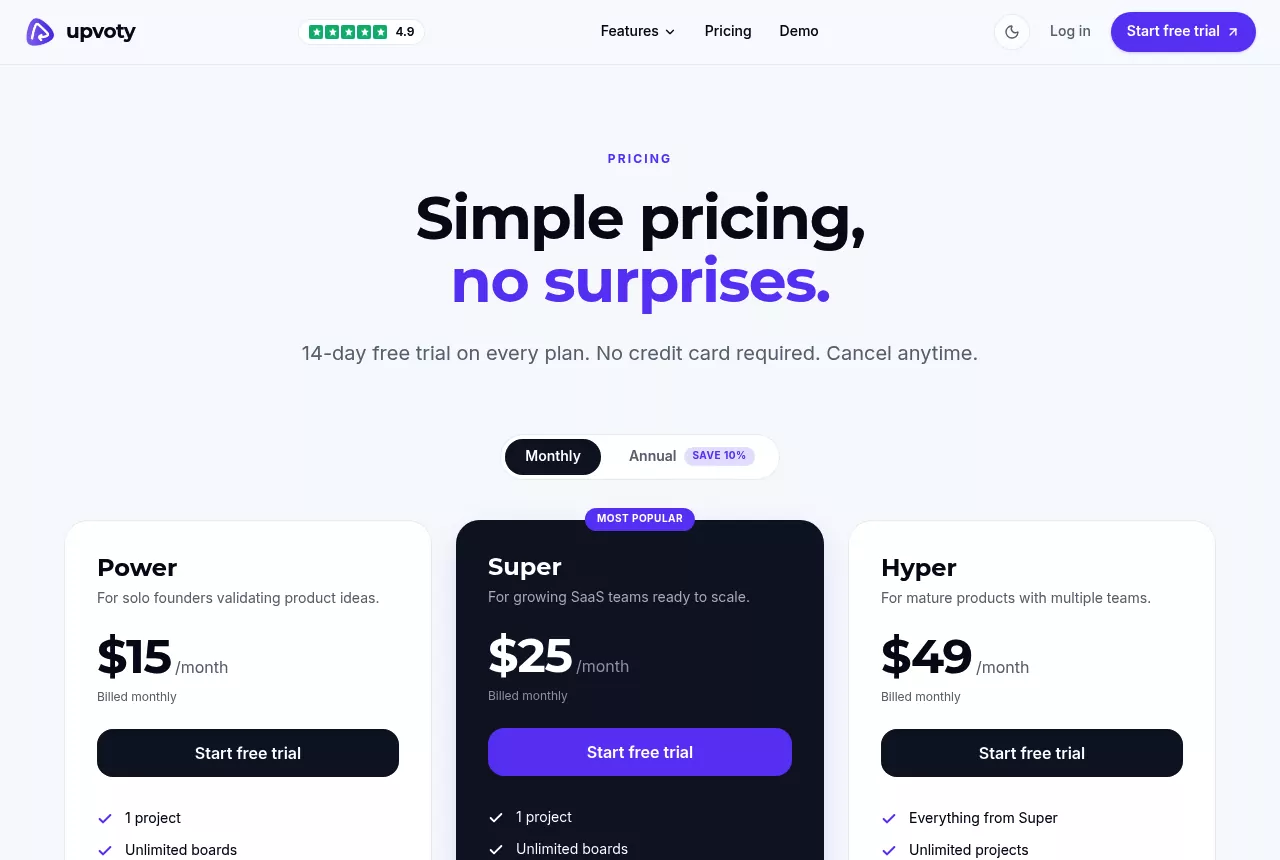
Upvoty is a voting board with a public roadmap and a changelog, sold at a flat monthly price per project. Every plan includes unlimited boards and tracked users.
Key features:
- Boards, a public roadmap, custom branding and a custom domain on every plan.
- A changelog and all integrations, such as Slack, Jira, Intercom and Zapier, from Super.
- Merge AI, which detects and merges duplicate posts.
- Single sign-on, SAML, an API, webhooks and unlimited projects on Hyper.
Pricing: As of November 2026, Upvoty's pricing page lists Power at $15, Super at $25 and Hyper at $49 a month, billed monthly. Annual billing saves 10 percent. Every plan has a 14-day free trial with no credit card, and there is no free plan.
Pros:
- A low entry price, and the bill doesn't grow with voters.
- A custom domain even on the cheapest plan.
Where it falls short:
- The changelog and integrations start on Super.
- Single sign-on and the API are only on Hyper.
- One project per plan below Hyper.
Best for: early-stage teams that want a cheap, simple board that won't cost more as voters grow.
The Upvoty pricing guide compares the three plans line by line.
6. Survicate: Best for Multichannel Surveys and Feedback Analysis
Type: Survey tool.
Survicate is a survey and feedback analysis platform. It runs surveys on your website, inside your product, by link and by email, then helps you sort the answers.
Key features:
- Website, in-product, link and email surveys, with built-in email sending.
- Multilingual surveys and custom branding.
- A Research Hub and an AI agent that help analyze answers.
- More than 25 integrations on Growth and more than 40 on Pro.
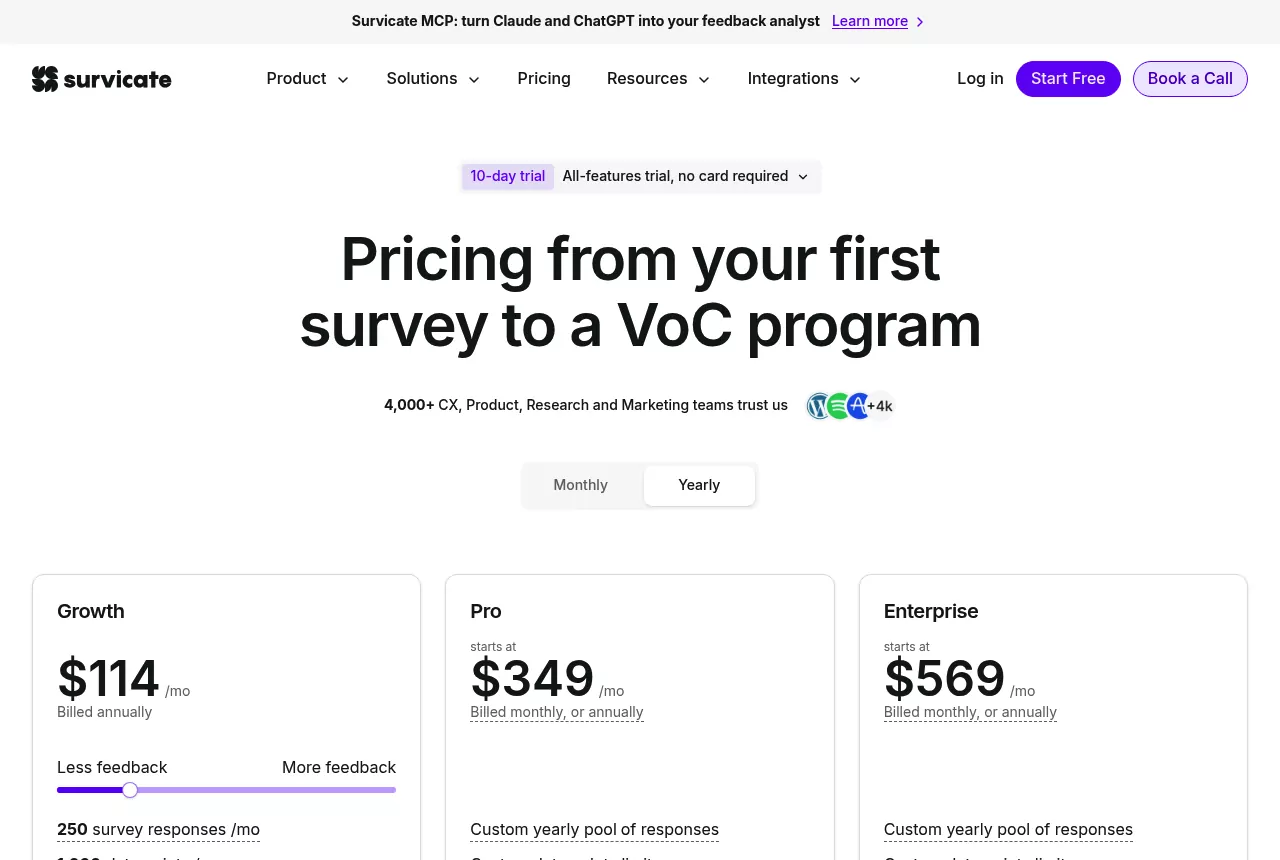
Pricing: Survicate charges by survey responses. As of November 2026, its pricing page shows Growth at $114 a month billed annually for 250 responses a month, with 10 user seats. Its listed Growth tiers run from $56 a month for 100 responses to $289 for 1,500, billed annually.
Pro starts at $349 and Enterprise at $569 a month. A free plan allows 25 responses a month with one active survey, and the 10-day trial needs no card.
Pros:
- One tool for email, link, website and in-app surveys.
- AI analysis is built in.
- A free plan for very light use.
Where it falls short:
- It is built around surveys. Its plans list no voting board, roadmap or changelog, so those need a second tool.
- Cost rises with response volume.
- Advanced survey logic starts on Pro.
Best for: teams that want NPS, CSAT and research surveys across many channels.
Read the Survicate pricing guide to see how response tiers change the price.
7. Refiner: Best for In-App Microsurveys Priced by Active Users
Type: Survey tool.
Refiner is a microsurvey tool for SaaS products. It shows short surveys inside web and mobile apps, and it also runs website popups, email surveys and survey pages.
Key features:
- NPS, CSAT, customer effort and product-market fit templates.
- Survey logic, user segments and reporting dashboards.
- AI response tagging, plus Slack, Teams and email alerts.
- On Growth: multilingual surveys, CRM, CDP and analytics integrations, a REST API and webhooks.
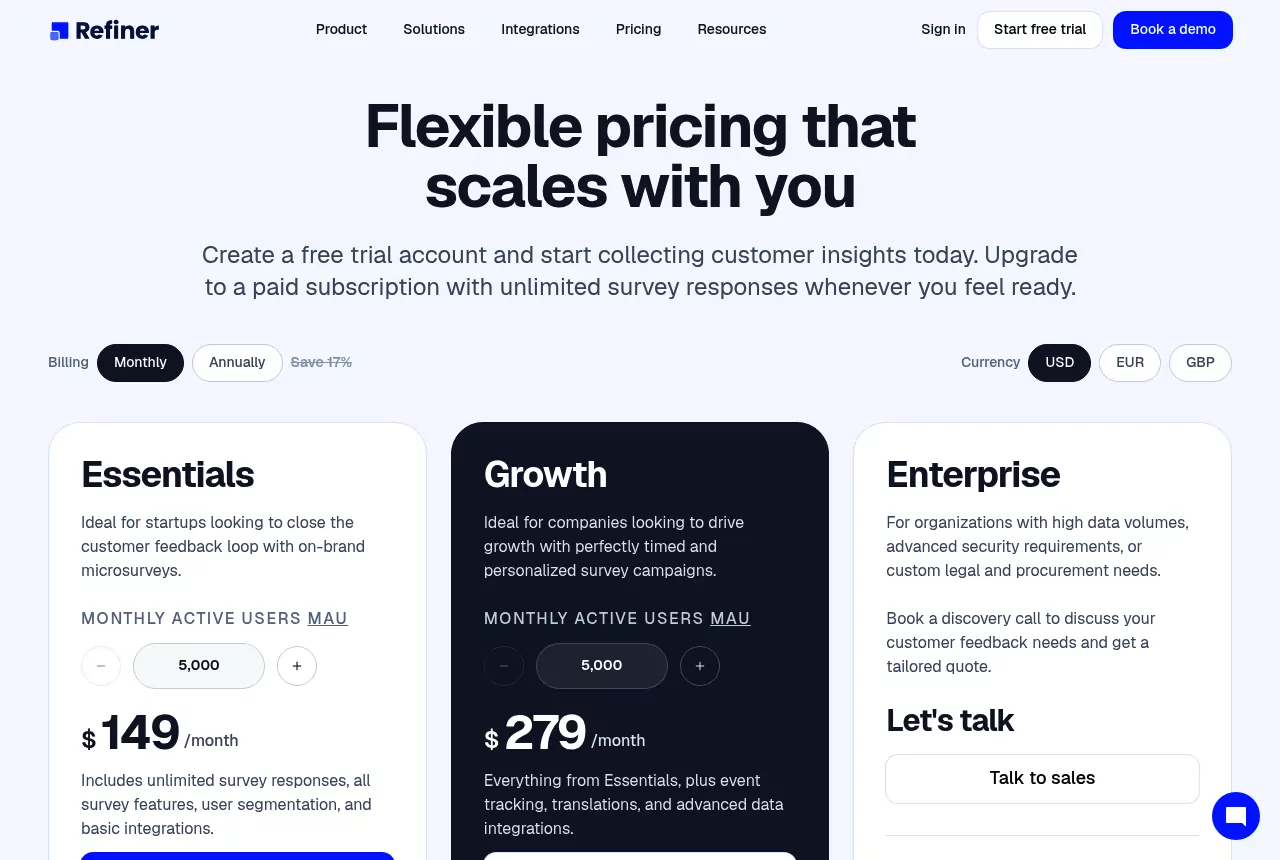
Pricing: Refiner charges by monthly active users, with unlimited survey responses on paid plans. As of November 2026, its pricing page lists Essentials at $149 and Growth at $279 a month for 5,000 monthly active users, billed monthly.
Annual billing saves about 17 percent; Essentials at that level is $1,490 a year. The 30-day trial is capped at 100 responses. After it, a free plan allows 25 responses a month.
Pros:
- Unlimited responses and team members on paid plans.
- Surveys inside mobile apps as well as web apps.
Where it falls short:
- The smallest paid tier starts at 5,000 monthly active users.
- It is built around surveys. Its plans list no voting board, roadmap or changelog.
- Translations, CRM integrations and the API start on Growth.
Best for: SaaS teams that want in-app NPS and CSAT and know their active user count.
8. Beamer: Best for In-App Changelog Announcements
Type: Changelog tool.
Beamer is a changelog and announcement tool. It shows product updates in an in-app widget and on a standalone page, and it is now one team with the onboarding tool Userflow.
Key features:
- An in-app and standalone changelog with boosted announcements and analytics.
- Comments, reactions and basic segmentation from Pro.
- Feedback (ideas, voting and a roadmap) and NPS as separate products, each with a free tier and a paid add-on.
- An API, webhooks and Zapier for integrations.
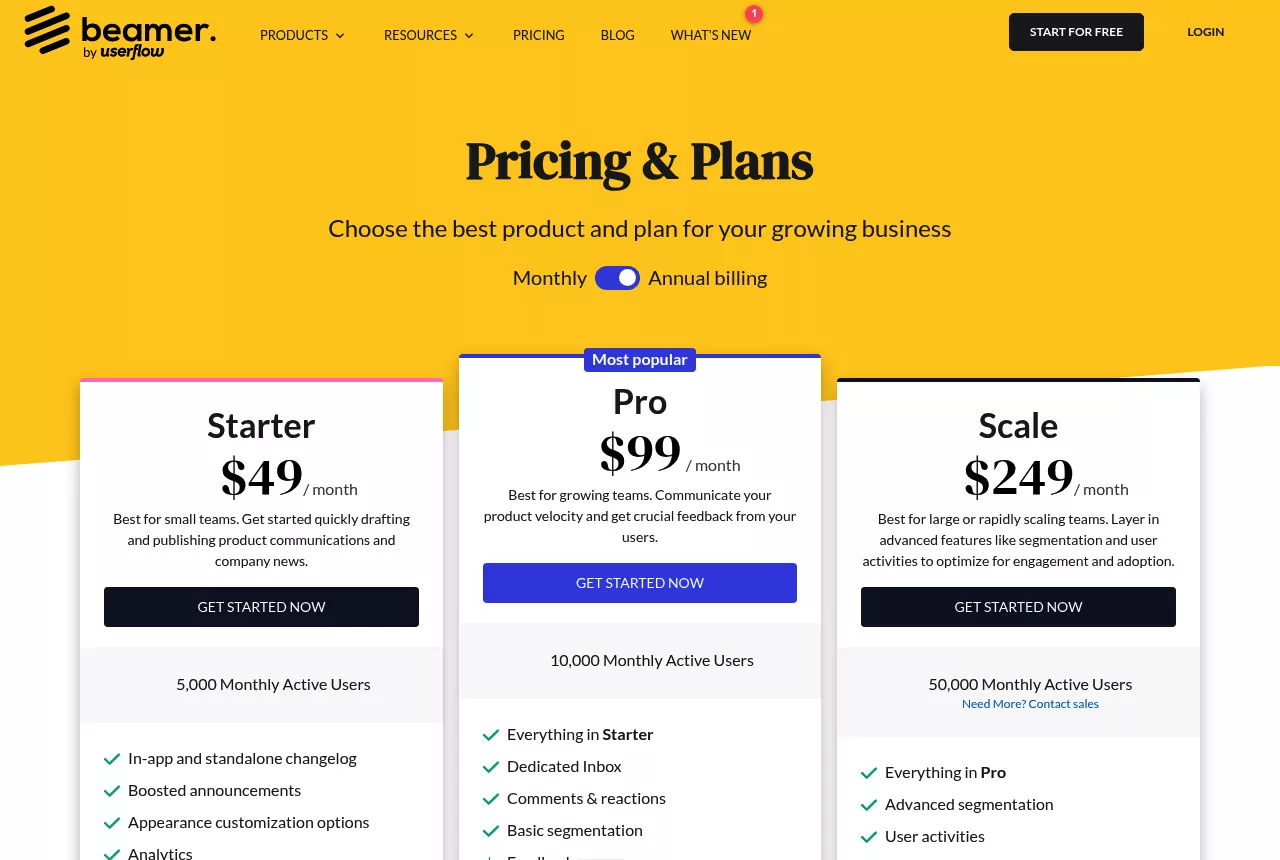
Pricing: Beamer charges by monthly active users. As of November 2026, its pricing page lists a Free plan under 1,000 MAU and Starter at $49 a month billed yearly ($59 monthly) for 5,000 MAU. Pro is $99 yearly ($119 monthly) for 10,000 MAU, and Scale is $249 yearly ($299 monthly) for 50,000 MAU.
Feedback Pro is $99 a month billed yearly ($119 monthly), and NPS Pro is $99 a month. If you pass your plan's MAU, Beamer adds blocks of 5,000 MAU at $50 a month.
Pros:
- In-app announcements, its main job, including popups and top bars.
- A free plan for small audiences.
- Ideas, a roadmap and NPS are available in the same account.
Where it falls short:
- Private boards, moderation, segmentation and larger NPS volumes need Pro add-ons on top of the changelog plan.
- Extra active users are billed automatically.
Best for: teams whose main job is telling users what shipped, right inside the app.
The Beamer pricing guide covers the add-ons and MAU tiers in full.
9. AnnounceKit: Best for Buying Only the Feedback Pieces You Need
Type: Changelog tool.
AnnounceKit sells separate products that you combine: a changelog, feature requests with a roadmap, NPS surveys, a knowledge base, in-app notifications and product tours. Each one works alone, and the prices add up.
Key features:
- A changelog with an AI-assisted editor, a standalone page, widgets, scheduling, comments and reactions.
- Feature Requests and Roadmap: boards, voting, a public roadmap, Jira sync and internal notes.
- NPS surveys with targeting and unlimited surveys and responses.
- A GraphQL API, webhooks, Zapier and Slack included with every product.
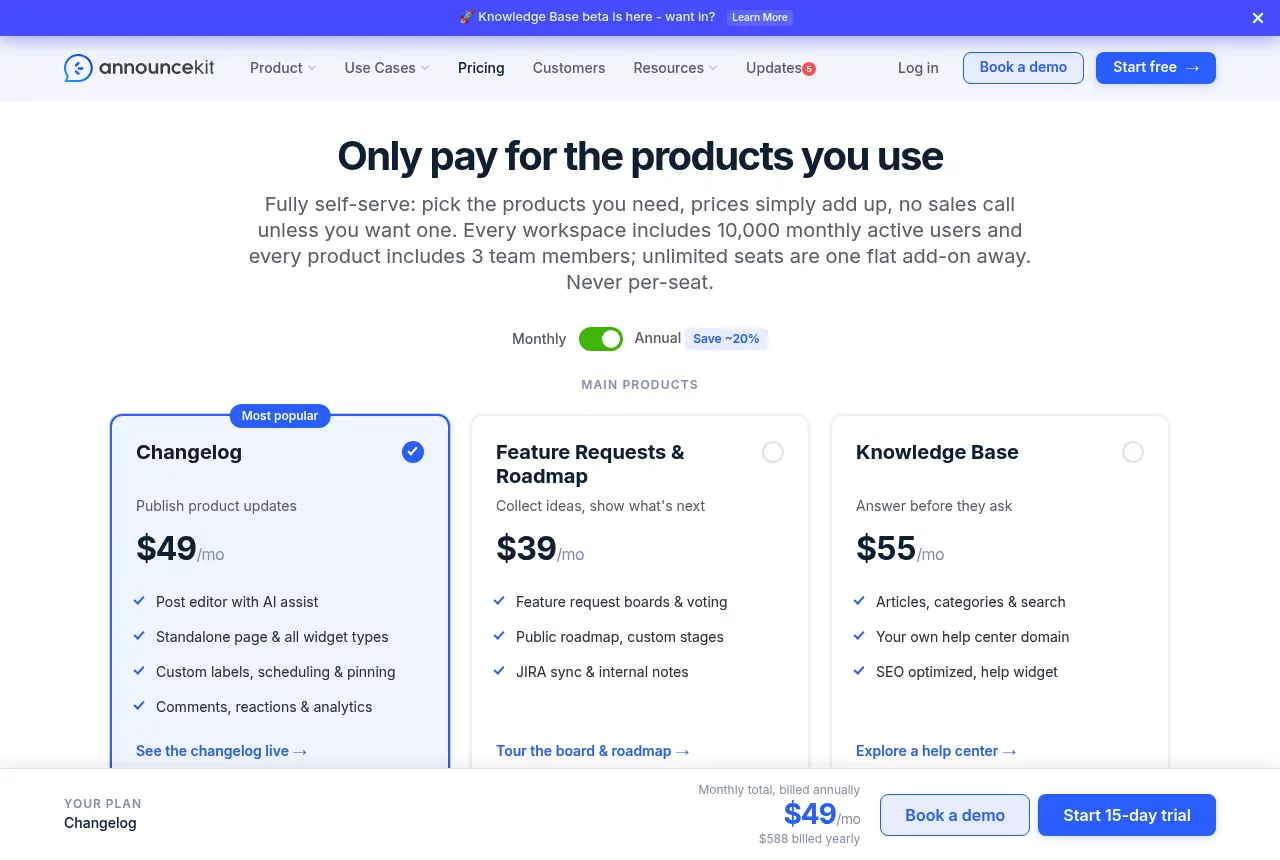
Pricing: AnnounceKit prices each product on its own. Every workspace includes 10,000 monthly active users, and each product includes 3 team members.
As of November 2026, its pricing page lists Changelog at $59, Feature Requests and Roadmap at $49 and NPS at $59 a month, billed monthly. Billed annually, Changelog drops to $49 and Feature Requests to $39 a month.
Add-ons such as email, branding, JWT login and SAML single sign-on run from $29 to $99 a month. Extra users cost $25 per 5,000 MAU, and Enterprise starts at $799 a month. The 15-day trial needs no credit card.
Pros:
- You pay only for the pieces you use.
- API, webhooks and Zapier are included, not paywalled.
- No per-seat pricing.
Where it falls short:
- The total climbs as products and add-ons stack up.
- Only 3 team members per product unless you buy the $39 unlimited team add-on.
- No free plan after the trial.
Best for: teams that want a changelog first and may add a board or NPS later.
10. Tiny Team Feedback: Best for Boards, a Changelog and Surveys in One Module
Type: Boards, changelog and surveys.
Tiny Team's Feedback module is a web app for customer, user and product feedback. It puts voting boards, a roadmap, a changelog and surveys on one public portal.

Key features:
- As many boards as you need, each private or public on the portal. Customers post, vote and comment after verifying their email, with no password or account.
- Each board has its own workflow of 1 to 20 statuses, with threaded comments and internal notes customers never see. Duplicates are merged by hand; votes, comments and subscribers move over.
- A board-by-board roadmap built from your statuses, with drag and drop. Customers see a read-only roadmap of public boards.
- A changelog with New, Improved and Fixed categories, drafts, scheduling and linked requests. Publishing can mark linked requests completed and email subscribers, and voters are emailed when a status changes.
- Surveys with ten question types, including NPS (0 to 10), CSAT (1 to 5), customer effort (1 to 7) and product-market fit, up to 20 questions each. Share them as a portal link or a website popup targeted by page path (popups take anonymous answers only).
- A portal with your name, logo and colors that can run on your own subdomain (an admin adds the DNS records shown). An embeddable widget shows a board, the roadmap or the changelog on your site: you paste one script tag into your site.
Pricing: a module plan for the whole organization, with no per-seat, per-tracked-user or per-voter fees. Review current prices, payment timing and renewal terms before paying.
Read the 60-day money-back guarantee terms to see which payments are covered.
Pros:
- No per-voter, per-response or per-seat fees.
- Boards, a roadmap, a changelog and NPS or CSAT surveys in one module.
- A branded portal on your own subdomain, plus an embeddable widget.
Where it falls short:
- No AI of any kind, so duplicates are merged by hand.
- No integrations (Jira, Linear, Slack, Intercom, Zapier or others), no webhooks and no public API.
- No single sign-on or identification of logged-in users; customers verify by email.
- No revenue weighting, prioritization scoring, tags, assignees or custom fields.
- No import or export, so there is no migration from another tool.
- No moderation queue, multi-language portal, voting on behalf of customers or team alerts for new feedback.
- No survey branching, email surveys, NPS trends over time or mobile SDK. It doesn't replace heatmaps, session recordings or visual bug reporting.
Best for: small teams that want feature voting, a roadmap, a changelog and NPS or CSAT surveys on one portal, with no per-seat fees, and that can work without integrations or AI.
Also Worth a Look: Sleekplan, UserJot, FeatureOS and Fider
Sleekplan combines a feedback board, a changelog, a roadmap and CSAT and NPS surveys. It is priced per workspace, with a free single-admin Indie plan. As of November 2026, Starter is $13 and Business $38 a month, billed yearly.
The Sleekplan pricing guide covers its seats, AI credits and plan limits.
UserJot offers feedback boards, a public roadmap and a public changelog, with unlimited users and posts on every plan. Its Free plan includes 2 boards, and as of November 2026 Starter is $29 and Professional $59 a month. The UserJot pricing breakdown shows what each plan adds.
FeatureOS bundles boards, roadmaps, changelogs and a knowledge base, with AI features, a prioritization matrix and Jira and Linear integrations. Plans charge for team seats, not end users. As of November 2026, Starter is $50 a month billed annually for 5 seats and 5 boards.
Fider is an open source voting board under the AGPL-3.0 license. You can self-host it for free, which means running the server, updates and backups yourself. As of November 2026, its hosted version is free within a fair-use limit of 250 feedback items, and a Pro plan costs $25 a month.
When You Need More Than a Feedback Tool: Productboard, UserVoice and Jira Product Discovery
Some teams need prioritization scoring, revenue weighting or product discovery inside Jira. That is a different, heavier job than the 10 tools above.
Productboard is a product management suite priced per maker, now sold with an AI agent. Its pricing page shows Business and Enterprise plans by demo, with no prices. The Productboard pricing guide explains the plans, and these Productboard alternatives cover lighter options.
UserVoice is enterprise feedback management. As of November 2026, its pricing page lists Launch from $1,000 a month ($12,000 billed yearly) and Business from $1,833 a month, both by demo. The UserVoice pricing guide traces how its published prices have changed.
Jira Product Discovery is Atlassian's prioritization tool inside Jira, priced per creator. It is free for up to 3 creators, and Standard costs $10.50 per creator a month as of November 2026. See the Jira Product Discovery pricing guide for the full tiers.
Customer Feedback Software Pricing Models Explained
Per tracked user
Canny bills by tracked users: anyone who posts, votes or comments. The count builds up over time instead of resetting each month. A busy board means a bigger invoice, whatever your team size.
Per seat
Featurebase bills per seat, so cost follows the size of your team. Customers vote for free, but each teammate who manages feedback adds a seat. AI resolutions and extra outbound email can add usage fees on top.
Per survey response
Survicate bills by response volume. The more people answer, the higher the tier, so a successful NPS campaign can push you up a plan.
Per monthly active user
Refiner and Beamer bill by monthly active users, the people who use your product or see your widget in a month. AnnounceKit includes 10,000 active users per workspace and charges for blocks above that. The bill is easy to predict but grows with every new user, voter or not.
Flat plans by board, project or product
Frill, Upvoty and Nolt sell flat plans with limits on ideas, projects or boards. Voters and admins don't change the price, so the bill only moves when you outgrow a limit. AnnounceKit prices each product on its own, and the totals add up.
Organization-wide plans, self-hosting and one-time deals
Tiny Team Feedback offers a module plan for the whole organization, with no per-seat, per-tracked-user or per-voter fees. Fider is open source and free to self-host, which means running the server, updates and backups yourself. Some other feedback tools also sell one-time lifetime-deal plans from time to time.

Worked example: a 6-person SaaS team with 3,000 active users
Say 2 people manage feedback, and over time roughly 2 to 5 percent of users post, vote or comment. That is 60 to 150 people. Here is the entry plan that fits on each vendor's published prices as of November 2026:
- Canny: Pro (board, roadmap and changelog), since 60 to 150 tracked users is past the Free plan's 25. Pro is $79 a month billed yearly ($99 monthly) up to 100 tracked users and $129 ($161 monthly) up to 200, per Canny's billing plans.
- Featurebase: Growth (board, roadmap, changelog and surveys, plus a help desk) for 2 seats, $58 a month billed yearly ($29 per seat), plus $0.49 per resolution if you turn on the Fibi AI agent.
- Frill: Business (board, roadmap, changelog and 3 surveys) at $49 a month billed monthly, since a board for 3,000 users will likely pass Startup's 50 active ideas.
- Nolt: Essential (board and roadmap) at $29 a month billed annually ($39 month to month) for 1 board, with no charge for voters or admins.
- Upvoty: Super (board, roadmap and changelog) at $25 a month billed monthly, the first plan with a changelog.
- Survicate: Growth (surveys only) at $114 a month billed annually, assuming up to 250 survey responses a month ($56 if you stay under 100).
- Refiner: Essentials (surveys only) at $149 a month billed monthly for its smallest tier, 5,000 monthly active users, which covers 3,000 users.
- Beamer: Starter (changelog only) at $49 a month billed yearly for the 5,000 MAU tier.
- AnnounceKit: Changelog plus Feature Requests and Roadmap (changelog, board and roadmap), $108 a month billed monthly or $88 billed annually.
- Tiny Team Feedback: current module plans and prices are on the pricing page.
Across these figures, flat board plans start at about $15 to $49 a month. Survey plans priced by responses or active users start higher, at about $56 to $149 a month, and per-seat or per-voter plans grow with your team or your audience.
How to Choose a Customer Feedback Tool
- Name the job. Decide whether you need to collect feature requests, show a roadmap, publish release notes, run satisfaction surveys or a mix.
- Work out what you will be billed on. Count voters, seats, survey responses, active users or boards. Then check the next tier up as well as the entry plan.
- List your must-haves. Common ones are Jira or Slack integrations, single sign-on to identify logged-in users, AI duplicate detection, survey branching, email surveys and CSV import or export. Cross off any tool that lacks one.
- Check how the tool closes the loop. Look for status-change emails to voters and a changelog linked to requests.
- Run a trial with real customers. Share the board with a few friendly users before you import anything.
Then match the pick to your situation:
- Pick Canny if feedback arrives through support and sales tools and you want AI to capture it.
- Pick Featurebase if you also need a help desk and a help center.
- Pick Frill if you want a flat monthly price with unlimited admins.
- Pick Nolt if you want unlimited users and single sign-on on a plan priced by boards.
- Pick Upvoty if you want a low entry price and unlimited tracked users.
- Pick Survicate if surveys across email, links, your website and your app matter most.
- Pick Refiner if you want in-app microsurveys with unlimited responses.
- Pick Beamer if in-app release announcements are your main job.
- Pick AnnounceKit if you want to buy a changelog now and add other pieces later.
- Pick Tiny Team Feedback if you want boards, a roadmap, a changelog and NPS or CSAT surveys in one module, and you can work without integrations, an API, single sign-on or AI.
The Bottom Line
Choose the billing model before the brand. Pick a flat plan if your user base will grow fast. Pay per tracked user for AI capture if most feedback comes through support and sales tools.
Want feature voting, a public roadmap, a changelog and surveys on one portal, without a bill that grows with every user who votes? Tiny Team's Feedback module covers all four, and the portal can run on your own subdomain. It offers a module plan for your whole organization, with no per-seat or per-voter fees.
Review current prices, payment timing and renewal terms before paying. Choose a module plan. New workspace access starts after the first module payment is confirmed.
Frequently Asked Questions
What are some examples of customer feedback tools?
Examples by job: voting boards such as Canny and Frill, in-app surveys such as Survicate and Refiner, and changelogs such as Beamer and AnnounceKit. Survey platforms such as SurveyMonkey and Typeform cover research and email surveys.
Are there free customer feedback tools?
Yes, several vendors publish free plans. As of November 2026, Canny's covers 25 tracked users, Featurebase's 1 seat, UserJot's 2 boards and Beamer's fewer than 1,000 monthly active users. Refiner's and Survicate's free plans allow 25 survey responses a month, and Fider is open source and free to self-host if you run the server yourself.
What is a customer feedback management system?
It is the set of tools and steps a team uses to collect feedback, organize it into requests with statuses, decide what to build and tell customers what shipped. Most small teams build one from a voting board, a changelog and a survey tool rather than buying one large platform.
Do you need AI in a customer feedback tool?
AI helps when feedback arrives in volume from support tickets, chats and calls. Canny's Autopilot captures and merges it, and Survicate and Refiner tag and sort survey answers. A small team that reads every post may not need it: Tiny Team Feedback, for example, has no AI, so duplicates are merged by hand.
What is the best customer feedback software?
No single tool is best for every team, so match it to the job. Canny fits AI capture, Featurebase a help desk, Frill or Upvoty a flat price, Survicate multichannel surveys and Beamer in-app changelogs; the decision list above covers the rest.